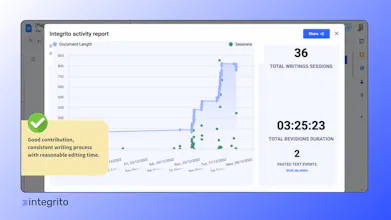
Integrito Activity Report eliminates AI detectors' downsides and provides the most accurate way to prove originality and authenticity of your texts. Get a writing history report to catch any cheating attempt including plagiarism, AI, and even ghost-writing.
Hello, fellow hunters! 👋
AI-generated texts are massively submitted by people who were supposed to write these texts and receive credit for that. It happens in multiple industries like education, content writing, etc. AI detectors provide false positives or even fail to catch AI text when it is masked.
To solve the question of originality and authenticity, we developed a way to see HOW the text was written, including:
🔹how much time was spent on writing it;
🔹suspicious events like pasted text;
🔹contributors to check for ghostwriting;
🔹session comparison to the final version.
One-click Activity reports in Google Docs can be easily shared as proof of authenticity or as an evident case of cheating.
📝With Integrito Activity reports, students and writers can easily prove they didn’t use AI and wrote assignments and texts independently by showing the writing process. This way, they can get a fair evaluation no matter what AI detectors say.
👩🏫For teachers, Integrito gives confidence in assignment authenticity by tracking suspicious events like pasted text or outsourcing the writing to a third party. Activity reports provide an extensive overview of what AI detectors and plagiarism checkers are missing.
Currently, Activity reports are available in Google Docs, with future launches in other editors.
We can’t wait to hear your thoughts and insights in the comments💬
@halyna_plagiarismcheck_org My congrats with the launch! How do you define the AI factor? What is the logic behind it? I know that it's quite difficult and all existing services can't define it with the high quality
Congrats on the launch! I just installed the Chrome extension and tried it on a few docs. The details it provides are interesting and definitely helpful, but as someone who writes a lot of content, I would point out that there are some legit reasons and scenarios for pasting content into a Google Doc. Seeing that an entire article was copied and pasted doesn't necessarily prove that it was written with AI or plagiarized. On the other hand, if you can see in the report that it was slowly written, it probably does prove that it was written manually.
@marc_andre1 Hey Marc! Great points you brought up. Indeed, the fact that the text was pasted doesn't mean it was a fact of cheating, but it makes that fact suspicious. So after a few feedbacks we added an ability to check this pasted text for plagiarism & AI to see where it is coming from.
Regarding the typing speed, it is also in our roadmap as those who want to use AI text really ban can just retype it from another screen. So we plan to make cheating so hard that it will be easier to write a piece from scratch :)
Wow Halyna! It's really awesome. Few weeks ago, I started discussing about the ways to detect and analyze AI texts in order to understand where we are and how is the behavior in front of us as users. Really glad to see you addressing this topic. All we're grateful.
Congratulations on the launch! It will be a really helpful product to detect plagiarism and AI text. Is it available as a browser extension or do you have a web version?
@ashimanski For now, it is available as a Google Chrome Extension, Firefox, and Edge extension. It works in Google Docs, but we plan to extend it to Office 365 soon. Actually to cover all most requested platforms for writing😉
TraceGPT AI Detector
Founder Reports
TraceGPT AI Detector
Build Check
TraceGPT AI Detector
FixMeBot
TraceGPT AI Detector