Launching today

iSurge
An activity monitor, at your notch.
49 followers
An activity monitor, at your notch.
49 followers
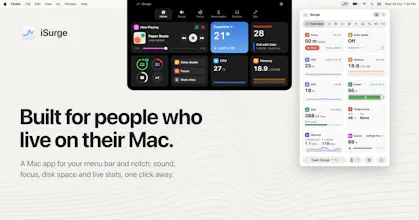
iSurge is one app for people who live on their Mac: live stats at the notch, each app's volume and mic, disk clean-up, an uninstaller, dev tools for ports, projects and Homebrew, a focus timer and Keep Awake. $14.99 once, $10.99 with PHPROMO20. No account.




Payment Required
Launch Team / Built With


Framer AI AgentsDesign and publish professional sites with AI
Promoted
Hi Product Hunt! I'm Ruthran, and I make iSurge.
It started with a small annoyance. My Mac slowed down, so I opened Activity Monitor and scrolled through about a thousand processes. All that time, the notch, the spot I look at all day, did nothing. So iSurge put the answer there: two live stats beside the notch, and your whole Mac when you rest your pointer on it. A thousand processes, added up into the apps you know.
Then I kept adding what I was missing, for anyone who spends the whole day on their Mac:
Sound: every app gets its own volume and its own speakers, so the music goes down and the call doesn't. You see which app is using your mic, and ⌥⌘M mutes them all.
Disk space: it shows what fills your disk, clears what's safe (caches, old installers, downloads), and asks before it moves anything. Removing an app takes the files it leaves behind too.
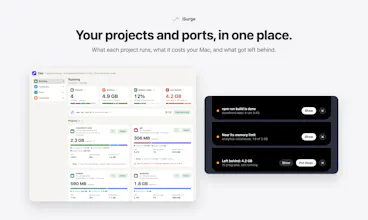
For developers: each project with what it runs and what it costs your Mac, who's on a port (free it in a click), containers by project, and Homebrew.
A focus timer that sits beside the notch and pauses when you step away, and Keep Awake, so your Mac doesn't fall asleep in the middle of a download.
Alert: Click any app to see everything about it: what it uses now, its usual, and its past warnings. And when your Mac is under strain, the warning names the apps behind it.
The price: $14.99 once for Lifetime (the launch price; it's normally $29.99), or $9.99 for a year, and nothing renews. For Product Hunt: $4 off Lifetime with the code PHPROMO20 ($10.99 for one Mac), for the first 100 buyers. Everyone who had iSurge before this version keeps it free. No account, no ads, no analytics.
I'd love your feedback, and to hear what you'd want in it next.
Grouping helper processes under the app they belong to makes the numbers easier to act on. I'd want to see the whole project's footprint when a dev server leaves a few things running.
@oleksii_sekundant Thanks! That's what the Dev tab does: servers, ports and containers grouped by project, with what each one costs your Mac, plus a "Left behind" list for things still running after you've stopped.
figma + 40 chrome tabs is basically my whole day so seeing which app is eating my ram right at the notch sounds perfect lol. per-app volume is also so good, music down call up 🙌
@erenasiroglu Haha, totally feel you on the 40 chrome tabs + Figma combo—that was basically the main reason I built it! Appreciate the support, let me know how it handles your setup! 🙌
the per app volume controls and port tools would probably be the parts i reach for most
nice to have the license work offline too rather than needing another account just to manage the mac
@saad_el_gueddari Appreciate it! The per-app volume and port tools are definitely some of the most useful pieces to have on hand.
And totally agree on keeping it lightweight—no account and analytics, just drop in your license key once by email and it keeps working offline smoothly. Hope you enjoy using it🙌