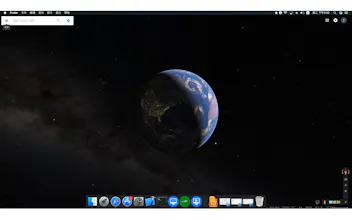
iWall is a very popular video that can be used in any format (no conversion required), audio (visualization), pictures, animations, flash, gif, programs, web pages, web sites, URL, url as your dynamic wallpaper, dynamic desktop software, and can interact. Feel good, please share and actively recommend, thank you.
iWall is a good software for everyone to work on the water, kill time, soak my sister, various functions, many interesting resources, what desktop weather, alarm clock, clock, games, etc., everything is said And think, it is to support the development of resource producers, we are struggling to find, so do not let more people also go to waste the time and energy, or even money, iWall net all kinds of Internet you can See and can not see the effect, or even desktop monitoring, there are pro using the software monitoring website, check at any time, the software is not landscaping, is already a set of beautification and tools, entertainment, games in a novel and interesting Things, and only more people know before they can continue to develop the software down, and finally get the benefits or you guys! Especially when you show a very cool desktop to your goddess and goddess, that eyesight, fold, really envy others. Really cool and dazzling, high-grid,
Report
Hunter
iWall is a good software for paddling, killing time and soaking up your cousin, especially when you show your gods and goddesses on a very cool desktop, Fold, really envy others. Really cool and dazzling, high-grid,
Report
Hunter
iWall brings unprecedented levels of enjoyment to your Mac desktop.This is a novelty and wonderful world, waiting for you to explore.
Report
Hunter
Christmas is coming, quickly transform your Mac desktop into a Christmas-filled desktop now! Various resources and games are waiting to be discovered. This year is definitely a different Christmas, because of iWall.
Report
Hunter
iWall will be updated soon, next month you can use the latest version of iWall, this update joined the full screen of other applications, will automatically pause the video play a major function, when we can think of how to play how to play, (. · ∀ ·) ノ ゙ Hi (. · ∀ ·) ノ ゙ Hi, Without considering the impact of resources and energy consumption, high-end to low-end Internet can run a variety of video resources smooth, stable Safety. look forward! This year the focus is to launch community features, hope that the majority of Mac users support yo. This is a program that brings you happiness, fun when using a Mac, and a lot of knowledge, thanks.
Report
Hunter
Dear iWall users, iWall has no effect on standby and sleep, screen saver. Is fast lock screen will not be affected. As long as 15 minutes will automatically go to sleep or standby and screen saver. If you want to switch between interaction and lock screen, just click iwall in the top left corner, click the iWall little icon in the top right corner of the status bar, or the iWall big icon in the right click on the Dock bar. Click the Hide Desktop Icon to interact. Click the Show Desktop Icon lock screen (non-interactive), the two are free to switch between. Software is difficult to make money at this stage, follow-up development is difficult to sustain, is entirely by faith in the follow-up development, every time we download and share support iWall sustainable development, if you like it, feel good , Remember a lot to share and actively recommended, especially online, many of the features we do not know, only to slowly find and then tell everyone, the last to benefit are the system users, thank you very much. Contact needs at any time, I wish happiness!
Report
Hunter
iWall Current Version 1.8.0 Easy to Use Help:
Click iWall in the upper left corner, click on the iWall small icon in the upper right corner of the status bar, the right mouse button iWall big icon will pop up settings menu bar, click Preferences will pop up the function box. Function box three buttons function:
Select Video File Toggle video, audio (visualization), picture, gif.
Select Html File (Html File) arbitrarily switch applets, web pages.
Use the URL button (Use Url) Just enter any website, URL, url can be.
If you want to switch between interaction and lock screen, just click iwall in the top left corner, click the iWall little icon in the top right corner of the status bar, or the iWall big icon in the right click on the Dock bar. Click the Hide Desktop Icon to interact. Click the Show Desktop Icon lock screen (non-interactive), the two are free to switch between.
Video Mute Mute button, tick mute. Video Mute below the volume adjustment, adjust the volume.
Automatically start at login is boot from the start option.
Show Dock Icon Show Hide Dock Bar iWall large icon toggle.
Next to iwall in the upper left corner Click File Open Recent to quickly select the wallpaper source you like or used, clear menu to clear the history.
Next to iwall in the upper left corner, click File (Open Video File For Screens 2 and 3) to expand the video sources for the second screen and the third screen.
iwall use is such a simple, simple to frighten each person's chin!