
KelpShot
Screenshots that say what you mean.
9 followers
Screenshots that say what you mean.
9 followers
KelpShot is a fast, private screenshot tool for macOS: capture, annotate, redact, recognize text, and share in seconds. One-time purchase, no subscription.

Free Options
Launch Team / Built With


LoomShow, don't just tell with Loom
Promoted


I built KelpShot because I take dozens of screenshots a day to explain bugs, point at details, and show people what to do next. Every time, the screenshot was the easy part. Adding an arrow, hiding an email address, or copying text out of the image was the slow part.
KelpShot is a native macOS screenshot app that keeps all of that in one flow:
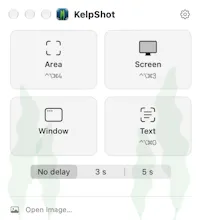
Capture an area, a window, the whole screen, or a long scrolling page (drag the selection to the screen edge and it keeps scrolling)
Explain with arrows (straight or curved), text, numbered steps, highlights, a spotlight, and a magnifier
Hide what's private with solid redaction, or let Redact Text find the words for you
Copy text out of any screenshot, recognized right on your Mac
Copy, save, drag, or pin the result above other windows
Everything stays on your Mac: no account, no cloud, and the only network request is an optional update check.
It's early access: not signed by Apple yet (that's $99 a year, and license sales are paying for it), so macOS asks you to confirm the first time you open it. The install guide shows the checksum for every build, and the signed version will be a free update.
Personal is $8.99 and Supporter $18.99, one-time, with every 1.x update included. There's a free 30-day trial, and this week code PRODUCTHUNT takes 25% off.
What's the slowest part of your screenshot workflow today? I'm choosing what to build next from the answers.
@harsxv - this looks great and I actually purchased, however, the message I got when downloading is a little concerning. I think you need to understand why and fix this otherwise it may impact your sales. Best of Luck.
@codeandsea Thank you so much, Brent, for buying and for reporting this.
KelpShot's build is new and not yet signed by Apple, so I think Chrome doesn't recognize it, yet.
To check yours is the real one:
Compare your zip's SHA-256 with the one on kelpshot.app/install.
I just recently uploaded the file to VirusTotal. And 0 of 67 security vendors flagged that exact file: https://www.virustotal.com/gui/file/77fdd2c700db925ff0b08b6259198b0c3af677d1691659fe31b5230e804b8bd8
You're right that it hurts trust, so I'm moving Apple Developer ID signing and notarization up to this week later. Your purchase is literally helping pay for it.
Hope Mantra Timer's launch goes great too!
@harsxv Thanks for the update and clarification. All the best
@codeandsea Anytime Brent! Let me know if anything else comes up. Have a great day!
@codeandsea Hey Brent! How is it going?
Just a quick follow-up. KelpShot 0.1.6 is now signed and notarized by Apple, so macOS no longer warns that it can't verify the app. Grab it at https://kelpshot.app/install. Your license carries over, and macOS will ask for Screen Recording once more. And if Chrome flags the download as "not commonly downloaded", that's just because the file is new. It should calm down as more people grab it. 🙂
Thanks for your support! Feel free to let me know if anything I can help you with.
KelpShot 0.1.6 is signed and notarized by Apple 🎉
Hey everyone 👋
Quick update: KelpShot is now signed and notarized by Apple. No more "Apple could not verify" warning and no trip to System Settings. Download it, drag it to Applications, and it opens like any other Mac app.
This happened because of you. Every license sold went toward Apple's $99 developer fee, and the goal is now reached. Thank you to everyone who bought a license, left a tip, or just shared KelpShot. 🙏
What's new in 0.1.6:
Signed and notarized by Apple
Now also available as a disk image (.dmg), next to the zip
A quieter start at login: KelpShot waits in the menu bar instead of opening its window
One heads up if you installed an earlier version: macOS will ask for Screen Recording permission once more, because the app's signature changed. It's a one time prompt, and later updates keep the permission.
Download and release notes: https://kelpshot.app/changelog
Tell me what you'd like to see in KelpShot next.
Happy weekend!
KelpShot 0.1.7 is out, and most of it came straight from users feedbacks:
One click to capture. Click the menu bar icon and you're already selecting. Right-click for the menu.
Same area again. The selection remembers your last area, so Return takes the same screenshot again.
Instant OCR. ⌃⌥⌘O, drag, and the text is on your clipboard, with a small preview so you know what you got.
Lighter. KelpShot now uses about half the memory after text recognition.
A new About window with your license and quick links.
If you already have KelpShot, it'll tell you about the update.
New here? Every feature is free for 30 days, then $8.99 once.
What's new: https://kelpshot.app/changelog
Keep the feedback coming. Two of these changes exist because someone told me KelpShot took too many clicks. 🙏
Shipped this week
Screenshots now include KelpShot's own windows
Launch at login works again
At login it starts quietly in the menu bar instead of opening its window
Full notes: kelpshot.app/changelog
We're live! 🎉
Use code PRODUCTHUNT for 25% off all week, or try everything free for 30 days first.
Questions about the unsigned build, Intel Macs, or how KelpShot compares to CleanShot X are all welcome. I'm here all day, and I'll ship fixes as they come in.