Launched this week

Keysi
See every shortcut of the app you're in
44 followers
See every shortcut of the app you're in
44 followers
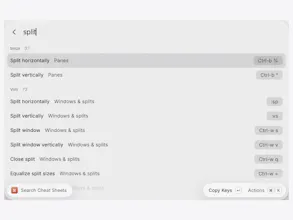
Hold ⌘ in any Mac app to see every keyboard shortcut, read live from its menus. Click a row to run it. Free, no time limit. Keysi Pro ($14.99 once) teaches the ones you keep missing: a quiet reminder, spaced-repetition drills, and "New" marks after updates.


used cheatsheet for years, had no idea it died on sonoma until now lol. does the vim/tmux sheet work over ssh on a remote box or only local
@jaewon_seo ha! glad the CheatSheet memory landed 😜. It's all local only for now: Keysi detects Vim and tmux by looking at the processes running under your terminal, and over ssh all it can see is the ssh process. You can still open the Vim or tmux sheet by hand from the ⇧⌘K panel and use it as a reference while you're on the remote box.
Nice that Keysi shows every shortcut of whatever app I am in, so I can stop guessing and actually learn the keyboard flow.
@karimbenkeroum thanks a lot Kareem. Learning them is the idea behind the paid part: it tells you once when you click a menu item that has a shortcut, then drills the ones you keep missing. The overlay itself is free with no time limit. Thanks again for your comment and appreciation! 🙏
I absolutely love it! I always needed something like this.
@chartwuja thank you Tomasz, that's great to hear 😄. If there's an app where it misses shortcuts or something feels off or weid, tell me and I'll look at it. Thanks again! 🚀
Keysi looks handy for muscle-memory apps where you forget half the shortcuts! Does it surface shortcuts for the frontmost app only, or can you peek at another app's map without switching to it?
hey@neerajnathany thanks!
The hold-⌘ overlay reads the menus of whichever app is frontmost, live, so it always matches what you are looking at.
That makes a lot of sense, thank you Manu! Reading the menus live means the overlay stays correct even after an app update changes its shortcuts. Does it also show custom shortcuts that someone has set up themselves in System Settings?
@neerajnathany thanks!
Yes it does 😄 Keysi shows the shortcuts you’ve set in System Settings ▸ Keyboard ▸ Keyboard Shortcuts ▸ App Shortcuts.
They show up in the app’s own menu, which Keysi reads live, so they appear without any setup. It also reads the macOS setting behind that panel (`NSUserKeyEquivalents`) for every app. On top of that it picks up your own keymaps from VS Code, JetBrains, Xcode, Sublime Text, Zed, Final Cut Pro, Vim and Emacs.
@noloman That's really thorough, Manu! Reading NSUserKeyEquivalents for every app plus the editor keymaps means it covers pretty much everything someone has customized. Thanks for walking me through it :)