Knock turns taps on your MacBook into instant actions. Switch tabs, change desktops, play/pause music, open apps, run custom scripts, or take screenshots - all with a simple knock. Tap the desk beside your laptop or knock on the MacBook’s chassis (not the trackpad). Knock uses the built-in accelerometer in Apple Silicon MacBooks to trigger customizable shortcuts.
No reviews yetBe the first to leave a review for Knock
Knock on your MacBook to control your Mac? My cat already does this—except it’s more like “paw aggressively at the hinge until something happens.” If this can distinguish between intentional knocks and feline percussion, you’ve solved the real edge case.
@lliora Haha that might actually be the toughest edge case to solve.
Knock tries to detect very short, sharp tap impulses rather than general movement, so in theory it should ignore most “feline percussion”… but if your cat learns the gestures before you do, I can’t take responsibility for what actions it triggers!
Distinguishing intentional knocks from general vibration is actually the main challenge. Knock looks for short, sharp vibration spikes rather than longer or continuous movement, which helps separate a deliberate knock from things like background desk vibration.
It also temporarily ignores knock detection while you're typing. There’s a 500ms suppression window after the last keystroke so heavy typing doesn’t accidentally trigger gestures.
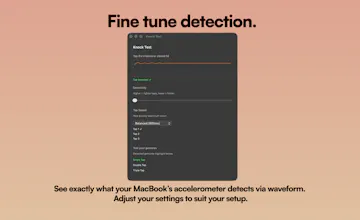
There’s also a live sensitivity slider and a Knock Test tool so users can tune it for their desk setup and see exactly what the accelerometer is picking up.
Right now Knock supports single, double and triple gestures, but I’m definitely exploring more custom patterns and timing options for future updates.
Report
Congrats on the launch! Just a quick quest: Beyond the basics, have you thought about multi-knock patterns to layer in more gestures without overwhelming the tuning?
@swati_paliwal Thanks! Yeah definitely - right now it’s single/double/triple taps, but I’ve been thinking about expanding into more pattern-based inputs. Just trying to balance adding depth without making it harder to use or tune
Report
@will_gee1 This is so cool! I'm guessing this is similar to how you can double-tap the back of some devices (e.g., Pixel) to take a screenshot or perform other actions?
@jahtofunmi Thank you! And yeah that’s a good way to think about it - pretty similar concept, just applied to the Mac so you can trigger shortcuts, apps, or commands with taps
Report
This is such a creative hack of hardware that Apple left sitting there unused. The accelerometer-based detection is clever, and the fact that you built a live waveform viewer for tuning sensitivity shows real attention to UX. I can see this becoming muscle memory fast for things like play/pause during calls or switching desktops hands-free. Have you thought about adding rhythm-based patterns — like a specific knock cadence to trigger different macros? That could open up a whole new layer of interaction without needing more hardware.
@lee_kunlin Thank you - really glad you picked up on the waveform side, that was a big part of making it actually usable. Rhythm-based patterns are a super interesting idea too, I’ve been thinking along similar lines. There’s definitely room to push it further without adding more hardware, just comes down to keeping it intuitive and not overcomplicating it
Report
Totally agree that keeping it intuitive is key — the best gestures are the ones you don't have to think about. Looking forward to seeing where you take it. Followed!


Knock on your MacBook to control your Mac? My cat already does this—except it’s more like “paw aggressively at the hinge until something happens.” If this can distinguish between intentional knocks and feline percussion, you’ve solved the real edge case.
Tell
@lliora Haha that might actually be the toughest edge case to solve.
Knock tries to detect very short, sharp tap impulses rather than general movement, so in theory it should ignore most “feline percussion”… but if your cat learns the gestures before you do, I can’t take responsibility for what actions it triggers!
Product Hunt
This is pretty fun! How do you prevent accidental knocks/bumps?
Tell
@gabe Thanks Gabe, really appreciate that.
Distinguishing intentional knocks from general vibration is actually the main challenge. Knock looks for short, sharp vibration spikes rather than longer or continuous movement, which helps separate a deliberate knock from things like background desk vibration.
It also temporarily ignores knock detection while you're typing. There’s a 500ms suppression window after the last keystroke so heavy typing doesn’t accidentally trigger gestures.
There’s also a live sensitivity slider and a Knock Test tool so users can tune it for their desk setup and see exactly what the accelerometer is picking up.
Right now Knock supports single, double and triple gestures, but I’m definitely exploring more custom patterns and timing options for future updates.
Congrats on the launch! Just a quick quest: Beyond the basics, have you thought about multi-knock patterns to layer in more gestures without overwhelming the tuning?
Tell
@swati_paliwal Thanks! Yeah definitely - right now it’s single/double/triple taps, but I’ve been thinking about expanding into more pattern-based inputs. Just trying to balance adding depth without making it harder to use or tune
@will_gee1 This is so cool! I'm guessing this is similar to how you can double-tap the back of some devices (e.g., Pixel) to take a screenshot or perform other actions?
Tell
@jahtofunmi Thank you! And yeah that’s a good way to think about it - pretty similar concept, just applied to the Mac so you can trigger shortcuts, apps, or commands with taps
This is such a creative hack of hardware that Apple left sitting there unused. The accelerometer-based detection is clever, and the fact that you built a live waveform viewer for tuning sensitivity shows real attention to UX. I can see this becoming muscle memory fast for things like play/pause during calls or switching desktops hands-free. Have you thought about adding rhythm-based patterns — like a specific knock cadence to trigger different macros? That could open up a whole new layer of interaction without needing more hardware.
Tell
@lee_kunlin Thank you - really glad you picked up on the waveform side, that was a big part of making it actually usable. Rhythm-based patterns are a super interesting idea too, I’ve been thinking along similar lines. There’s definitely room to push it further without adding more hardware, just comes down to keeping it intuitive and not overcomplicating it
Totally agree that keeping it intuitive is key — the best gestures are the ones you don't have to think about. Looking forward to seeing where you take it. Followed!
Tell
@lee_kunlin Thank you!
You're welcome! Congrats on a solid launch — #8 day rank for a utility app is impressive. Wishing you the best as Knock evolves!@will_gee1
IMAI Studio
after using the cheat code came across this love the product
Tell
@sammy_xf Appreciate it! Glad you found it!
Tell
Quick update for everyone who checked this out earlier:
Knock now works on all Macs - including those without the built-in accelerometer.
You can now use your iPhone as an input device, which makes it way more reliable and accessible across different setups.
I also pushed a bunch of improvements:
cleaner UI
easier testing before purchasing
smoother launch behaviour
live update banners so updates are clearly shown in-app
general stability upgrades
If you weren’t able to use it before, it should now work for you.
Would love to hear what you think if you give it another shot.