
Launching today

Lightfield
AI-native CRM that builds itself and does work for you
401 followers
AI-native CRM that builds itself and does work for you
401 followers
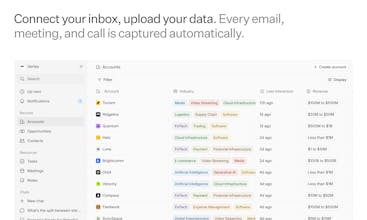
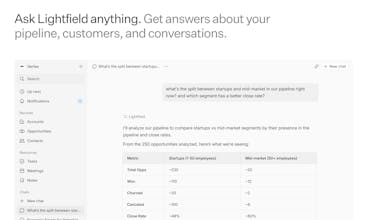
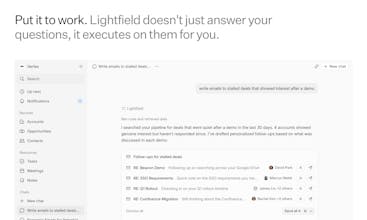
Lightfield reads your emails, meetings, and calls to build your CRM automatically. No manual data entry — ever. Connect your inbox, upload a spreadsheet or CSV from your old CRM, and everything is recreated in less than five minutes. Ask it anything in plain English: who needs follow-up, what objections keep coming up, how has our ICP shifted — answered from your actual conversations. Then put it to work to draft follow-ups, create board decks, build proposals, and more.





Congrats ! It’s a great great product. Features in my top 3 products!
I could not believe first time when I saw the all data
auto populated back to 12 months !the context it pulls from Emails / calls and intelligence on accounts and people is exceptional! Our entire team is on it!
Lightfield
@tamanna_dhamija1 - thank you for the kind words! It truly is a magical experience, I remember feeling the same when I saw an early version of the product before I joined.
Lightfield
Hey Product Hunt — I'm Keith, co-founder of Lightfield. Before this, I led Instagram Direct from zero to 500M users and helped build Stories and camera AR. I then co-founded Tome, which launched as #1 on Product Hunt and grew to 20M users.
Of all the products I've worked on, Lightfield has the deepest engagement I've ever seen. It’s an AI-native CRM that builds and updates itself from your real conversations — emails, calls, and meetings. No fields to define. No manual data entry, ever.
Connect your inbox, upload data from a spreadsheet or your old CRM, and you're up and running in five minutes.
One of our early users connected her inbox, typed one prompt — "go through my emails and fill in my opportunities" — and came back to a fully populated pipeline. Stages, contacts, deal context. All built from conversations she'd already had.
Most AI CRMs stop there. Lightfield goes further — it stores every interaction as continuous context, not disconnected records, so the AI sees the full story of every relationship. Then it writes and runs code against that complete memory.
Ask it anything:
"What objections keep coming up across all my calls?" — pattern-matched across every conversation you've ever had
"How has our ICP shifted in the last 3 months?" — answered from real deal data, not gut feel
Then put it to work:
"Draft a re-engagement email for each of my cold prospects" — written with full knowledge of your history together
"Build a board-ready pipeline report" — from what's actually happening inside deal
We built this for founders doing their own sales, from our own experience. That's where every company's customer knowledge begins — with the founding team and their first conversations. Lightfield makes sure none of it gets lost. Not when you hire your first rep. Not when you build out a team. Every conversation compounds.
As a thank-you to the Product Hunt community — we're offering 3 months free for anyone who signs up with code PH3. We ask for credit card up front at sign-up to keep bot traffic out, so don’t forget to use the code to get free access.
Try it at https://lightfield.app
Our entire team is on standby to help you get set up. Drop a comment with your first question for the agent — I'll reply to every one.
Huge thanks to @chrismessina for hunting us. We're honored to have the #1 Product Hunter behind our launch.
GrowthTrack AI
@keith_peiris I have been absolutely blown away by Lightfield, and it is now one of my core tools. Keep it up!
BrandingStudio.ai
Every CRM I've tried has the same failure mode: it's only as good as what people remember to put into it, and nobody does consistently.
The auto-capture from emails and calendar is the piece that actually solves the behaviour problem rather than just the interface problem. Most CRM redesigns just make it easier to enter data manually. This skips the entry step entirely, which is a different category of solution.
Running a SaaS and managing a mix of inbound leads and partnership conversations, so this is directly relevant. The question I'd have is around signal quality: when the AI is reconstructing deal context from email threads, how does it handle relationships that are mostly async and fragmented across months? That's usually where CRM data gets thin and unreliable, regardless of the tool. Congrats on the launch!
Lightfield
@joao_seabra - great question. We have customers representing logitudinal records across years in Lightfield. When you connect your inbox you can sync up to two years of email data, and anything else you upload from your old CRM data can be added to that to create a single longitudinal record that you can query.
Happycapy
Lightfield
@bartvandekooij Great questions!
Lightfield is a direct replacement for HubSpot as a CRM - we've already had many customers migrate from HubSpot to us. A few things that make us different: there's zero manual data entry since we auto-capture from emails, meetings, calendar, and more, so your CRM stays up to date without anyone having to maintain it. Beyond that, our AI agent can answer deep questions about your deals and relationships, draft personalized emails in batches, and generate pipeline analysis and dashboards on demand.
On email marketing and automation, we can help with personalized outreach today, but we're not yet a full replacement for dedicated tools like Klaviyo or HubSpot's marketing automation. That said, it's on our roadmap.
As for support tools, we don't have a native integration yet, but many of our users pull support tickets into Lightfield via webhook or API.
Curious what support tool you’re using? Helpful for us to prioritize integrations.
Happycapy
Lightfield
@bartvandekooij got it - we can definitely connect with that.
this is a pretty strong pitch honestly. the zero manual data entry part is what stands out most, because keeping crm data updated is where a lot of teams quietly lose consistency. also like that it is not just storing info but actually helping teams do something with it after.
curious, when people switch from hubspot, what’s the first thing that usually makes them feel the difference most?
Lightfield
@akshay_kumar_hireid The "it already knows everything" moment is usually what lands first.
Connect your email and calendar, and within minutes Lightfield gives you a working CRM - accounts, contacts, and deal history pulled from your real conversations. That's before you've even migrated a single record from HubSpot.
When you're ready, our AI can handle the full HubSpot data migration in hours instead of days. From there, you're just talking to your CRM: asking questions, pulling insights, getting work done.
After years of manually maintaining HubSpot, that difference is obvious within the first few minutes.
nice one. a crm that actually stays updated on its own sounds way more realistic than asking sales teams to log everything properly forever. the part about asking questions from actual conversations is pretty interesting too.
curious, what kind of teams are adopting it fastest right now, smaller sales teams or bigger ones with messy existing crm data?
Lightfield
@nayan_surya98 Honestly, both but for different reasons.
Smaller teams adopt fastest because the setup cost is near zero. There's no admin, no onboarding project - you connect email and calendar and you have a working CRM in minutes. For a founder doing sales themselves, that's a completely different category of tool.
Bigger teams with messy legacy data are a strong fit too. We've had large customers come over with 10+ years of HubSpot history and our AI handles the data migration in hours. The part that surprises them is they're already getting value from live email and meeting capture before the migration is even done.
The common thread isn't company size. It's teams where the CRM has been quietly decaying because nobody wants to maintain it.
that looks amazing :) I always struggled to force sales people to keep up and fill out CRM data properly. More often than not, the end solution was to set up a lot of guardrails, firing out warning messages every time somebody forgot to follow the expected flows.
I'm wondering though, how customizable is this? because different customers will likely have different pipelines!
Lightfield
@matteo_avalle Thanks!
You can change any field in the data model and pipeline stages in Settings.
We have multiple pipelines landing in the next month along with custom objects.
Lightfield
@matteo_avalle - it's highly customizable! You can configure distinct pipeline stages and opportunity fields to map to how your business works. Happy to hop on a call and show you how if you're interested in learning more.