
Launching today

Lightfield
AI-native CRM that builds itself and does work for you
462 followers
AI-native CRM that builds itself and does work for you
462 followers
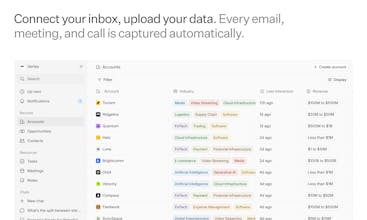
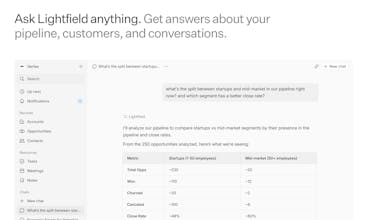
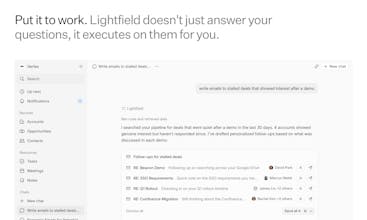
Lightfield reads your emails, meetings, and calls to build your CRM automatically. No manual data entry — ever. Connect your inbox, upload a spreadsheet or CSV from your old CRM, and everything is recreated in less than five minutes. Ask it anything in plain English: who needs follow-up, what objections keep coming up, how has our ICP shifted — answered from your actual conversations. Then put it to work to draft follow-ups, create board decks, build proposals, and more.





that looks amazing :) I always struggled to force sales people to keep up and fill out CRM data properly. More often than not, the end solution was to set up a lot of guardrails, firing out warning messages every time somebody forgot to follow the expected flows.
I'm wondering though, how customizable is this? because different customers will likely have different pipelines!
Lightfield
@matteo_avalle Thanks!
You can change any field in the data model and pipeline stages in Settings.
We have multiple pipelines landing in the next month along with custom objects.
Lightfield
@matteo_avalle - it's highly customizable! You can configure distinct pipeline stages and opportunity fields to map to how your business works. Happy to hop on a call and show you how if you're interested in learning more.
The biggest CRM problem I have seen is not the setup — it is that people stop updating it after a few weeks. Zero manual entry sounds like it solves that. But what happens when part of the conversation happens on channels you are not connected to — do you end up with gaps that make the data unreliable?
Lightfield
@klara_minarikova Totally fair question. Email and calendar are just the starting point. We're actively expanding to capture more context, including LinkedIn, Slack, WhatsApp, and more. Teams can also push data in directly via webhook or API to cover anything outside those channels.
This is a great take on CRM.
The biggest problem was never the tools it was getting people to actually update them.
If the system builds itself from real activity, that’s a huge shift.
Curious how you handle accuracy and edge cases.
Lightfield
@new_user___2902025abb5753b18b341a5 Thanks!
It's pretty accurate because it's using Claude and our Knowledge System. We ask humans to approve any consequential field updates so you have auditability. We just suggest the field updates to the human.
Lightfield
@new_user___2902025abb5753b18b341a5 - one of the things we do to help with accuracy is use code execution to run prompts on deterministic sets of data - makes a huge difference when you run queries across thousands of records.
As for 'edge case', well I guess it depends on the edge case. If there's something specific you have in mind I'd be happy to help add more color.
Timelaps
Lightfield
@harryzhangs yes, collaboration and privacy is built into the model. We have teams with >100 commercial employees in a single Lightfield instance.
You can build custom workflows from Settings > Workflows.
You can definitely add deal value associated with any object. You just need to edit the data model in settings.
Sequences are coming soon along with a lot more power.
Lightfield
@harryzhangs - collaboration is one of the best parts of the product. You get shared context from everybody's customer interactions. We have companies with up to 150 employees on Lightfield and right now it's a great fit for anybody with a sales team under 200 people.
Workflows are in the product too. Happy to hop on a call to walk through how to build what you're looking for if helpful.
Houck's Newsletter
When I heard Lightfield's founders shut down a product with 20M users to build this, I knew it had to be pretty special. And, after a couple months of early access I totally understand why they did it. I've never been good at updating my CRM. But having it updated is actually super valuable... it's just the kind of tedious work I either feel too busy to do or just forget. Lightfield is the first CRM I've used where I feel like I'm getting that value without having to do the work myself. It's definitely the first CRM I've actually loved using.
Lightfield
@michael_houck1 - Really appreciate the kind words! We made Lightfield for founders like you. Grateful for your support.
Trufflow
When using AI to personalize emails, I have trouble with the emails coming out too robotic like or overly formal. Are there ways to configure Lightfield to train it to maintain the writing in the same style that I write in?
Lightfield
@lienchueh - yes. When you configure your workspace knowledge you can give it style preferences to make sure it matches how you write. Personally, I find it gets things about 95% there and still requires a bit of manually tweaking but it's getting better every day.
I am a @Lightfield customer who was a Salesforce customer for 13 years. Can you believe how much money I freaking put into that legacy product? I switched to Lightfield because I, like many founders who run their own sales operations, get annoyed with data entry. So why switch to Lightfield? NLP and AI first are just two of the leading features to keep in mind. Lightfield also solves the problem of refreshing pipeline and task reminding. How so? Lightfield is synced with all the tech that serve as touchpoints (email, calendar, etc.). Admittedly I am not a superuser but I can tell you without Lightfield I'd still be guessing how to keep the prospect engaged until a deal closes. #AlwaysBeClosing #Sales #CRM
Lightfield
@stellayu - thank you for your support! Appreciate you being with us from the early days and for the feedback you've given us along the way.