
Launched this week

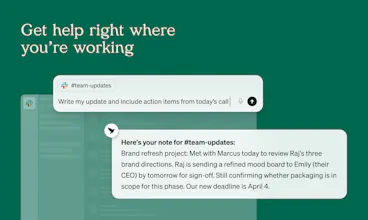
Littlebird is an AI assistant that already knows your work. Every answer, draft, and plan is more relevant because it has the context behind it. It sees what's on your screen and transcribes your meetings, building a private memory of your projects and priorities. Littlebird connects the dots across all your apps and conversations, giving you answers grounded in your actual work. No integrations required. If you've seen it on your desktop, Littlebird has too. Just ask.






PixelBin.io
I've been using Littlebird for a while now, and it's become an essential part of my day.
Here's one of my use cases: I've set up a routine that pulls all support emails related to the features I own, from the past 24 hours, and surfaces them with relevant context(a duplicate, something already fixed, or tied to a different issue I'm working on). I get up to speed in under a minute every morning. It's the first AI tool that feels like it's working with my day instead of asking me to manage it.
Congratulations on the launch! 🎉
The "full context from your screen" framing is interesting - where does the screen data actually live? Local only, or does it go through your servers? That's usually the first thing people ask before they'll actually use something like this.
Littlebird
@mykola_kondratiuk data is stored in the cloud, encrypted on hardened AWS servers. since the best models are far too large to run locally, data has to leave your device anyway - and it unlocks additional ux and feature benefits like cross-device sync & background routines that you can't get otherwise. we totally get that some users will want local-only. we plan to offer that as an option(with limited features), as well as on-prem for enterprise.
Sounds really cool! Is there integration between devices, or is it only a desktop application?
Littlebird
@mykyta_semenov_ there is, we have mobile apps for both iOS and Android
Big congrats on the launch , this is seriously exciting! I’m especially interested in the Routines feature. How do you go about creating one? Do you manually choose what it should bring up, or does it learn and adapt to your preferences over time?
Littlebird
@jensen_miles thanks! it's an evolving feature - right now you set up a prompt that runs daily/weekly/monthly on your schedule.
while we don't have a dedicated UI, you can just ask Littlebird to suggest new routines based on your workflows. or you know setup a meta routine to suggest more routines.
Littlebird
@jensen_miles There are a few built-in options that act as starting points (or you can start from scratch). You can customize it for what you specifically need and schedule it on whatever cadence you're looking for!
Littlebird
@jensen_miles manually for now! though automatically creating new ones is an interesting idea. In general, the application will definitely learn your preferences over time.
congrats on the launch, this is genuinely exciting stuff! curious about Routines specifically - how do you actually set one up? do you define what you want it to surface, or does it figure that out on its own over time?
Littlebird
@jens_deryckere1 thanks! it's an evolving feature - right now you set up a prompt that runs daily/weekly/monthly on your schedule.
while we don't have a dedicated UI, you can just ask Littlebird to suggest new routines based on your workflows. or you know setup a meta routine to suggest routines.
what we're working on next is semantic triggers - things like "create a todo every time i use this phrase" or "proactively ping me if a task is near deadline."
Littlebird
Hey folks, Chris here 👋 I work on design at Littlebird. As someone whose work is spread across Figma, Slack, calls, and iterations, a lot of decisions don’t live in one place. Building Littlebird has been no different, except now I use Littlebird to keep track of it.
In a meeting recently, I was asked about a design decision from weeks back. I didn’t remember the specifics. That happens more often than I’d like, because the context is usually spread across multiple threads and explorations.
I asked Littlebird, and it pulled everything together, including the explorations, conversations, and the final direction. It helped me get back to the “why” quickly. That answer didn’t exist anywhere cleanly. Littlebird just pieces it together as you go.
Give it a try and see how it fits into your workflow. Would love to hear how you end up using it!
Littlebird
Hey PH! Naman here, co-founder of Littlebird. Alex already walked through the product so I'll keep this short. Before Littlebird, Alap and I built Sentieo, a research platform for finance (acquired by AlphaSense). We spent a decade figuring out how to help people find information faster. Littlebird is us taking that same obsession in a completely different direction. What if the AI already had the information and you never had to go looking for it? You don't have to search. You don't copy-paste. You just ask. That's what we mean by AI that already knows your work.
The thing I'm personally most proud of is what happens after about a week of use. That's when Littlebird starts connecting things across meetings, docs, and conversations that you wouldn't have connected yourself. It goes from useful to something you genuinely rely on. We're hanging out here all day, ask us anything.