
Launched this week

MacNotch
Turn your MacBook notch into a Productivity Hub.
172 followers
Turn your MacBook notch into a Productivity Hub.
172 followers
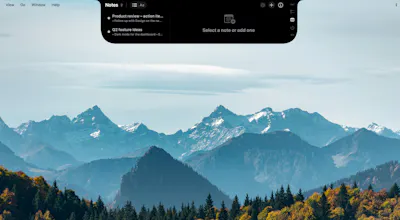
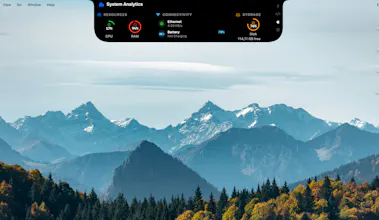
MacNotch turns your MacBook notch into a modular dashboard. Weather, music, calendar, tasks, notes, Pomodoro timer, Bluetooth devices, system monitor, translation, app shortcuts, reminders, daily quotes and more, all at a glance, right where your eyes already go. Drag files onto the notch to AirDrop, zip, convert, or send to iCloud. Lightweight, native Swift, and designed to feel like it belongs on macOS.


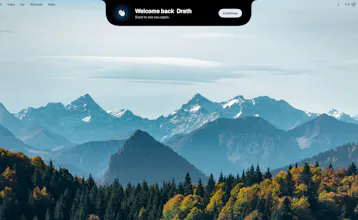
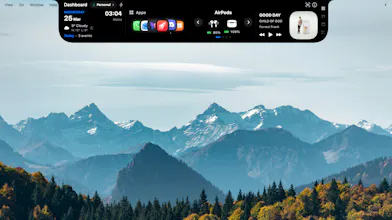

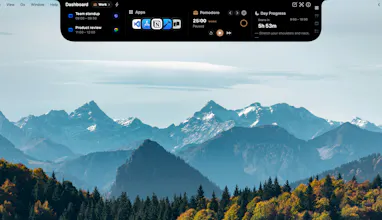

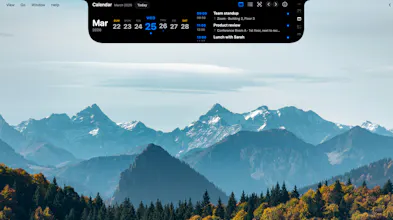




@eddiejaoude Thank you for the nice comment! I hope you'll enjoy using MacNotch. I’d love to hear your feedback, and there’s a dedicated feedback module right inside the app.
Honestly? I just wanted the notch to earn its keep. MacNotch has grown into this big toolbox of things I hope you’ll actually use. I spent ages on the “does this feel native?” question, like it belongs on the Mac, not like a hack. Hope I’m in the ballpark. I’m not done: new releases are coming to make it smoother and more capable. And I’m genuinely open to input, so if you’ve got a wish list or a “this drives me nuts,” send it my way.
Product Hunt
@curiouskitty Thanks for your question Kitty 🙌 . Honestly, the free trial will probably tell you more than I can in a comment, you’ll pretty quickly see if it fits how you work day to day.
MacNotch is native Swift, so the goal is for it to feel normal on macOS and not like a heavy thing sitting on your screen. There’s a bunch you can tweak (modules, layout, behavior), plus things like tasks, notes, Pomodoro, calendar, media, Bluetooth, system info, translation, and file drop actions. Pricing wise there’s a one-time option and a monthly option, depending on what you prefer.
I also want it to feel fun and make your Mac feel a bit more “yours,” not only useful. At the end of the day it’s personal taste though, so why not give it a go 🙃
This looks really great and very creative! I love that it’s one time purchase software and not subscription.
It would be useful if there were screenshots or if on the video on your homepage, you showed what it looks like when there are apps running because I’m not clear if this overlays apps or if it actually takes up some of the top screen space.
And something showing it minimizing/hiding and only showing the notch or something similar would be great. As it stands right now, it seems I have to install this to actually understand how it fully works, which isn’t something customer should have to do. Great job though this looks really cool!
@jasonrdunn Thank you so much for this feedback 🙌 . I’m really glad you appreciate the one-time purchase model. You’re absolutely right about the visuals, I should make that clearer. I’m going to add more screenshots, including how MacNotch looks when collapsed so it’s easier to understand before installing. Quick note in the meantime: when collapsed, MacNotch stays the same size as the built-in notch, so it doesn’t permanently take extra top bar space. Thanks again for taking the time to write this, it’s super helpful and I really appreciate it.
Buddymove
That's an interesting idea, but in my case, I already don't have enough space on my MacBook for all the icons I'd like to have in the top bar, and an app like that would take up even more space... the screenshots show only a few items from the app menu - what happens if there are more?
@szymon_kadzielawa Thanks for your comment Szymon. That is a great question and totally fair point.
When retracted, MacNotch takes exactly the same amount of space as your Mac’s notch.
If you already have many menu bar icons, some can sit under that notch area, but only while you interact with MacNotch.
The rest of the time, it stays compact and doesn’t permanently compete with your top bar space.
If you’re not already using one, I can also recommend a few good top bar app hiders, they do a great job at managing your top bar space.
You can also try MacNotch with the 14-day trial, and if it doesn’t fit your needs, I’m always open to suggestions.
@szymon_kadzielawa yeah I would plus one on the need for screenshots showing what happens when this software is minimized/hidden. And a simple YouTube video showing the same thing would be really helpful.
@jasonrdunn Hey, thanks for your feedback!, you can actually visit the MacNotch website https://macnotch.io/ where I uploaded some additional screenshots and demo videos. I'd love to hear your thoughts.
@freelrdev_etienne great, thanks!
I wish if we could have something similar for the windows too, I do use the Power toys but it is not as cool as this one, is this supported for ipads too?
@nayan_surya98 Thanks for your comment, Nayan, I really appreciate it. For now it’s Mac-only (no Windows or iPad support yet). I’m putting all my energy into making the macOS experience great first, then I’ll see where it can go next. Honestly, I’m not even sure it would feel natural on Windows 😅
@freelrdev_etienne That's true, we do not have the notch yet, but keep up the good work, one day when I will buy mac will definitely get this added for sure
Quick update, I just shipped MacNotch v1.8.0 🚀
This one has been a big focus on making the app feel smoother every day, with less friction and better reliability.
What’s new:
Dashboard Quick Toggles: faster access to actions like Keep Awake, Dark/Light mode, True Tone, Night Shift, Bluetooth, Hide Desktop Icons, and more
Screen Clean mode: instantly launch a distraction-free clean screen when needed
In-app App Help: quicker access to guidance directly inside MacNotch
Cleaner layout controls: easier module visibility and organization in settings
More reliable Git PR/MR experience: improved loading and stability in notch views
Better notch behavior, including drag/drop and monitor-connected feedback
Notch behavior refinements: better drag/drop stability, smoother transitions, and monitor-connected HUD feedback
All of this is designed to make MacNotch feel more immersive, more native to your Mac, and more natural to use. I hope this update is getting closer to what you expect 🙌🏼