Hey Product Hunt community! 👋
I built this tool out of a very specific, personal frustration that I think many developers using local AI coding agents or terminal workflows will relate to.
Lately, I've found myself constantly opening massive PLAN.md files or editing complex PRD.md specifications suggested by coding agents. Trying to review and manage these long-form contents in a cluttered environment was deeply uncomfortable. Even worse, the sheer pain of losing all your edits and notes when a session accidentally closes or a window is mistakenly terminated was just unbearable.
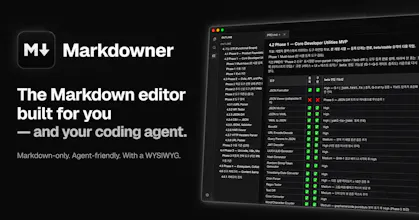
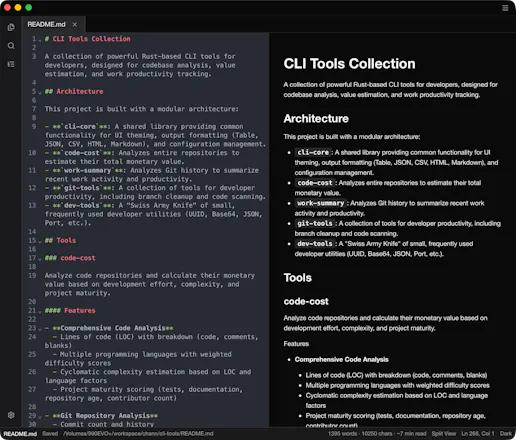
Markdowner was born to solve exactly that. It is designed to be a clean, lightning-fast, and crash-resilient companion that lets you instantly preview, format, and safely manage your markdown text without any unnecessary bloat.
We are officially live today, and I’d love to hear from you:
How do you currently manage and review markdown files generated by your AI coding agents?
What’s the number one feature you feel is missing when dealing with massive markdown docs?
Please try it out at markdowner.chann.dev and leave your honest feedback or feature requests right here. Your insights will directly shape our next roadmap!
Thank you so much for your support! 🚀
Report
Love that this is markdown-only and built with coding agents in mind, that focus is refreshing. Genuine question though how does the agent integration actually work, do I pipe in my own CLI or does it hook into something specific out of the box?
Report
Maker
@mahmut6xja Thanks! The integration is intentionally agent-agnostic rather than tied to a specific agent or SDK.
Markdowner installs a small mdner launcher and can configure EDITOR and VISUAL to use mdner --wait. That means Claude Code, Codex, Git, or any other CLI that supports an external editor can hand a prompt, review buffer, note, or commit message over to Markdowner. You edit the plain Markdown file, save it, close the tab, and control returns to the CLI.
For your own CLI, you can either set its editor command to mdner --wait or invoke Markdowner directly with something like mdner path/to/file.md. So you’re not piping the agent itself into Markdowner—the integration boundary is simply a normal .md file and the standard CLI editor contract.
Report
How does this actually play nice with coding agents in practice, like do the agents edit the markdown directly or do they go through some kind of dedicated API I would need to set up first?
Report
Maker
@zekiyeo28717 Mostly, the agents edit the Markdown files directly. There’s no Markdowner-specific API, MCP server, or plugin you need to configure first—the integration is intentionally based on plain .md files and standard filesystem access.
So any coding agent that can read and write files can update a document in place, and Markdowner can detect those external changes for you to review. For a more interactive human-in-the-loop workflow, you can install the mdner CLI and set EDITOR or VISUAL to mdner --wait. The agent or CLI then opens the file in Markdowner, pauses while you review or edit it, and continues after you save and close the tab.
In practice, Markdowner acts as the polished review and editing surface, while the agent continues working with normal Markdown files—no proprietary integration layer required.
Report
Reviews
No reviews yetBe the first to leave a review for Markdowner



Love that this is markdown-only and built with coding agents in mind, that focus is refreshing. Genuine question though how does the agent integration actually work, do I pipe in my own CLI or does it hook into something specific out of the box?
@mahmut6xja Thanks! The integration is intentionally agent-agnostic rather than tied to a specific agent or SDK.
Markdowner installs a small mdner launcher and can configure EDITOR and VISUAL to use mdner --wait. That means Claude Code, Codex, Git, or any other CLI that supports an external editor can hand a prompt, review buffer, note, or commit message over to Markdowner. You edit the plain Markdown file, save it, close the tab, and control returns to the CLI.
For your own CLI, you can either set its editor command to mdner --wait or invoke Markdowner directly with something like mdner path/to/file.md. So you’re not piping the agent itself into Markdowner—the integration boundary is simply a normal .md file and the standard CLI editor contract.
How does this actually play nice with coding agents in practice, like do the agents edit the markdown directly or do they go through some kind of dedicated API I would need to set up first?
@zekiyeo28717 Mostly, the agents edit the Markdown files directly. There’s no Markdowner-specific API, MCP server, or plugin you need to configure first—the integration is intentionally based on plain .md files and standard filesystem access.
So any coding agent that can read and write files can update a document in place, and Markdowner can detect those external changes for you to review. For a more interactive human-in-the-loop workflow, you can install the mdner CLI and set EDITOR or VISUAL to mdner --wait. The agent or CLI then opens the file in Markdowner, pauses while you review or edit it, and continues after you save and close the tab.
In practice, Markdowner acts as the polished review and editing surface, while the agent continues working with normal Markdown files—no proprietary integration layer required.