
Mimic AI Digital Assistant
AI Digital Assistant
3 followers
AI Digital Assistant
3 followers
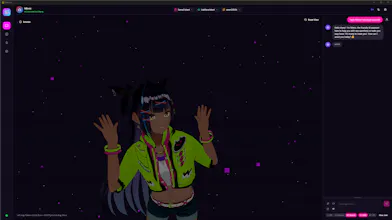
AI avatar assistant, voice creation, Qwen3/Kitten Text To Speech utilizing locally installed LLMs with Ollama. Multiple personas can be created with persistent contextual conversational and uploaded saved file memory, along with individually configurable personality prompts. Text to speech can be disabled for fluid response and conversation. Version 1.1.0 now fully supports VRM models and VRM animation files. Find a demo here https://www.youtube.com/channel/UCyGtGKZazDM3PTTyHWyaBGA


Free Options
Launch Team

Framer AI AgentsDesign and publish professional sites with AI
Promoted
I wanted to create a digital assistant, persona that I could have a conversation with, or simply use speech-to-text transcription for speaking to a locally installed LLM via Ollama. After that I became mad with power and put on my best Dr. Frankenstein cosplay and began trying to make my own multi-modal Frankenstein talk back to me! Thus M.I.M.I.C. the Multipurpose-Intelligent-Molecular-Information-Catalyst was brought to life! Bring your local models personality to life with a voice and configurable personality. Every persona has access to its own storage for conversation memory, and can have files saved to be referenced. Give it a shot and bring your own creation to life!
https://github.com/bmerriott/MIM...
Mimic AI Digital Assistant v 1.1.0 Latest
Mimic Digital AI Assistant https://github.com/bmerriott/MIMIC-Multipurpose-Intelligent-Molecular-Information-Catalyst-/releases/tag/v1.1.0
Short Demo Video Here
https://imgur.com/a/SjsTsgj
Mimic AI v1.1.0 - VRM Avatar & Persona Memory
🎉 Major Update
Mimic AI v1.1.0 introduces full 3D VRM avatar support with VRoid model integration, avatar-persona memory connection, and a bundled default persona with voice.
📦 What's Included
File
Description
Size
Mimic-AI-Setup.exe
One-click installer (recommended)
~152 MB
Mimic-AI-v1.1.0.zip
Portable ZIP archive
~158 MB
launch-mimic.bat
Launch with Python backend
-
MimicAI-StopAll.bat
Stop all services
-
README.md
Full documentation
-
QUICKSTART.md
Quick start guide
-
CHANGELOG.md
Version history
-
vrma/
VRM animation library
-
🚀 Getting Started
New Users
Download and fully extract the ZIP (keep vrma/ folder).
Run Mimic-AI-Setup.exe.
Launch from Start Menu/Desktop.
3D avatar loads automatically.
Upgrading from v1.0
Existing personas and memories are preserved.
Default “Mimic” persona auto-upgrades to VRM avatar.
Switch between VRM and Abstract avatars in Persona Manager.
🔧 Prerequisites (Same as v1.0)
Python 3.10–3.12 (add to PATH during install)
Ollama (run ollama serve once after install)
Docker Desktop (optional, required for web search)
✨ What’s New in v1.1.0
🎭 VRM Avatar Support (New)
Full 3D VRM model loading (VRoid Hub/custom)
Bundled default avatar (PeePhanthong)
Facial expressions & lip-sync
Height-based intelligent camera positioning
🎬 VRMA Animation Support (New)
Play VRMA animation files
Bundled greetings, poses, dances, idle animations
Context-aware animation triggers
🧠 Avatar–Persona Memory Integration (New)
Shared contextual memory
Emotional state reflected in expressions
Personality-driven avatar behavior
🎨 Avatar Personality System (New)
Automatic trait extraction from prompts
Voice parameter adjustment from traits
Dynamic emotional tracking during conversation
🧍 Persona Learning System (New)
Conversation history per persona
Emote preference learning
Rapport, familiarity, and trust scoring
Favorite topic detection
🔊 Procedural Vocalizations (New)
AI-generated non-verbal sounds (giggles, sighs, hums) via Qwen3 TTS
Cached per persona (max 10) in IndexedDB
🔧 Improvements & Fixes
Fixed camera snapping/over-zoom
Fixed AudioContext suspension (silent audio issue)
Increased silence delay (3.5s → 5s)
Real-time blob color updates
⚠️ License Change
Mimic AI is now under a Proprietary License with 7-Day Trial.
7-day full-feature trial from first launch
$5/month subscription (Patreon) required after trial
Previously MIT licensed (v1.0)
See LICENSE.txt for full terms.
💻 System Requirements
Windows 10/11 (64-bit)
8GB RAM minimum (16GB recommended)
5GB free storage (increased due to bundled assets)
GPU optional but recommended
🐛 Known Issues
First launch may take 30–60 seconds (asset copying)
Docker must be running for web search
Some antivirus programs may flag installer (false positive)
🔧 Troubleshooting
Avatar not loading (red cube):
Normal on first launch; wait 10–15 seconds and restart
Verify default_bundled.vrm exists in %APPDATA%\com.mimicai.app\vrm_library\
“VRM not found in library” error:
Ensure full ZIP extraction
Confirm vrma/ folder is alongside installer
Voice not working (Qwen3):
Launch via launch-mimic.bat
Confirm TTS backend connection
Test default voice in Voice Studio
For other issues, see README and CHANGELOG.
🎨 Attribution
Default Avatar: PeePhanthong (VRoid Hub)
Animations: VRoid Project (pixiv Inc.), 八ツ橋まろんのお店, Kannaku @ Nekokoya
Full credits in ATTRIBUTION.md
📄 Documentation & Support
Full documentation: README & CHANGELOG
Issue tracker available via GitHub repository
This release focuses on immersive 3D avatars, deeper persona memory integration, improved emotional realism, expanded animation support, and a transition to a subscription licensing model.
Version 1.2.0 live - check it out here https://www.producthunt.com/p/vibecoding/mimic-digital-ai-avatar-megathread