

MiroMiro
Copy any website's design & assets in one click
896 followers
Copy any website's design & assets in one click
896 followers
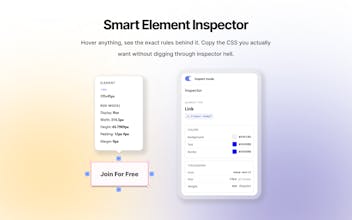
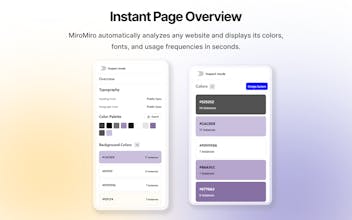
The fastest way to copy any website's design. MiroMiro is a Chrome extension that lets you inspect and extract design assets from any website without opening DevTools. Hover over any element to instantly copy its CSS, colors, fonts, and spacing. Download images, SVGs, and even Lottie animations with one click. Extract design tokens and export them as Tailwind config or CSS variables. Built for designers and developers who want to stop rebuilding from scratch and start shipping faster.





Vozo AI — Video localization
Congratulations on the launch! I think this product is really interesting and fits a designer's workflow perfectly. I’ve already recommended it to our design team and tried it out myself.
While the Inspector Mode is great, I’ve run into a specific issue:
1. When I know there is an image in a specific part of a page that I want to download, I turn on Inspector Mode and click on it.
2. Currently, it only captures the style data for that element.
3. It doesn't seem to retrieve the actual image file or asset within that `div`.
Right now, all the images and SVG assets for the entire page are mixed together in the general "Images" or "SVG" tabs. When a page has a lot of assets, it becomes very difficult to find the specific one I need.
Is there a way to make it so that when I click a specific `div`, the images or SVG assets contained within that section are displayed exclusively? It’s possible the feature already exists and I just haven't figured out how to use it yet
MiroMiro
@josie_oy Thank you so much for the kind words and for taking the time to share such detailed and honest feedback, I really appreciate it! I’m continuously improving MiroMiro based on user feedback like yours.
I understand the issue you’re describing. At the moment, Inspector Mode focuses on capturing the selected element’s styles, and in some cases images or SVGs inside a div can be tricky to retrieve directly, which is why you currently need to rely on the Assets tabs. I agree that when a page has many assets, this can quickly become hard to navigate.
I’ll work on enhancing this in an upcoming version. Your feedback truly helps make MiroMiro better every day. Thanks again for sharing it! 😊
Vozo AI — Video localization
@soraiadev Your product is really well-made. I wish you guys great success!😊
Smart approach for design teams doing competitive analysis.
Question: how do you handle dynamic content or design systems that load assets asynchronously?
Many sites use lazy loading or component-based rendering that traditional inspect tools miss.
Curious about your extraction logic.
Skipping DevTools to directly extract CSS and design tokens is super practical, especially for front‑enders who need to quickly replicate competitors or maintain design systems. Exporting Tailwind configs is a smart feature, but the ceiling lies in whether it can handle complex states (like hover, responsive breakpoints) and component‑level extraction—if it can, it evolves from a “style‑copier” into a “design‑system extractor.”
DevTools works but it's a pain for quick design extraction.
This fixes that. Clean product. Congrats on the launch.
MiroMiro
@testyourideaapp Thank you a lot Vincent, super happy you like MiroMiro :D
Good idea, fire crawl API into an easy to use extension
MiroMiro
@akiko_hayami I'm not using Firecrawl but its also an amazing product to scrap websites
Oasi
Cool app! this is support also more advance designed code, such as canvas?
The Tailwind config export is a nice touch - manually setting up design tokens from scratch can be tedious. For sites that use custom CSS properties or design systems, does MiroMiro extract the variable relationships, or does it inline the computed values?