Launching today

Mo
A little character on your Mac who does 232 tasks for you
17 followers
A little character on your Mac who does 232 tasks for you
17 followers
Mo lives on your Mac screen and does the work for you: files, PDFs, photos, email, calendar, settings, routines and more, 232 tasks with no other app. Talk or type, get answers as cards, undo anything. Private, local models or your key. $19.99 once.




Free Options
Launch Team

AWS Activate CreditsCredits that fuel your startup’s next milestone
Promoted
Hi Product Hunt! 👋
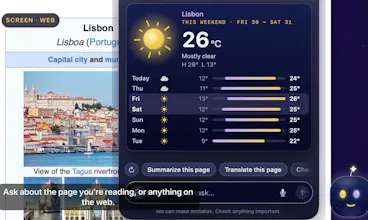
Meet Mo. He is a little character who lives on your Mac’s screen, and he does the work for you. You type to him or just talk to him, the way you would ask a friend, and he gets it done: files, PDFs, photos, video, email, calendar, your Mac’s settings, the web, and a lot more. Every answer comes back as a clean card you can read at a glance, not a wall of text. He asks before he changes anything, and one Undo takes back whatever he did.
He does 232 tasks on his own, no other app needed. The whole list, and what he does with my other apps, is in the replies right under this comment.
✨ Everything else Mo does
Talk to him. Tap Control-Option-S and speak, or talk back and forth: he answers out loud and listens for your next words.
Type to him from any app with Control-Option-M.
“What’s this?” Control-Option-W explains whatever is under your pointer.
Siri, Shortcuts and Spotlight: “Hey Siri, ask Mo…"
One sentence, many jobs: “convert these to JPG, zip them and email them to Sara.” He plans the steps.
Cards, not text. Every answer is a designed card with the next button on it.
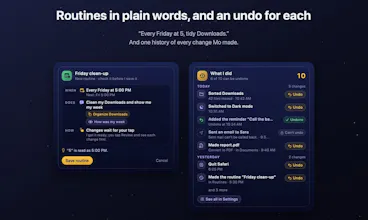
Asks first, one Undo. Nothing changes without your Continue, and every change he made sits in one list with its own Undo.
Routines. “Every Friday at 5, clean my Downloads and show me my week.” On a schedule, when new mail arrives, when a file lands in a folder, or at your first unlock of the day.
The notch island. Drag Mo up into the notch and he keeps working from there. It shows your timer, a recording, Mo at work, and quick glances like Show in Finder for a download or Join for a meeting. Three looks to pick from.
He speaks first, gently: a morning brief, prep before a meeting, the emails waiting on you, a wrap at the end of the day.
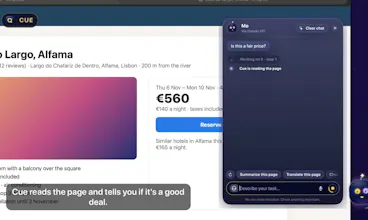
Ideas without asking. An email, a product page or a chat question in front of you gets two or three one-tap ideas above his head.
Copy an address, a tracking number or a date and he offers to map it, track it or add it to your calendar.
Live spelling help in any app, as a small bubble you click only if you want it.
Memory. Tell him what to remember. It stays encrypted on your Mac.
Screen memory, off by default. Turn it on and ask “what was that link I saw yesterday?"
iCloud sync. Your routines, memories and settings follow you to your other Macs.
Private. Free on-device models (Apple’s, or local ones through Ollama or LM Studio), or your own key for the strongest answers. Most tasks need no AI at all.
The character. Poke him, pick him up, fling him, hand him a file. He gets sleepy when your battery is low, sparks up when you plug in, and plays with his star when nothing is happening. He has his own voice, and yes, he is a lot of fun.
🎁 Launch week: 25% off with code MOLAUNCH, until 4 November.
💜 Price
$19.99, one time. No subscription. Use it on up to 3 of your Macs, and try everything free for 7 days first.
I built Mo because I wanted a Mac helper that actually does things, not one that only talks about them. I would love to hear what you ask him first, and what you want him to learn next. Thank you for checking him out!