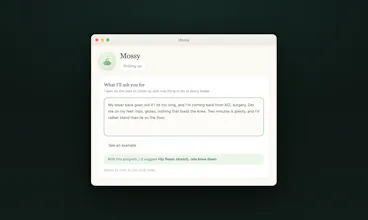
Mossy is a small plant that lives on your Mac desktop. The longer you sit without a break, the more it wilts. You write one sentence about what your breaks should be. Stretch my bad back. 20 push-ups. Teach me a Spanish word. Just make me stand up. An AI writes every break from that sentence, one task at a time, with a timer. It never blocks or dims your screen. Ignoring it is a normal way to use it. Free, no account, 1.4 MB, native, macOS 12+.
A few of you installed him on launch day and never touched him since. That's the point, but he's changed since then. Right click the plant, "Update", done.
What's new:
He updates himself now.
You can offer him to someone, with a note inside. Right click, "Offer a cutting". They get a link, the note opens when their plant sprouts.
Fixed: when the plant ends up off screen, he comes back to the middle.
Fixed: you can now park the plant against the edge, or slightly off screen, so he takes less room. The bubble follows him.
If yours already says 0.2.15, you're good. Go pick who gets the first cutting.
I'm a developer and I sit about ten hours a day. My lower back has been going out on me for years. I also play basketball, and I tore my ACL last October, so this year has been surgery, physio, and even more chair than usual.
My wife is an architect. Same laptop, same chair, same ten hours. We have a one year old, so "just train in the evening" is a fantasy. We built Mossy for the two of us, to kill the sitting, after deleting every break app we tried. They all failed the same way: the full screen break lands mid-sentence, you skip it, and a week later it's gone.
So Mossy never blocks anything. It sits in the corner, wilts while you sit, and waits. Refusing a break is a normal way to use it, not a failure to correct.
The second thing we needed was breaks that fit our own bodies. Mine needs hip and psoas work, hers doesn't, and no fixed stretch list was ever going to cover both. So you write one sentence and an AI writes each break from it. Your words decide what you do, and nothing in the app inspects what you asked for. Write "20 push-ups" or "teach me a
Spanish word" and that is what you get.
The key for that AI lives on a small relay, never in the app. The only things that leave your Mac are that one call and an anonymous daily ping you can switch off. No account, no tracking. It isn't medical advice, and the app says so itself.
Free, native Swift, 1.4 MB, macOS 12+.
Report
@heymossy This should be adapted to mobile phones with graduating tones to warn drowsy drivers from completely nodding off, hopefully averting disasters.
Report
@heymossy Awesome one! Definitely gonna use this with my Pomodoro technique
If you right click on Mossy you'll find the settings, and there's a size option in there. "Discreet" makes him quite a bit smaller, which might be enough. You can also hide him from that same right click menu, and he comes back on his own at your next break.
If neither of those really solves it, what would you want it to do instead?
Also, we did a lot of updates, don't forgot to update mossy :).
Happy to hear it.
Report
the line that got me is "refusing a break is a normal way to use it, not a failure to correct" @heymossy . every break app ive deleted died right there, becuase it treated the skip as me failing and by day three i resented ittt.
@rabnoor_s Yes exactly, sometimes we're really focused and we can't or don't want to take a break at that moment. Mossy was created exactly for that: take a break when it works best for you, because you decided to. "Mossy is just a reminder app".
Report
The flower starts wilting, and suddenly you feel guilty. Much better than just a timer!
Okay, my lower back peaked right up and said, "Click the download button!" and I've got what for now looks like a pretty chipper cactus in the lower right corner of my second screen! This looks fun... Wish he had a ball cap. :-)
@busmark_w_nika Thank you so much !
We are so excited to lauch Mossy today. Feel free to use it 🌱
Report
@busmark_w_nika This should be adapted to mobile phones with graduating tones to warn drowsy drivers from completely nodding off, hopefully averting disasters. I already posted this to Mossy as well.
@busmark_w_nika Hi Nika, thanks again for the comment, my wife screenshotted it.
I only looked at your product after, which made me laugh. You get people to put their phone down, we try to get people out of their chair. Probably the same people, and we're not competing at all.
Anyway, question if you don't mind. We got #9 of the day which was great, and then it just stopped. 41 installs on launch day, 3 the day after, and so far none today. HN flagged us, Reddit wants karma I don't have, so I'm mostly sitting here refreshing an analytics page like an idiot.
You've done this way more than me, so I'd love any advice on what comes after a launch. Where do you keep going once the launch day traffic is gone?
@heymossy Hey, I recommend to use other channels – e.g. show in the buildingplubic community what you are working on, it is not only on Product Hunt – you need to build marketing channels on other fronts as well. We did ASO, ads, social media – organic content, articles, influencer collabs. So in general, more activities :)
Mossy
@heymossy This should be adapted to mobile phones with graduating tones to warn drowsy drivers from completely nodding off, hopefully averting disasters.
@heymossy Awesome one! Definitely gonna use this with my Pomodoro technique
Mossy
Mossy
@heymossy, I like it. However, it does take up space on my 2nd screen over the other apps between breaks.
Mossy
@sasconsul1 Hello :)
Thanks for the feedback, that's useful.
If you right click on Mossy you'll find the settings, and there's a size option in there. "Discreet" makes him quite a bit smaller, which might be enough. You can also hide him from that same right click menu, and he comes back on his own at your next break.
If neither of those really solves it, what would you want it to do instead?
Also, we did a lot of updates, don't forgot to update mossy :).
Happy to hear it.
the line that got me is "refusing a break is a normal way to use it, not a failure to correct" @heymossy . every break app ive deleted died right there, becuase it treated the skip as me failing and by day three i resented ittt.
Mossy
The flower starts wilting, and suddenly you feel guilty. Much better than just a timer!
Mossy
Okay, my lower back peaked right up and said, "Click the download button!" and I've got what for now looks like a pretty chipper cactus in the lower right corner of my second screen! This looks fun... Wish he had a ball cap. :-)
Mossy
minimalist phone: reduce your screentime
One of the cutest visualisations I have seen today :)
Mossy
@busmark_w_nika This should be adapted to mobile phones with graduating tones to warn drowsy drivers from completely nodding off, hopefully averting disasters. I already posted this to Mossy as well.
Mossy
@busmark_w_nika Hi Nika, thanks again for the comment, my wife screenshotted it.
I only looked at your product after, which made me laugh. You get people to put their phone down, we try to get people out of their chair. Probably the same people, and we're not competing at all.
Anyway, question if you don't mind. We got #9 of the day which was great, and then it just stopped. 41 installs on launch day, 3 the day after, and so far none today. HN flagged us, Reddit wants karma I don't have, so I'm mostly sitting here refreshing an analytics page like an idiot.
You've done this way more than me, so I'd love any advice on what comes after a launch. Where do you keep going once the launch day traffic is gone?
Thank you !!
minimalist phone: reduce your screentime
@heymossy Hey, I recommend to use other channels – e.g. show in the buildingplubic community what you are working on, it is not only on Product Hunt – you need to build marketing channels on other fronts as well. We did ASO, ads, social media – organic content, articles, influencer collabs. So in general, more activities :)
Mossy
@busmark_w_nika Thank you for your answer. We will examine the various approaches in detail :)