
Mux: Auto Network Switch
Automatic priority-based network switching for your Mac
45 followers
Automatic priority-based network switching for your Mac
45 followers
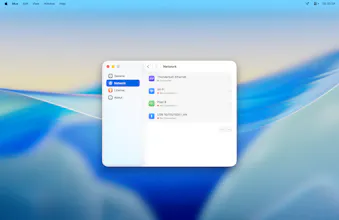
Dock your MacBook, Wi-Fi turns off. Undock, it comes back. Mux monitors every network on your Mac (Ethernet, Thunderbolt Bridge, USB tethering, Wi-Fi) and automatically switches to the highest-priority one available. Set your own priority order, add a delay for unstable connections, temporarily override from the menu bar, or view full details for every network service.


Free Options
Launch Team / Built With


World model AI : Sharm SEKAISimulate your idea on a living world.
Promoted
Hi, I'm Lauren, the developer behind Mux.
I built Mux because macOS has a blind spot: it doesn't manage network priority the way you'd expect. Plug in Ethernet at your desk, Wi-Fi stays on. Tether via USB on the go, same thing. You're left manually toggling connections every time your setup changes.
The existing solutions are shell scripts tied to LaunchAgents: fragile, unsigned, and Ethernet-only. I wanted something that handles all connection types (Ethernet, Thunderbolt Bridge, USB tethering), lets you configure priority order, and just works.
That's Mux. It sits in your menu bar, monitors every network service on your Mac, and automatically switches to the best one available. You also get a clear view of your entire network stack (IP addresses, DNS, hardware info, status) and can manage services directly.
A few details:
Priority-driven: you set the order, Mux handles the switching
Configurable delay to prevent flapping on unstable connections
Preferred Network override for temporary manual control
Native SwiftUI with Liquid Glass on macOS Tahoe
No analytics, no telemetry, no account required
7-day free trial, one-time purchase.
Give it a spin if you use a dock, adapter, or USB tethering, and let me know what you think!