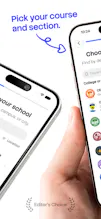
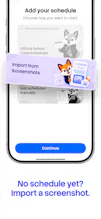
Built for Philippine college students, MySched turns timetable screenshots and published school timetables into an offline-first planner. See what’s next, track tasks and attendance, set reminders, and keep your schedule on Home and Lock Screen widgets.
No reviews yetBe the first to leave a review for MySched
Maker
📌
Hey Product Hunt 👋 I’m Neil, the maker of MySched.
Philippine college students often receive class schedules as screenshots buried in group chats. I built MySched to turn that mess into a schedule students can actually use.
Import a screenshot, choose a published school timetable when available, paste text, or add classes manually. MySched shows what’s next, works offline, tracks tasks and attendance, schedules local reminders, and puts the day on Home and Lock Screen widgets. The core scheduling experience works without an account.
MySched began as a thesis-era project. This launch is a ground-up native SwiftUI rebuild, shaped around real Philippine timetable formats and a nationwide directory of 2,700+ colleges.
I’d especially love feedback on the import experience—and which student-planning features should stay simple versus grow next.
Report
would love to see a way to share schedules with classmates or blockmates, maybe through a code or link, so we can compare timetables and figure out when to meet up for group work without having to send screenshots back and forth.
Report
Would love a feature that syncs my schedule across iOS and Android with a friend so we can see when each other's free between classes to grab coffee.
Report
love how it pulls class details straight from a screenshot, basically skipping the manual entry that usually kills me. the home screen widget showing the next class with the room number is such a thoughtful touch for busy mornings.
Report
Offline-first is such a smart call for this use case, especially with how spotty campus wifi can get. The widget integration sounds like exactly the kind of thing that makes a planner actually stick.
Report
Screenshot-to-timetable parsing actually worked on my messy photo, which surprised me. The lock screen widget is a nice touch for checking classes between breaks.
would love to see a way to share schedules with classmates or blockmates, maybe through a code or link, so we can compare timetables and figure out when to meet up for group work without having to send screenshots back and forth.
Would love a feature that syncs my schedule across iOS and Android with a friend so we can see when each other's free between classes to grab coffee.
love how it pulls class details straight from a screenshot, basically skipping the manual entry that usually kills me. the home screen widget showing the next class with the room number is such a thoughtful touch for busy mornings.
Offline-first is such a smart call for this use case, especially with how spotty campus wifi can get. The widget integration sounds like exactly the kind of thing that makes a planner actually stick.
Screenshot-to-timetable parsing actually worked on my messy photo, which surprised me. The lock screen widget is a nice touch for checking classes between breaks.