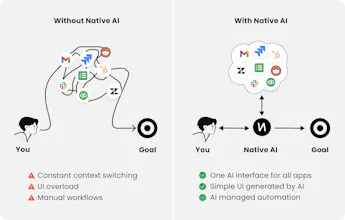
Native AI is your companion across apps like Gmail, Slack, Jira and more. Operate apps from one interface without context switching. Flow through your work with a simple UI instead of clunky UIs. Get your work done faster with effortless automations.
Hi Everyone!
Native AI provides working professionals with one universal AI interface across all apps.
No more context switching, clunky UIs, or manual tasks.
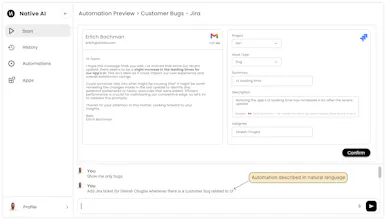
For example, with a single command, Native AI can gather customer issues from sources like Slack, Gmail, and more. You can then file a Jira ticket for tracking with a simple right click on the issue. In addition, Native AI suggests automations based on your workflow, like file a Jira ticket whenever there is a UI related bug in Gmail or Slack.
Moreover, schedule meetings for your team or generate balance sheets from quickbooks. Also, get curated industry news from social channels like LinkedIn, Reddit, and more along with your coffee every morning!
What makes Native AI different?
Native AI is a new paradigm where apps appear and disappear within one AI interface, instead of AI bolted on to the side of every app.
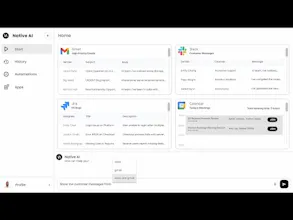
1. Super fast interactions: Type, speak, or click to interact with AI. Use commands or autocomplete options to speed up your interactions. With one request, view customer messages, track bugs, or generate reports across apps.
2. Simple interfaces: Operate all apps with a minimalistic UI based on your intent. Get contextual recommendations from AI tailored to your actions. For example, right click on your calendar to send a message and resolve meeting conflicts or record an invoice in Quickbooks from Gmail directly.
3. Effortless automations: There is no need to set up rules or visual flowchart to automate tasks. You can interact with AI in natural language to set up your automations. Automate filing tickets, sharing messages, generating reports, and more.
We look forward to hearing from y'all :)
@leovs09 Thank you for the suggestion Vlad! Am I understanding correctly that you want to keep switching apps between browser tabs, i.e. you don't want one AI interface across all the apps? I'm curious to learn about what you love about separate tabs for apps that is missing in Native AI?
Love the idea of having one universal AI interface across all favorite apps. I can't wait to give it a try! Is there a place we can suggest new tools for integration with Native AI?
Wow, that sound promising. Looking at the interface it seems you managed to create something simple to use that does a complex job.
How/where do you manage all the automations? I can image if it's so easy to create them, it might get out of hand
@thomas_wink Great question! There is an automations menu in the sidebar, where all the automations will be listed. Automations could be turned on or off, or updated from that interface.
Report
Native AI looks like it could greatly improve our workflow.
I'm curious, how does it ensure the security of users' private data?
@bonvisions Thank you Bon. Data security and privacy is utmost priority for us. We encrypt the data at rest and at motion. Data is only retained for limited periods. We work with model providers that are strictly compliant with our policies.
Good job and congrats! Some people like to keep mentioning "wrappers" while forgetting that making AI more and more accessible to the end users is an entire useful industry in itself!
@grigory_sl Thanks you! Native AI is a new paradigm where apps appear and disappear within a universal AI interface, instead of AI bolted on to the side of every app. Since Native AI understands your end to end context, it can provide personalized assistance based on your daily activities. Native AI renders a just in time UI with minimal elements to accomplish actions specific to each task.
@sheikhirfan10 Native AI helps to get work done faster, while eliminating context switching, clunky UI, and manual tasks. Specifically:
Super fast interactions: Type, speak, or click to interact with AI. Use commands or autocomplete options to speed up your interactions. With one request, view customer messages, track bugs, or generate reports across apps.
Simple interfaces: Operate all apps with a minimalistic UI based on your intent. Get contextual recommendations from AI tailored to your actions. For example, right click on your calendar to send a message and resolve meeting conflicts or record an invoice in Quickbooks from Gmail directly.
Effortless automations: There is no need to set up rules or visual flowchart to automate tasks. You can interact with AI in natural language to set up your automations. Automate filing tickets, sharing messages, generating reports, and more.
Native AI
Native AI
Native AI
Flowlu
Native AI
Native AI
Native AI
ReadPartner: Media Intelligence Platform
Native AI
SocialBu
Native AI
SocialBu
DiffSense
Native AI
DiffSense