Instant access to real iOS and Android devices with one Magic Link. Run AI-powered tests using Maestro, capture crashes, and share rich bug reports. Turn mobile testing into a superpower.
@sachinjain024 Thanks! BrowserStack does a great job at device access. We’re focused on what happens around testing - combining real devices, AI-driven testing, and collaboration into one shared workflow. The Magic Link is a big part of that: one place where everyone sees the same app, on the same device, with the same context. We often describe it as Figma for mobile testing, which hasn’t really existed before.
While BrowserStack primarily serves QA teams, NativeBridge plugs in much earlier in the lifecycle - starting at development (via our VSCode/Cursor extension) and continuing through QA, reviews, and feedback, all in one flow (and one link).
Manisha here. I work on solutions and growth at NativeBridge, and spend most of my time listening to teams building and shipping mobile apps.
What I hear most often isn’t about missing features, it’s about friction. Waiting for devices to free up, second-guessing test results, and stitching together screenshots or recordings just to explain a bug. Right before release, many teams end up asking: are we confident enough to ship this?
NativeBridge is built to reduce that friction. Real devices available instantly, automation that’s easier to work with, clear performance signals, and one Magic Link that keeps everyone aligned. The goal is simple: make mobile testing feel calmer, clearer, and closer to how users actually experience the app.
If you’re shipping mobile apps, what usually causes the most stress right before a release? I’ll be here all day and happy to chat.
Hey Product Hunt! 👋 Himanshu here, founding engineer at NativeBridge.
The past 14 months have been quite a ride. Alongside @sahil_choudhary22 and my teammates @anushka_bhandari and @bhavish_mayyar , we have been obsessing over one thing making mobile testing feel effortless.
If you have ever waited forever for a device to free up, juggled screenshots and screen recordings just to file a bug, or spent more time writing test scripts than actually testing yeah, we have been there too 😅 That's exactly why we built NativeBridge.
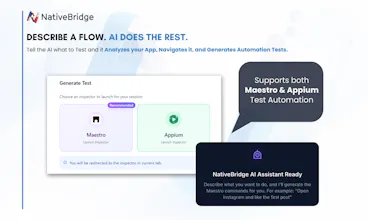
What I'm most excited about with this launch: real Android and iOS devices ready in seconds 📱, Magic Links that get your whole team on the same page ✨, and AI that turns plain English into working automated tests. No setup drama, no context-switching, no more "it worked on my device" conversations.
We have learned a ton from early chats with dev and QA teams, and today we are excited to hear from this community.
What's the biggest pain point in your mobile testing workflow? We're around all day would love to hear what's frustrating you 🙌
Report
Interesting indeed. How teams balance AI-generated tests with manual testing using NativeBridge though??
@himani_sah1 Good question. Most teams use manual testing for discovery and edge cases, and AI-generated tests for repeatable flows. NativeBridge lets them switch between the two without changing tools or workflows.
Report
This is a genuinely valuable product for mobile app developers. Too often, teams put most of their effort into the web side, while mobile testing remains underfunded and difficult to execute properly.
App testing comes with a steep learning curve ,just getting started can take a lot of time ,and this often slows down both development and early hiring. NativeBridge does a great job of lowering that barrier, reducing friction, and saving developers time by making real-device testing more accessible and practical.
@dineshj28 Yes we do support GPS and location spoofing across all device types Android emulators, real Android phones, iOS simulators, and real iOS devices. So you can test location-based features easily, no matter which device you are using.
@kate_ramakaieva Thanks Kate! Complex flows are exactly where real devices help. Teams usually validate the flow manually first, then automate it so it runs reliably across devices and releases.






Requestly
Congrats @sahil_choudhary22 on the launch! Looks impressive.
Curious to know what's different from existing market leaders like BrowserStack?
NativeBridge
@sachinjain024 Thanks! BrowserStack does a great job at device access. We’re focused on what happens around testing - combining real devices, AI-driven testing, and collaboration into one shared workflow. The Magic Link is a big part of that: one place where everyone sees the same app, on the same device, with the same context. We often describe it as Figma for mobile testing, which hasn’t really existed before.
While BrowserStack primarily serves QA teams, NativeBridge plugs in much earlier in the lifecycle - starting at development (via our VSCode/Cursor extension) and continuing through QA, reviews, and feedback, all in one flow (and one link).
NativeBridge
Hey Product Hunt! 👋
Manisha here. I work on solutions and growth at NativeBridge, and spend most of my time listening to teams building and shipping mobile apps.
What I hear most often isn’t about missing features, it’s about friction. Waiting for devices to free up, second-guessing test results, and stitching together screenshots or recordings just to explain a bug. Right before release, many teams end up asking: are we confident enough to ship this?
NativeBridge is built to reduce that friction. Real devices available instantly, automation that’s easier to work with, clear performance signals, and one Magic Link that keeps everyone aligned. The goal is simple: make mobile testing feel calmer, clearer, and closer to how users actually experience the app.
If you’re shipping mobile apps, what usually causes the most stress right before a release? I’ll be here all day and happy to chat.
NativeBridge
Hey Product Hunt! 👋
Himanshu here, founding engineer at NativeBridge.
The past 14 months have been quite a ride. Alongside @sahil_choudhary22 and my teammates @anushka_bhandari and @bhavish_mayyar , we have been obsessing over one thing making mobile testing feel effortless.
If you have ever waited forever for a device to free up, juggled screenshots and screen recordings just to file a bug, or spent more time writing test scripts than actually testing yeah, we have been there too 😅 That's exactly why we built NativeBridge.
What I'm most excited about with this launch: real Android and iOS devices ready in seconds 📱, Magic Links that get your whole team on the same page ✨, and AI that turns plain English into working automated tests. No setup drama, no context-switching, no more "it worked on my device" conversations.
We have learned a ton from early chats with dev and QA teams, and today we are excited to hear from this community.
What's the biggest pain point in your mobile testing workflow? We're around all day would love to hear what's frustrating you 🙌
Interesting indeed. How teams balance AI-generated tests with manual testing using NativeBridge though??
NativeBridge
@himani_sah1 Good question. Most teams use manual testing for discovery and edge cases, and AI-generated tests for repeatable flows. NativeBridge lets them switch between the two without changing tools or workflows.
NativeBridge
@arunanshu_arya Really appreciate your feedback and support!!
Really interesting approach to mobile dev workflows.
I haven’t had a chance to dive in yet, but quick question,
does this support GPS and location spoofing for testing geo features ?
NativeBridge
@dineshj28
Yes we do support GPS and location spoofing across all device types Android emulators, real Android phones, iOS simulators, and real iOS devices. So you can test location-based features easily, no matter which device you are using.
FuseBase
Congrats @anushka_bhandari @sahil_choudhary22 @sahil_choudhary22 🙌🏻 How reliable is it for complex user flows?
NativeBridge
@kate_ramakaieva Thanks Kate! Complex flows are exactly where real devices help. Teams usually validate the flow manually first, then automate it so it runs reliably across devices and releases.