Launching today

omerta
Catch .env secrets leaking into git
29 followers
Catch .env secrets leaking into git
29 followers
Catchenv secrets leaking into git: a pre-commit hook and CLI that fails when an API key or any value of your env files is staged, tracked or anywhere in the history. Your real values, not patterns.



Free
Launch Team

Klaussy ReviewTop Ranked AI Code Review Agent on ReviewBench
Promoted
Hi Product Hunt, I'm Sergii. omerta is a free, open-source CLI and pre-commit hook that answers one question: is any value from my .env in git?
Secret scanners such as gitleaks and TruffleHog look for strings shaped like keys. Many secrets have no shape: a smaller provider's API key, a storage bucket's name, an organisation ID, a database password. And a key that does leak often turns up encoded, inside a URL or a recorded test fixture.
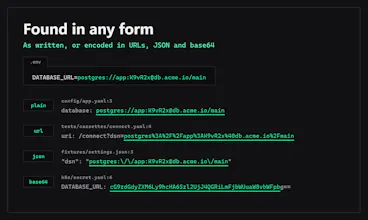
omerta takes the other route. It reads the values of your env files and searches git for exactly those, as written and as encoded in URLs, JSON and base64:
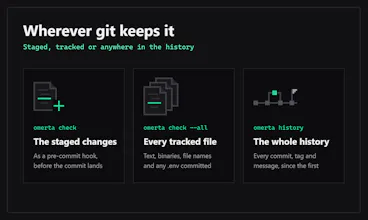
• omerta check: the staged changes, as a pre-commit hook
• omerta check --all: every tracked file
• omerta history: every commit, tag and commit message
It reports the file, the line and the variable's name, never the value. A committed .env counts as a leak in itself.
Fully offline. Fast (with hyperscan).
With uv installed, try it in any repository:
uvx omerta check --all
uvx omerta history
It runs with pre-commit, Husky, Lefthook or GitHub Actions, on Linux, macOS and Windows, under the MIT licence.
I'd value your feedback!
reporting the variable name without printing its value is a good detail
a secret checker that accidentally copies the secret into a ci log would leave u with another cleanup job
searching for the real values instead of key-shaped strings makes alot of sense, a db password never looks like a secret to a regex
once i rotate a key, does omerta history still catch the old value sitting in an old commit, or only what's in the current .env??? and how do you deal with short values like a port number, does it get noisy???
@thamibenjelloun Hi Thami. Thanks, that's exactly the gap it's meant to fill.
As regards rotated keys, `omerta history` searches the whole history (every reachable blob + commit and tag messages), but it only looks for the current values in your env files. If a key is rotated, omerta won't know about this. A way to solve this is putting your old keys into e.g. `.env.old` next to your `.env`. The default patterns are `.env` and `.env.*`, so omerta reads it without additional config. Only templates like `.env.example` are skipped. Then run `omerta history` and it searches all commits and reports where an old value entered git. Also, make sure that `.env.old` is gitignored, since omerta reports a tracked env file as a violation too.
Regarding short values. By default, anything under 8 chars is skipped. Ports like 5432, true/false, and placeholders like DUMMY, never match. The noise that's left comes from values that aren't secret, like `localhost`, `postgres`, etc. You can list such noisy vars under `ignore` in pyproject.toml's `[tool.omerta]` (or in `.omerta.toml` if your project isn't in Python), and they will be dropped. If you have real secrets shorter than default 8 chars, you can lower `min-chars` setting and add any noisy vars to `ignore`.
Reporting the variable name without printing its value is a good call. A failed check needs to be safe to paste into a ticket.