
Launched this week

PawseKeys
Shield your keyboard from kids and pets
99 followers
Shield your keyboard from kids and pets
99 followers
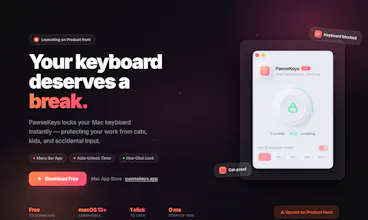
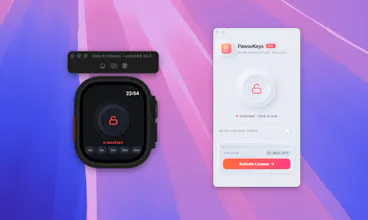
Home-office is great until a cat, dog, or toddler "helps" you type. PawseKeys is the ultimate shield for your Mac productivity. While it’s a powerful standalone locker, we’re adding a world-first factor: remote control via Apple Watch. The Watch companion app is currently in final review and will be released as a free update this week! Lock or unlock your Mac keyboard directly from your wrist. Perfect for stepping away from your desk or cleaning your setup. ⌚✨




Hehehe. My cat loves walking right on top of my keyboard when I have a Claude Code instance running and I panic hoping she does not press escape.
Wonderful idea. 💡 Rooting for you.
@richard_andrews4 Haha, I totally feel you, Richard! Preventing a 'cat-driven' financial crisis of burnt tokens is exactly why we're building this. PawseKeys is here to save your terminal (and your wallet) from those paws! 🐾
Hi Product Hunt! 🚀
I’m Pablo, a Full Stack Developer based in Lisbon 🇵🇹. After 14+ years building systems for companies like BMW and Ericsson, I decided to build something for a very specific (and chaotic) workplace: the Home Office.
We’ve all been there: you step away for a coffee, and your cat, dog, or toddler decides to "refactor" your code or send a cryptic Slack message to your boss. 🐾👶
I built PawseKeys to be the ultimate shield for your Mac. It’s a powerful standalone keyboard locker, but I wanted to add a bit of magic.
✨ The Watch Remote: We are likely the first to sync macOS with the Apple Watch for this! Note: The Watch companion app is in the final stage of Apple’s review and will be available as a free Pro update in just a few days! Grab Pro today to be ready the second it drops.
Key Features:
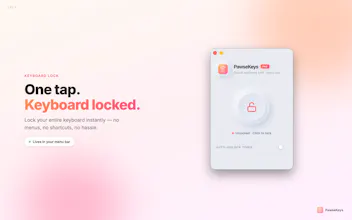
🔒 Solid Locking: Block all inputs instantly with one click.
⌚ Watch Remote: (Coming this week!) The "Wow Factor" — control your Mac from your wrist.
🧼 Cleaning Mode: Wipe down your keys without triggering 50 random shortcuts.
🏠 Home-Office Ready: Designed for parents, pet owners, and focus-seekers.
🎁 PH SPECIAL: Use code PHPAWSE20 for 20% off the Pro version via Lemon Squeezy!
I’d love to hear your feedback. What’s the craziest thing your pet (or kid) has ever typed? Let me know below! 👇
I remember once I kept my mac open like this and my cat came and sat on the keyboard as it was bit warmer, which led to some weird messages in Teams😓, I wish I had closed the lid or had this app installed, Great work man thanks!
@nayan_surya98 Oh man, I totally feel you! It's a classic pet owner struggle, right? 😂 I have a puppy who's just learning how to jump, and her favorite landing spot is always my mechanical keyboard.
Beyond the 'pet chaos', I also struggled to find a tool that actually blocked everything, most apps out there don't block special keys like Power, Media, or Volume, which made cleaning the keyboard a nightmare. That’s exactly why I built this! Thanks so much for the support! 🙏"
Hi Pablo. One question, how is this better than just making my mac sleep with a shortcut?
@julien_wolfensberger Good point! Sleep is great for security, but PawseKeys is for active work.
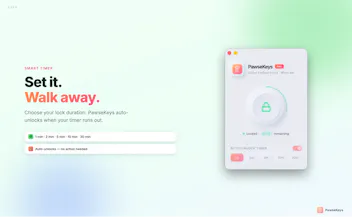
Think of it like this: If you're in the middle of a long download or a code compile, you can't "Sleep" the Mac. PawseKeys lets the Mac stay "awake" and working, while making the keyboard/trackpad "pet-proof."
Plus, it’s a lot easier to wipe your keys clean in "Cleaning Mode" than trying to do it while the lock screen is flickering! 🧼⌨️ Don't you think?
My 8-month-old chaotic cocker spaniel magically learned how to climb my work desk. While it's cute to see, I work with Slack all the time, so...
This is such a great idea, simple enough to make me like it and need it!
@tamilietti Haha, oh the life with a 8-month-old Cocker 🐶 They really are 'chaos agents'. I built PawseKeys exactly for these 'magic' moments where pets (or kids) decide to join the meeting uninvited. Glad it can help you keep your Slack safe from your furry coworker. Thanks for the support!
This is such a wonderful idea! It actually reminds me of something that happened to me. One day my dog had the zoomies, ran over my keyboard, and completely messed up everything I had already done 😅
Once in the time tunnel I let my workstation free opened and I went to have a break. Far from their, in another floor, I had remembered I forgot to close my email editor. I thought to myself: “oh, nobody will taked it.” When I came back and non-desired email was sent to my director. I wished I had this solution to lock my keyboard remotely..LoL