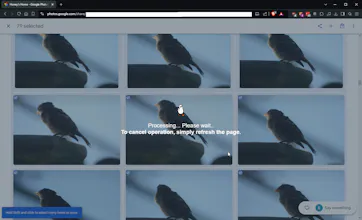
PhotoZap is a Chrome extension designed to help you automatically select and delete photos in Google Photos. You can fine-tune the delay, the number of images to select, and whether or not to automatically delete the selected images.
👋 Hi Product Hunt!
I'm thrilled to introduce PhotoZap—a Chrome extension that automates the tedious task of selecting and deleting photos in Google Photos. This tool was born out of my frustration with the lack of reliable solutions available online.
When I searched for similar tools, I only found outdated GitHub scripts that were either buggy or ineffective. Other Chrome extensions I tried either didn't work as advertised or required a payment. I knew there had to be a better way, so I created PhotoZap to fill that gap.
🔧 Key Features:
- Automatically select photos based on your preferences.
- Option to delete selected images with ease.
- Experimental support for Google Image search results.
💡 Why I Built This: Managing my photos was taking up way too much time, and I wanted a solution that worked seamlessly without any hassle. PhotoZap is the result of that effort, and I'm excited to share it with you.
⚠️ Note: PhotoZap is still in its early stages, and there may be some bugs. I’m actively working on improvements, and any feedback is welcome to help make it better. Your input is incredibly valuable to me!
I’d love to hear your thoughts, feedback, and any suggestions you have for future improvements. Thanks for checking out PhotoZap, and I hope you find it as useful as I do!
Report
Congratulations on that launch!
Really curious to know, how is it different from normal google photo deletion. What kind of customisation are being offered?
@kavyaaatripathi The normal google deletion routine requires you manually select all of your photos, which can be a pain if you've got thousands! This does all of that for you.
Report
PhotoZap for Chrome is really time-saver for anyone with a overflowing Google Photos library! thanks to the developer for creating such a handy tool to help us clean up our photo clutter. I'm really looking forward to seeing future updates that allow for more granular selection options (like by date or keyword) and can't wait to try it out!
Report
Congrats on the launch! This fixes a very core yet un-looked problem. Love that we can fine-tune to delete certain photos. I can now finally get rid of my cluttered photos
Hey Robert,
Is there a way to undo accidental deletions or preview selections before finalizing?
Do you have plans to expand this functionality to other photo storage platforms?
Congrats on the launch!
@kyrylosilin You may use Google undo deletion after it's finished or go to trash to restore images. Also, you can leave auto-delete unchecked and just let it auto-select everything for you. Then you can go through the checked photos to verify them and continue to download or delete them all manually!
Report
I’ve tried a few tools for managing photos, and PhotoZap seems super promising. Quick question—does it work well with large libraries? Excited to see what’s next!Congrats on the launch!
@samuelparker You will have to test it out for me! it should work with larger libraries. The most I've tested it on was about 9k images. Feel free to give it a shot and leave an issue in the repo if something went wrong!


PhotoZap
PhotoZap
PhotoZap
Telebugs
PhotoZap
PhotoZap