No reviews yetBe the first to leave a review for Plann
Hi Guys, Great Product I'm sure - but I'm the founder of Plann, an app that has been in the iOS and Android store for a few years now. (website: www.plannthat.com)
Would be great if you could consider the implications to both of our businesses (for both SEO, ASO and all round general confusion) by choosing the same name?
Report
@christy Weird choice alright.. A simple Google search brings you up as first result!
Hey there! Thanks for checking out Plann by Unito - we’re beyond excited to be here and share it with you! Thanks so much for Hunting, us, Olivia!
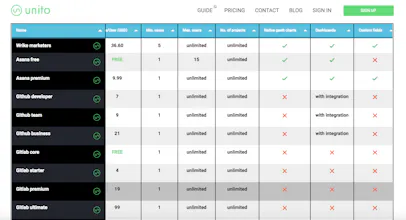
We built Plann for anyone looking to use a work planning app such as Asana, Trello, Jira, GitHub, Gitlab, Wrike, and more. There’s sooo many work planning apps out there, each with their own unique features, options, and limitations. In order to choose one that best meets your needs, you’d have to manually look up apps one by one, do the research, contact support, and compare all the info. This can take hours, days, or even weeks...and ain’t nobody got time for that!
Which is why we created a tool that lets you compare the top apps out there, and easily choose one. With Plann, you can find the best app for your needs, in minutes! The best part is...it’s free.
We’d REALLY appreciate your feedback on Plann! Do you prefer more than 3 collapsable filters at the top? Are there any project management apps you’d like us to add to the table? Do you find it easy enough to use? Is there anything you don’t understand?
Our team will be available here all day to answer any questions you may have. So let us know what you think!
@trevorl hey Trevor! Love this, cleaner, simpler and way easier to use than Capterra, etc. Can you add Flow to the table? Happy to chat and provide info about our app, just let me know who to speak to 👍
Report
Love it, it's very useful to be able to compare every tools from one place! How does the app filter the chart based on the dropdown choices?
Thanks @l_dicostanzo. The chart gets filtered based on our recommendations for each value in the drop down menu. Since we connect other work management apps together, we have seen A LOT of different ways to manage and organize work, and became an independent expert in the field.
I love when I've got an idea, am too busy on other projects, then someone else launches it 100x better. Love it! I'm guessing you wouldn't be including affiliate links ( https://www.producthunt.com/post... ) as you'd want to keep it impartial?
@richp_ Thanks Rich! We don't do affiliate links at this time unfortunately :)
Report
Excellent way to cut through the cost of discovery for PM tools. I think it'd be interesting to consider the stage of the product and its team.
For example, I've always run on Asana with small teams. But when passing 10 people or involving cross-functional teams, it totally breaks down and I suddenly favour something like Jira.
Just another reason underlining the value of Unito's product in that it enables data across any of those tools to remain fresh and constantly accurate.
Well done!
@eyaltoledano Thanks so much for your comment, and great point. Plann does allow you to filter apps based on the size of your team, kind of, but there's no *explicit* filters for how far along the project is.
What kind of lifecycle filters were you thinking of? Would you like another column named something like "Product lifecycle" with "MVP, Funded, launched, profitable, etc." as the values inside the column? Or were you thinking of something else?
Report
@trevorl Yep
Thinking size of team (#), stage of product (pre/post market fit, etc)
One thing that has always made Asana stand out is how elegantly it handles multiple "contexts." You can assign an email address independently of each "workspace" that will receive notifications + identify projects to assign emailed tasks to, etc. I've never found any other system that handles this more elegantly than Asana. For those of us with a dozen email addresses across our clients, etc, this is invaluable.
Not sure how you account for that in the grid or how you'd even label that feature, but it's worth mentioning.
Great resource!
@etc Thanks for your feedback, that sounds interesting. It might be worth adding a column with that information. Do you have any specific values in mind for the column?
Report
@trevorl I'm not sure. It's hard to even describe the feature and benefits, but once you've set it up, it's hard to go back to "none or all." Asana's ubiquity makes this even more valuable.
One of the difficulties of task management across many different workspaces if that it's hard to contextualize. With many solutions, although you might have a single sign on for all of the different "contexts," all of the notifications, emails, etc, are attached to one account as well. Segmenting them like Asana does allows me to focus on the context at hand without going the nuclear option of silencing everything. Perhaps this could be called "segmenting" or "contextual notifications."
Another nice feature of Asana is the ability to use it for personal tasks as well. This allows Asana to be a "one stop shop" for all of your tasks, personal and otherwise. Maybe this could be called "integrated portal."
Both features are a bit more abstract. I wonder what they're called internally at Asana.
@etc These are all great ideas, thanks so much for taking the time to share and describe. I'll definitely discuss adding these with my team.
Report
Hunter
Hey Product Hunters! Here's Plann.app. It's a simple and fun way to discover the best task management apps for any job. It's the latest free tool by @UnitoIO, who really turned something potentially tedious and complex into an elegant, intuitive and handy tool. Great job @UnitoIO!




Plann
Toyo
Plann
AI or VA?
Plann
Plann
Plann
Plann
Plann