
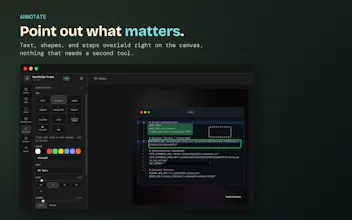
Portfolio Frame turns plain screenshots into polished, share-ready images, right in your browser. Capture a full tab, a code selection, or a single element, then add device mockups, backgrounds, and annotations (including a redact tool for blurring out secrets before you share). Export instantly as PNG, JPEG, WEBP, or SVG. Free to use, no account needed. Built for developers and designers who want their work to look as good as it actually is.




Free Options
Launch Team / Built With


CloudflareDeploy serverless functions globally in seconds
Promoted

 CleanShot X 5.0
Pretty cool product. Just gave it a test drive. Works pretty well. I liked the UX around directly pasting the twitter URL. One quick note I had was that some things that weren't marked as premium turned out to be premium. For instance in the brand section, the IP protection bit didn't have a lock icon but it seems to be a premium feature. Great product none the less and all the best.
@simplyshawn Thanks for the detailed test drive, genuinely useful. Good catch on IP Protection too, it's Pro-gated but missing the lock icon the other premium toggles show, that's an inconsistency I'll get fixed, not something intentional. Really glad the Twitter URL paste landed well. Appreciate you taking the time 🙏
Does the covered part go over the original, or does it actually get erased? If I export it as an SVG, the layers will be separated, so I think I can remove them
@inhwa PNG/JPEG/WEBP exports are safe, the whole canvas gets flattened into a single image, so what's covered is genuinely gone, not just hidden underneath. SVG is a different story since it can keep more of the original layout info instead of squashing everything into flat pixels, and I want to check exactly what that means here before I tell you it's fine. Checking this properly right now and I'll reply back with the real answer rather than guess.
Really great pollished tool, I am using it personally ; )
@whykislayThat's really great to hear!
the browser-only, no-upload angle is the right call for a screenshot tool, since it means nothing sensitive ever leaves the tab. one thing I'm curious about: for the redact tool, is the blur applied client-side only, or does an exported PNG/SVG ever get generated through a server step where an unblurred version could briefly exist?
@galdayan No server step at all, that's the whole point of building it this way. Redaction, blur, and every export format (PNG, JPEG, WEBP, SVG) happen entirely in-browser via canvas rendering. There's no upload, no image data ever leaves the tab. The only network call anywhere in the extension is license key verification for Pro, which never touches image content.