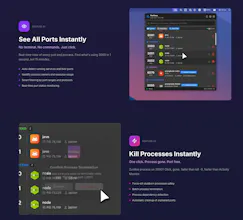
Stop wasting time with terminal commands. Portless lives in your menubar and instantly shows which ports are in use. One-click to kill any process. Perfect for developers juggling multiple projects - no more "Port 3000 already in use" errors. Smart filtering prioritizes dev ports (3000, 8080, etc), auto-detects Docker containers, and protects system processes. Built native with SwiftUI for blazing performance. Your new favorite dev tool that saves 10+ minutes daily.
No reviews yetBe the first to leave a review for Portless - End port conflicts forever
Maker
📌
Hey Product Hunt! 👋
As a developer, I was tired of the daily ritual:
1. Start dev server → "Port 3000 is already in use" 😤
2. Open terminal → type lsof -i :3000
3. Copy PID → kill -9 [PID]
4. Repeat 5-10 times per day...
That's why I built Portless.
It's dead simple - click the menubar icon, see all your ports, kill any process with one click. No more terminal gymnastics.
What makes it special:
✅ Developer-first - Common dev ports (3000, 8080, 5432) appear at the top
✅ Docker-aware - Shows container info alongside regular processes
✅ Foolproof - System processes are locked, optional kill confirmations
✅ Lightning fast - Native SwiftUI, updates in real-time
✅ Smart search - Filter by port, process name, or PID instantly
The result?
No more port conflicts interrupting your flow. Switch between projects seamlessly. Test multiple services without the hassle. Save 10-15 minutes daily on port management
alone.
Built this for myself, but realized every developer faces this pain. Would love your feedback on what features you'd want next!
Try it free and let me know what you think! 🚀
Report
Great job! Love how you visualized the process. It's so convenient not having to type commands every time. It literally saves me seconds on every run—can't wait to see how much time I get back in the long run! Strongly recommended!
Report
Easy to use. It helps me not to spend my concentration on meaningless chores.


Great job! Love how you visualized the process. It's so convenient not having to type commands every time. It literally saves me seconds on every run—can't wait to see how much time I get back in the long run! Strongly recommended!
Easy to use. It helps me not to spend my concentration on meaningless chores.
Swytchcode
Love such small developer-focused tools.