

Prompt Library
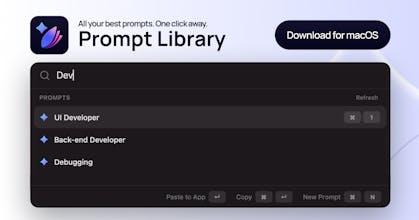
All your best prompts. One shortcut away.
423 followers
All your best prompts. One shortcut away.
423 followers
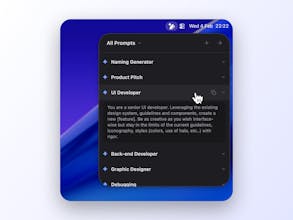
Save, tag, and organize prompts in collections, then press ⌘⌥P to instantly insert them into any app on your Mac.
423 followers
423 followers


Prompt Library
@olivia_grant You can create collections in Prompt Library exactly for that, great for organizing for different use cases!
Honestly, my Apple Notes has just become a messy graveyard of half-baked Claude and ChatGPT prompts that I can never find when I actually need them. I love that this acts like Raycast specifically for prompts. The ⌘⌥P shortcut is exactly what I needed so I don't have to break my flow and context-switch just to copy and paste. Also, massive respect for making it offline-first and a one-time payment—it makes it way easier to trust with work-related prompts. Great job on shipping this!
Prompt Library
@hassaan_baig Thanks for the kind comment! Appreciate it! 🔥
I keep rewriting the same prompts over and over across different apps. Having a shortcut to insert saved prompts sounds like a small but very practical upgrade.
Prompt Library
@kaito_takahashi Thanks! Glad to hear you enjoy the app!
This is already so handy, thanks for making it. Minor feedback:
- I tag like crazy. Would it be possible to select a previously used tag from keyboard? (Down arrow) and (Enter) would be ideal, so I can type a few letters of a previous tag and move quickly onto the next. Grabbing the mouse breaks flow. :)
- It doesn't look like you can add a prompt to a collection after it's created? Maybe I'm missing it. EDIT: I didn't think to right click in center column. Personally I expected to see it on the right, similar UI to initial creation.
- What would be great, is being able to drag a prompt from the center column and drop it into a collection on the left.
- When you navigate away from the prompt creation window, you lose whatever you've got in there; I've done that a few times (just forgot to press "Create"). Be nice to get a modal "Create Y/N" warning
- Some sort of import function might be great - ie from a spreadsheet or similar, to save mass cut-n-paste.
- Echoing comment above, variables or templates would be great. The ideal flow, I'd suggest, would be asking for variables when you paste. Understand this might be out of scope. Don't feature creep!
- Speaking personally I don't strongly want LLM guidance, but the option to connect to an existing API to do that might be cool.
Its clean and amazing but needs sync options like iCloud. Native Keyboard Extension for iOS. Single Source means I also want to find/insert a prompt whenever a mobile keyboard pops up. You are on your phone, you find this amazing prompt you want to save now. But you can't because your single source of truth is at home. So you save the screenshot, save the link, save a note/ markdown. Capture anywhere from anywhere. Insert / Search / Recall anywhere when the context is typing. Single Source of Truth only works when Its the truth on all your devices input context.
Your next favorite prompt starts on your mobile screen/ screenshot / current selected text / copied to clipboard
global shortcuts like:
Create New Prompt + Paste From Clipbboard
Create New Prompt + Selected Text
Auto Import any new markdown file in this folder as prompt
And/or support for OS native Shortcuts/Share Extension
Anyways great work
This is cool, I instantly downloaded! I've created something similar, but instead it's a prompt creator and library for AI music generators. I plan to incorporate more flexibility allowing users to add their own prompts. Haven't yet considered making it downloadable since most of the AI gen tools are web based... it's something to consider... thx!
Prompt Library
@malaika_mpressme Interesting use case, keep it up!
@martin_baudin Thx, I'm a customer ;)!
Build Check
Prompt Library
@german_merlo1 Thanks!