Every one of us would like to spend less time on distractions. Qbserve can help.
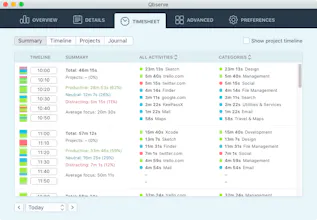
It keeps track of what you do on your Mac and provides constant feedback on your productivity. This way you can stay focused and develop better habits.
It automatically tracks work hours and can generate invoices based on the collected data. No need to remember to start and stop time tracking.
@jamesholland you can do it now by creating custom categories for your clients and then assigning sites and apps or their windows to these categories. But I have a couple ideas on how to make it even simpler in future.
Report
@ivmirx Sweet. I know a few platforms offer one-click import into finance back-ends. I think that's the really valuable aspect.
Great work @irmirx@ivmirx, I really like the detailed breakdown and the ability to categorize all activities myself! Gonna give it a shot 👍
Report
This is really nice. Well done. Considering very very slow development of RescueTime, I think you have a very good momentum. And your app look really nice, it feels polished and simple. Curious to see what you have planned! Keep up the good work! :-) 👍
Report
I've been a long time user of Timing https://www.producthunt.com/tech... which I picked because I want the data to remain local.
I've started giving Qbserve a try yesterday. So far, I really like it.
Where Timing's interface is really outdated, Qbserve's one is polished and I'm actually happy to have it open on one of my workspace. The productivity score in the menu bar is also a nice feature.
In the overview, I'd like to see the time of top activities instead of a percentage, but that's very personal.
I'm not sure yet how well idle times are handled.
This is awesome! I've been using Qbserve for two weeks to track my activities. I can totally see the pattens and where do I need to improve my focus. 👌🏻
Report
Other activity trackers and systems for keeping organized have always stressed me out a ton. Qbserve is the first activity tracker i've used that i don't feel hung up or bad about using through the entire cycle of use. There are periods where i will stop tracking for a while, but Qbserve is always easy to jump back into and use. You get immediate feedback about what's going on, and the color tracking in the dock icon gives a great visual feedback mechanism as a reminder for how on track you've been (or not).
Classification has gotten better, and the ability to triage stuff yourself is great. I wish there were some way to segment up my twitter use into work related, and time wasting, but that's my only complaint.
Pros:
Qbserve is an activity tracker designed with us poor wretched procrastinators in mind. Does a great job tracking & providing visual feedback
Cons:
It's pretty awesome! Most of the things i had complaints about have been fixed during its frequent updates after launch
This app is pretty awesome. They made it so detailed that when I walked away from my laptop for 20 minutes, instead of just logging whatever app I was on, it asked me if I was eating, sleeping, exercising, etc. since it knew I was away from the computer
It logs every single website and app you visit, and almost everything has been categorized for you. You can even make your own categories and projects to specifically log as well. At the end, I can also look at everything I did with charts and a pie chart showing my overall time spent categorized into productive, neutral, and distracted, which is a really awesome way to get a quick overview.
Pros:
Almost every app and website is pre-categorized
Charts categorize the day into: productive, neutral, distracted




QotoQot
Hubble
Pollpass
Other activity trackers and systems for keeping organized have always stressed me out a ton. Qbserve is the first activity tracker i've used that i don't feel hung up or bad about using through the entire cycle of use. There are periods where i will stop tracking for a while, but Qbserve is always easy to jump back into and use. You get immediate feedback about what's going on, and the color tracking in the dock icon gives a great visual feedback mechanism as a reminder for how on track you've been (or not).
Classification has gotten better, and the ability to triage stuff yourself is great. I wish there were some way to segment up my twitter use into work related, and time wasting, but that's my only complaint.
Pros:Qbserve is an activity tracker designed with us poor wretched procrastinators in mind. Does a great job tracking & providing visual feedback
Cons:It's pretty awesome! Most of the things i had complaints about have been fixed during its frequent updates after launch
Video Compare
This app is pretty awesome. They made it so detailed that when I walked away from my laptop for 20 minutes, instead of just logging whatever app I was on, it asked me if I was eating, sleeping, exercising, etc. since it knew I was away from the computer
It logs every single website and app you visit, and almost everything has been categorized for you. You can even make your own categories and projects to specifically log as well. At the end, I can also look at everything I did with charts and a pie chart showing my overall time spent categorized into productive, neutral, and distracted, which is a really awesome way to get a quick overview.
Pros:Almost every app and website is pre-categorized
Charts categorize the day into: productive, neutral, distracted
Create custom projects
Cons:Nothing really