Launched this week

Sider Omni Sidebar
Give every Mac app an Agent Sidebar
942 followers
Give every Mac app an Agent Sidebar
942 followers
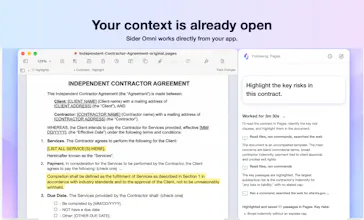
An AI agent beside any Mac app. Sider Omni sidebar sees what's on your screen and acts on it directly, right where you're working. Watch the result, ask for the next change. Nothing to copy, nothing to upload. Built on GPT-6 Astra, and it can run on your existing ChatGPT or Codex credits.




Love that it acts right on your screen without any copy paste, keeping you in flow instead of pulling you into yet another chat window.
@ilko_kacharov Thank you! We want AI to come to where you work, instead of making you move your work into another chat box. Sider Omni stays beside the current app and helps you get things done right there.
Earth.fm
@1mirul Glad that stood out to you! Constant copying and pasting breaks the flow, so Sider Omni stays beside the current app, understands the relevant context, and helps carry the task forward.
CheckYa
I liked the fact that the agent is positioned right next to the app, rather than appearing as a separate window. This small difference can make using AI during daily tasks feel much more natural and seamless.
@monir_ Thank you! It seems like a small placement detail, but it really changes the experience. Sider Omni follows the current window, so it’s right there when needed without pulling you away from what you’re doing.
AskDeck
Congrats, #3 is well earned. One question from someone who ships an MCP server: can the sidebar talk to outside MCP servers, or only its own built-in tools? Use case is simple, I'm in Keynote or PowerPoint, I ask the sidebar for a deck, and it hands the brief to my tool and drops the file back in the app I'm already in. If MCP is on the roadmap I'd happily be a test case.
@thicreator Thank you! Sider Omni already supports external MCP servers, including local stdio and remote HTTPS servers—it isn’t limited to built-in tools. Your workflow fits the design perfectly: hand the brief to your MCP tool, generate the deck, and let Sider Omni bring the file back into Keynote or PowerPoint. We’d be very happy to test it with you and your server!
AskDeck
@thappcode remote HTTPS with OAuth is exactly our setup, so this should just work. Ours is at askdeck.ai/developers/mcp if you want to point the sidebar at it. Happy to test from my side too, will report back with what the handoff into PowerPoint looks like.
@thicreator Awesome, thanks for sharing the endpoint! We’ll try connecting AskDeck and see how smoothly the deck moves into PowerPoint. I’d love to compare notes with your test results and see what we can improve.
Having the agent right beside the app feels much more natural than constantly switching between tabs. I can see this being useful for everyday Mac work.
@awesome_america Thank you! That’s exactly why we built Sider Omni—to keep AI beside the app you’re using, reduce context switching, and fit naturally into everyday Mac work.
Sider Omni Sidebar
@awesome_america Yes, definitely give it a try, and feel free to reach out to me with any feedback.
The sidebar concept is simple but practical. Having help available without leaving the app could make a big difference repetitive work.
@desire_waterman That’s exactly what we wanted to solve! Sider Omni stays beside the app you’re using, cutting down on app switching and copy-pasting to make everyday repetitive work a lot easier.
Sider Omni Sidebar
@desire_waterman Thank you, Desire, definitely give it a try
As a person who is juggling Pages, Numbers and the Web in a single day, I have been wasting my time by switching from one window to another to ask the AI something. The agent which will be right beside me, which will read what is there in the document and then perform the edit is what I have been dreaming of.
@sujoy_debnath1 You shouldn’t have to leave your work just to explain it to an AI. It should be right there beside you, understand what you’re looking at, and help make the edit. I hope Sider Omni feels a little like the workflow you’ve been dreaming of.