

SigmaMind AI
Platform to build enterprise-ready voice/chat agents
4.9•14 reviews•448 followers
Platform to build enterprise-ready voice/chat agents
4.9•14 reviews•448 followers
SigmaMind AI is a YC-backed conversational AI platform that lets you build, test, and deploy voice, chat, and email agents for sales and customer service. Use our no-code builder to create complex multi-prompt AI agents, or integrate directly with APIs into your existing systems. With pre-built integrations and support for custom third-party tools, SigmaMind AI makes deploying conversational AI agents across industries fast and effortless.
This is the 3rd launch from SigmaMind AI. View more
SigmaMind MCP
Launched this week
SigmaMind's MCP server exposes your entire voice AI stack as tools – agents, calls, campaigns, webhooks, phone numbers – manageable directly from your MCP client or IDE.
Spin up agents, trigger test calls, debug with inline call records, and automate deployments without leaving your editor.
Sub-800ms latency, SOTA noise cancellation, VAD, IVR navigation, and voicemail detection handled out of the box.
Free Options
Launch Team / Built With


SigmaMind AI
Hey 👋
We’re Ashish and Pratik, founders of SigmaMind AI.
After watching developers jump between dashboards, docs tabs, and their IDE just to configure a single voice agent - we knew the problem wasn't the technology. It was the workflow.
So we built SigmaMind MCP server.
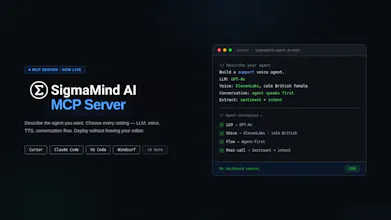
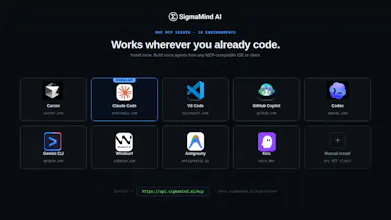
Open Cursor, Claude Code, or VS Code. Type what you want:
"Build a customer support voice agent. GPT-4o. ElevenLabs, calm British female. Agent speaks first. Extract sentiment and escalation flags after every call."
That exact spec deploys. No dashboard opened. No context switching.
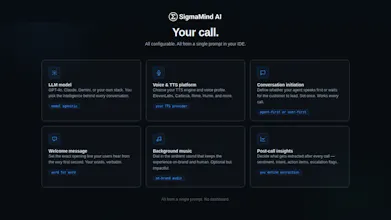
Here's what you're actually controlling from that one prompt:
→ LLM Model - GPT-4o, Claude, Gemini, or your own
→ Voice & TTS - pick the exact voice experience
→ Conversation Flow - who speaks first, how it behaves
→ Welcome Message - define the opening line
→ Background Audio - optional, on-brand
→ Post-Call Insights - sentiment, intent, escalation
Every layer configurable. All from natural language.
And telephony is built in - buy numbers or bring your own, assign to agents instantly, run real calls not simulations.
Under the hood:
→ Sub-800ms latency
→ IVR and phone trees navigation
→ Built-in VAD (Voice activity detection)
→ Noise cancellation for noisy background environments
→ Model-agnostic (Deepgram, GPT, ElevenLabs, or your own stack)
→ Multimodal (voice, chat, email - one agent brain)
→ Parallel tool calling for real-world actions
Set up in under 5 minutes: https://docs.sigmamind.ai/mcp/se...
i can direct claude code to an existing open source github repo and build voice agent for me with VAD / sub 800ms latency etc ? I understand this may consume more tokens. How is this MCP diff ?
SigmaMind AI
@raj_peko with this MCP you get access to SigmaMind's voice infrastructure which handles - VAD, noise cancellation, latency, IVR navigation etc. out of the box. You can absolutely use open source repos to build voice agents, but with voice matters, it's the 'wiring' that matters a lot. When you scale it up to over millions of calls, most of them being highly concurrent calls, this may present issues. This MCP just provides a ready-to-deploy voice infrastructure as opposed to developers needing to wire everything together.
SigmaMind AI
So proud of the team for getting the SigmaMind MCP Server live today!
I’ve seen how much effort went into making sure this wasn't just another 'cool tool' but a production-grade orchestration layer.
My favorite part? Being able to create and manage a Voice AI agent, all from a simple prompt, without leaving Cursor. It feels like magic every time.
We’re all hanging out here today to answer questions and get your feedback.
MCP for voice agents makes sense. wiring voice into an agent stack always gets messy - nice that this abstracts it.
SigmaMind AI
@mykola_kondratiuk1 Thanks! The goal was to make the stack invisible, so you're thinking about what the agent does, not how it's plumbed together.
Klariqo AI Voice Assistants
This is so cool. Running a VOICE AI company this is really good stuff. Congrats on the launch
SigmaMind AI
@ansh_deb thanks for the support!
Chirpz
This looks super clean... managing everything from the IDE is a big win. Curious to try it out.
SigmaMind AI
@sina_tayebati would love to get your feedback - our docs here: https://docs.sigmamind.ai