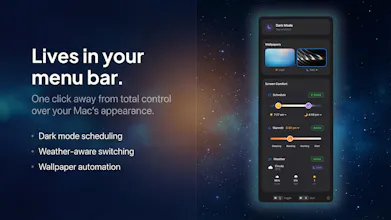
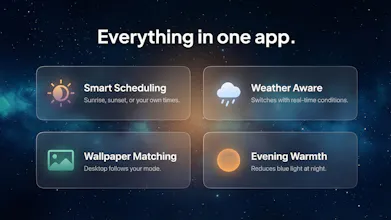
Solace lives in your menu bar and adapts your Mac's appearance to the day. Solar scheduling, weather-aware dark mode, wallpaper sync, and evening warmth, all in one app. No data collection. One-time purchase; $4.99.
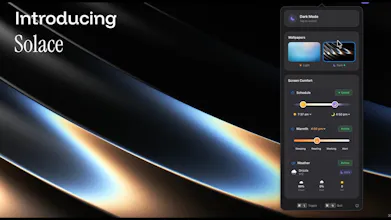
I built Solace because macOS dark mode kept getting it wrong on my Mac.
Apple gives you three options: Light, Dark, or Auto. Auto follows sunset, which sounds reasonable until you live somewhere where dark mode kicks in at 3:50 PM in December while still blasting light mode at 9 PM in June. There's no way to adjust the timing with no awareness of what's actually happening outside.
I looked for something that handled all of this together and couldn't find it. Most tools solve one piece: a wallpaper scheduler here, a screen warmer there, a dark mode toggle somewhere else. Nothing connected them. So I built Solace. It's a single menu bar app that coordinates everything your screen does in response to the world around it:
- Solar scheduling that recalculates daily as seasons change, with custom offsets so you're not locked to exact sunrise/sunset times.
- Weather-aware switching, so if it's dark and overcast at 2 PM, dark mode kicks in early. This is the feature I haven't found in any other app.
- Wallpaper sync which pairs a light and dark wallpaper, they swap automatically across all displays when your appearance changes.
- Evening warmth so you get gradual colour temperature shift as night approaches, integrated with your dark mode schedule rather than running separately.
- Global keyboard shortcut for when you just want to override everything.
On pricing and privacy: $4.99, one time, forever. No subscription. Zero analytics, zero telemetry. Your location data never leaves your Mac. Built natively with Swift and SwiftUI for macOS 13+. Sits in your menu bar, stays out of your way.
I've been using it daily on my own Mac for months. It's the kind of tool where you set it once and then forget it's there, which is exactly what I wanted.
I'm curious: how do you currently handle the light/dark switch on your Mac? Do you just leave it on Auto and live with the timing, or have you found a workaround?
Report
Hey, it was so interesting. But I can not install it, I am new user of mac so maybe I am doing something wrong, I just pay for it, download the package but getting this error when double-clicking it: The application “Solace” can’t be opened.
@renatojobal I'm sorry to hear this - have you tried using the the latest version of the app via the solace website? Make sure you drag and drop the app into your Applications folder first, and then it should work fine. Any issues drop me a message and I'll help you through it.
Report
@theodore_hq Hey, the last update works fine! Congrats on your launch
@renatojobal Great to hear it. Any other questions or feedback, just let me know. Thank you.
Report
@theodore_hq Having an issue with the app. After downloading the installer package from the website, double click on the icon, unable to drag the icon to the application folder as it does not show. Only shows the solace icon. Cant open the app or unable to find the files to uninstall it. See screenshot attached.
@yogesh_mistry1 Thanks for getting in touch - you should be able to just drag and drop the Solace App into the Applications folder in your Finder window seen behind? This should do the trick. Any more issues, let me know and I'll be sure to help out.
@yogesh_mistry1 Glad to hear it! Anything else, just let me know.
Report
Weather-aware dark mode is such a smart touch. I always found it annoying that Auto just follows sunset — on overcast winter days it should definitely kick in earlier. Love the one-time purchase + zero telemetry approach too, feels like how Mac utilities should be.
@letian_wang3 Thank you! Glad you feel the same about the weather functionality. It's usually dark and raining for me, so permanent light mode always felt straining on my eyes. Now Solace adapts for this automatically! Enjoy and any questions let me know.
Report
I remember trying to achieve something like that for a long time based on some applescript. The product is really well made. and a one time purchase licence. Awesome. Thanks a lot
Report
Simple, straightforward, and elegant. Congrats on building this!
I'm always with dark mode on, but I'm thinking of seeing what my experience on Mac could look like with Solace.
@tudor_moldovanu Thank you! Give Solace a go and see what you think about having a bit more light mode in your life! I personally like experiencing the design of both light and dark modes for different apps etc.
Solace
Hey, it was so interesting. But I can not install it, I am new user of mac so maybe I am doing something wrong, I just pay for it, download the package but getting this error when double-clicking it: The application “Solace” can’t be opened.
Solace
@renatojobal I'm sorry to hear this - have you tried using the the latest version of the app via the solace website? Make sure you drag and drop the app into your Applications folder first, and then it should work fine. Any issues drop me a message and I'll help you through it.
@theodore_hq Hey, the last update works fine! Congrats on your launch
Solace
@renatojobal Great to hear it. Any other questions or feedback, just let me know. Thank you.
@theodore_hq Having an issue with the app. After downloading the installer package from the website, double click on the icon, unable to drag the icon to the application folder as it does not show. Only shows the solace icon. Cant open the app or unable to find the files to uninstall it. See screenshot attached.
Solace
@yogesh_mistry1 Thanks for getting in touch - you should be able to just drag and drop the Solace App into the Applications folder in your Finder window seen behind? This should do the trick. Any more issues, let me know and I'll be sure to help out.
@theodore_hq Issue resolved thank you
Solace
@yogesh_mistry1 Glad to hear it! Anything else, just let me know.
Weather-aware dark mode is such a smart touch. I always found it annoying that Auto just follows sunset — on overcast winter days it should definitely kick in earlier. Love the one-time purchase + zero telemetry approach too, feels like how Mac utilities should be.
Solace
I remember trying to achieve something like that for a long time based on some applescript. The product is really well made. and a one time purchase licence. Awesome. Thanks a lot
Simple, straightforward, and elegant. Congrats on building this!
I'm always with dark mode on, but I'm thinking of seeing what my experience on Mac could look like with Solace.
Solace
@tudor_moldovanu Thank you! Give Solace a go and see what you think about having a bit more light mode in your life! I personally like experiencing the design of both light and dark modes for different apps etc.