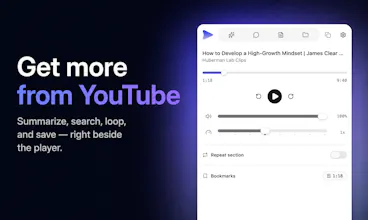
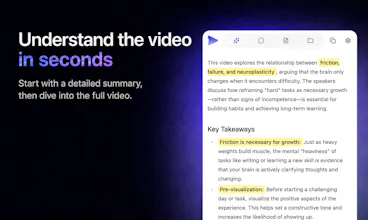
SpaceTube adds a panel right inside YouTube. Get AI summaries of the video and its comments in your language, search a click-to-seek transcript, loop any section, control speed and volume, save timestamped notes, and organize videos into folders — without ever leaving the watch page. Free to start; the Pro plan is free for a limited time, no card needed.
No reviews yetBe the first to leave a review for SpaceTube
The transcript search that lets you jump straight to the moment someone says a word is such a smart move, makes rewatching dense videos actually bearable.
Thanks! That's the part I use a lot myself. On a long video, I search the transcript and jump to the section I need, like the design part of a headphone review. Summarizing before watching helps too, you know what the whole video covers first. That's my workflow: summarize first, then search.
I built SpaceTube because I watch a lot of podcasts, tutorials, and lectures on YouTube. But I'd watch a 40-minute video and forget most of it by the next day — and when I wanted to go back to that one moment, I couldn't find it.
So SpaceTube is a full panel that lives next to the player: AI summaries of the video and its comments (in your language), a transcript where clicking any line jumps to that moment, an A-B loop, playback speed and volume controls, timestamped notes, and folders for the videos worth keeping. It matches YouTube's light/dark theme and stays out of your way until you need it.
My favorite way to use it: when a 1.5-hour podcast loads, I summarize it before settling in. You know what it covers and where it's going, so you watch with more focus — the summary isn't a replacement for the video, it's a map.
It's free to try, and the Pro plan is free for a limited time — no credit card.
I'm a solo developer and this is v0.2, so I'd genuinely love to hear what feels missing. What would make this your default way to watch YouTube?
Report
Finally gave this a try on a long tutorial and the click-to-seek transcript saved me a ton of scrubbing time. Summary was solid too.
Hi Lennon, thanks for the comment. Good to hear the transcript search and summary saved you time, that's exactly what they're for!
Report
Would love to see a "share timestamped note" option so I can send a specific moment and my note directly to a friend without them needing to hunt for it. Would make collaborating on tutorials way easier.
Report
Really cool idea, especially the timestamped notes and folder organization since that solves a real problem for me. One thing I'd love to see is a quick way to export my notes and folders into something like a Notion page or a plain markdown file, so I can actually use my research outside of YouTube later.
Report
honestly this looks super useful, I've always wanted something like this built right into YouTube. one thing that would be cool is letting us export the notes and folders as markdown or notion, basically so they don't get stuck inside the panel if you switch devices
Report
The click-to-seek transcript panel is such a thoughtful touch, turning passive watching into something you can actually navigate without breaking flow.




The transcript search that lets you jump straight to the moment someone says a word is such a smart move, makes rewatching dense videos actually bearable.
AISpace
@xander_rong
Thanks! That's the part I use a lot myself. On a long video, I search the transcript and jump to the section I need, like the design part of a headphone review. Summarizing before watching helps too, you know what the whole video covers first. That's my workflow: summarize first, then search.
AISpace
Hey Product Hunt! 👋
I built SpaceTube because I watch a lot of podcasts, tutorials, and lectures on YouTube. But I'd watch a 40-minute video and forget most of it by the next day — and when I wanted to go back to that one moment, I couldn't find it.
So SpaceTube is a full panel that lives next to the player: AI summaries of the video and its comments (in your language), a transcript where clicking any line jumps to that moment, an A-B loop, playback speed and volume controls, timestamped notes, and folders for the videos worth keeping. It matches YouTube's light/dark theme and stays out of your way until you need it.
My favorite way to use it: when a 1.5-hour podcast loads, I summarize it before settling in. You know what it covers and where it's going, so you watch with more focus — the summary isn't a replacement for the video, it's a map.
It's free to try, and the Pro plan is free for a limited time — no credit card.
I'm a solo developer and this is v0.2, so I'd genuinely love to hear what feels missing. What would make this your default way to watch YouTube?
Finally gave this a try on a long tutorial and the click-to-seek transcript saved me a ton of scrubbing time. Summary was solid too.
AISpace
@lennon_gu
Hi Lennon, thanks for the comment. Good to hear the transcript search and summary saved you time, that's exactly what they're for!
Would love to see a "share timestamped note" option so I can send a specific moment and my note directly to a friend without them needing to hunt for it. Would make collaborating on tutorials way easier.
Really cool idea, especially the timestamped notes and folder organization since that solves a real problem for me. One thing I'd love to see is a quick way to export my notes and folders into something like a Notion page or a plain markdown file, so I can actually use my research outside of YouTube later.
honestly this looks super useful, I've always wanted something like this built right into YouTube. one thing that would be cool is letting us export the notes and folders as markdown or notion, basically so they don't get stuck inside the panel if you switch devices
The click-to-seek transcript panel is such a thoughtful touch, turning passive watching into something you can actually navigate without breaking flow.