

Spoke
Private voice-to-text for macOS. Hold a key, speak, done.
101 followers
Private voice-to-text for macOS. Hold a key, speak, done.
101 followers
Spoke is a macOS app that transcribes your voice into any text field. It runs a local speech model — no audio leaves your device. Hold a keyboard shortcut, speak, and the text appears wherever your cursor is. Optionally connect an AI provider to process transcriptions on the fly.


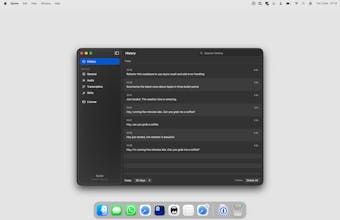
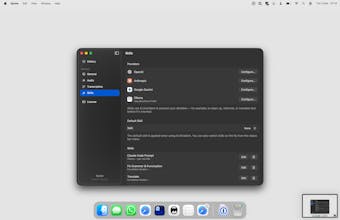
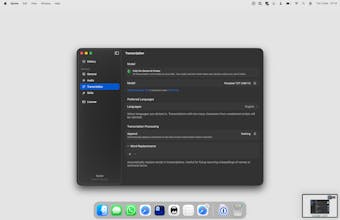
Hey everyone! I built Spoke because every dictation app I tried was overloaded with features I didn't need. I just wanted something simple — hold a key, talk, text appears. No menus to navigate, no modes to pick, no friction.
Spoke runs a local speech model so nothing leaves your Mac, but honestly the main goal was speed and simplicity. It works in any text field — Slack, iMessage, Claude, terminal, whatever you have focused. Hold the shortcut, speak, let go. That's it.
If you want more, you can plug in your own API key for OpenAI, Anthropic, or Gemini to process your speech on the fly. But the core experience is just fast, no-nonsense voice to text.
My favorite feature is auto-return — it presses Enter after you finish speaking, so in chat apps your message just sends. Feels like a walkie-talkie.
Happy to answer any questions about how it works or what's next.
I have a license code, limited to 50 uses:
No rush though — with how crowded this space is, those 50 codes are probably good for the lifetime of the app 😂
Hey @stoprocent, reeally nice work on this! The product identity and design look great and I think that matters a lot in a space that's getting pretty crowded with similar tools.
I also like the business model. The one-time purchase is refreshing compared to the endless subscriptions we usually see.
I’ve been testing it and the experience feels really simple and fast, which is exactly what you described.
The only thing that made me a bit sad is that Portuguese isn’t supported yet, it’s my native language and I still use it a lot 😅 Hopefully it can be added in the future!!
Thanks @douglasevaristo, that really means a lot — design and simplicity were the things I obsessed over most, so glad it comes through!
Portuguese is definitely on the list. The underlying Parakeet model has decent multilingual coverage and I've been testing it — the main challenge is making sure quality is consistent enough before I officially call it supported. I'll reach out when it's ready for some native-speaker testing if you're up for it
Is this coming to Windows and iOS? In the very short time I've used Spoke, it's my favorite transcription app.
Also, your purchase page is in test mode, so it appears I'm unable to buy a license.
@nicholas_greenweck That means a lot — thank you! 🙏
And sorry about the checkout link — I was so focused on shipping the app that I completely forgot to test the payment flow 😅
The correct link is here: https://buy.usespoke.app/checkout/buy/22707bf3-6bef-4804-a6c2-12f971677f78
Use code UYNJEYOQ for 50% off — valid until Wednesday!
To your question: yes, iOS is in the works! My plan is to have the Mac and iOS versions complement each other rather than just be ports — so they work together as a system. More details coming soon. Stay tuned!
NovaVoice
Nice launch!
When I am opening the app, I miss the tutorial how to use LLM formatting or translation. If it's possible, can you please add the information into onboarding?
@tony_shishov sure thing I will record some demo video on this.
I love how clean/simple this is — brilliant! What I really appreciate is that I can continue letting my music play while I dictate. Any plans on eventually setting this up so the text appears as it's being spoken (instead of at the end)? Or maybe that makes it more complicated and slows things down? Either way, thanks for sharing this. I'm really enjoying it!
Thanks @shaun_hurley , really glad it's working well for you
On real-time word appearance — great question, and the short answer is: it's a deliberate tradeoff rather than a missing feature. Spoke uses "attention-based" (non-streaming) model. It processes audio over a sliding context window and resolves word boundaries, punctuation, and meaning after hearing enough context. That's actually why the accuracy is so high — the model can "look back" and correct itself as you keep speaking. If I forced word-by-word output, you'd get a lot of jitter and corrections mid-sentence, which ends up feeling worse in practice. Think of it like autocorrect that only kicks in once you finish typing a word — the full context is what makes it smart. It's on my radar to explore partial output for longer dictations, but it won't be true streaming in the Whisper-style sense.
Copperlane
Nice! How’s the accuracy with the on-device model, especially for punctuation and formatting?
@brianna_lin Accuracy is genuinely the thing I'm most proud of. Parakeet (the model Spoke runs locally) is one of the top-performing English ASR models available right now — it competes well with cloud-based alternatives on standard benchmarks. Punctuation is solid for natural speech; it handles sentence boundaries well if you speak at a normal pace. Formatting is more contextual — things like lists or code won't auto-format since that's not what a speech model does, but if you connect an AI provider you can add a prompt to handle that on the fly. For everyday dictation — messages, notes, emails — it just works cleanly out of the box.
Spoke 1.1.0 — The Flows Update
Hey everyone! Huge update just dropped — this is basically a 2.0 in disguise.
What’s new
Flows — Custom Voice Pipelines The biggest addition. You can now build multi-step voice workflows: chain AI skills, text transforms, AppleScript, Shortcuts, webhooks, key presses — whatever you need. Assign custom shortcuts to each flow, add conditions based on active app, and choose how output is delivered (paste, copy, save, notify). It’s like Shortcuts but triggered by your voice.
Voice ID Train Spoke to recognize your voice. Perfect for hands-free mode when other people are around or you’re playing music — it’ll only respond to you.
Redesigned Hands-Free Mode New overlay with unified waveform visualization, flow colors, and mouse button hotkey support.
Brand New Interactive Onboarding Completely rebuilt onboarding with live dictation practice, AI skills demo, and flow walkthrough. Now available in 7 languages (English, German, Spanish, Polish, Swedish, French, Italian) with auto-detection of your system language.
Full Localization Every string in the app is now localized. 24 transcription languages supported.
UI Polish New settings layout with inspector panel, color-coded flows with icon picker, history filtering by flow and app, and smoother animations throughout.
Under the Hood Data layer migrated to SwiftData, stricter LLM output parsing, improved license validation, and multi-channel audio fixes for broader mic compatibility.
We also launched a refreshed website at usespoke.app — check it out for demos and a full feature breakdown.
Everything still runs on-device. No accounts, no cloud, no audio ever leaves your Mac. One-time purchase, yours forever.
Download the update at usespoke.app/download or let Sparkle auto-update do its thing.
Would love to hear what you think — especially about Flows.
We’re just getting started with what’s possible there.