
Stoa for Mac
Beautiful media browsing for the folders you already use
2 followers
Beautiful media browsing for the folders you already use
2 followers
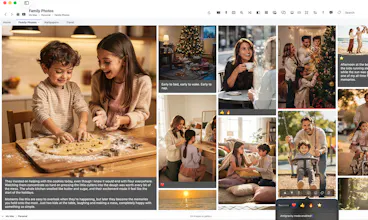
Stoa for Mac turns the folders you already use into rich visual galleries — no importing, no library lock-in. Browse photos and videos with adaptive layouts, keyboard-first navigation, comments, reactions, color tags, and pinned media that bring a more personal feel to your private library. Then lean back and let Stoa’s infinite autoscroll gallery turn your media into a flowing visual stream. Pair it with Stoa Saver, a free companion screensaver from our website.



Free Options
Launch Team

Dropbox SignSimple, secure eSignatures for the way your team works.
Promoted
Howdy Product Hunt — I built Stoa media browser because I wanted my local folders to feel less like file management and more like a modern web browsing experience.
A lot of us are used to visually rich interfaces online, with context like reactions, comments, and pins. But when it comes to our own local media, the experience usually falls back to plain folders or cumbersome photo apps.
Stoa is my attempt to bring some of that personalization to media on Mac — without the need to import files into a proprietary format. It simply visualizes folders as rich galleries, with a featured media column, keyboard-first navigation, comments, reactions, color tags, pinned media, and an infinite auto-scroll gallery when you want to sit back and admire your media memories.
I also made Stoa Saver, a free companion screensaver that brings the same visual flow to your screen as Stoa's infinite auto-scroll view to your ambient screensaver. If you use Stoa, the screensaver can reflect the comments, reactions, and color tags you’ve added there.
I’ve reserved a small number of complimentary Mac App Store codes for Product Hunt visitors who want to try Stoa. There’s a request form on the launch page.
Would love to hear how you currently browse and revisit your own media, and where Stoa feels especially useful — or rough around the edges.