Been using it for few days now and in love with it, great product and great UX. Out of curiosity, how much faster is it than transferring via Dropbox ?
@kishan_guptas
Great question! (and thanks for the love!)
I'm Evan, and I'm the CTO of Sunshine. We ran a competitive benchmark analysis within a controlled environment (Wifi DL 25 Mbps/ UL 10 Mbps) and found that streaming about a 1GB (5 video clips) file is more than 200X faster than Dropbox. Using Dropbox, the file took more than a half hour to upload to the cloud and 12 seconds of buffering time before participants could start streaming the media. With Sunshine, there was no upload needed and buffering took only 8 seconds.
When trying to download a 3GB video file, Sunshine was more than 40X faster than Dropbox. With Sunshine, no uploading was needed, and download took less than 8 minutes. With Dropbox, upload time took 3 hours and download time took more than 2 hours, totaling 5.5 hours to download media.
Feel free to PM me if you want a more in-depth explanation of our analysis.
Evan
@kishan_guptas@evankim79 Hi Evan, is it just the single source that is the originator of the stream (so the performance slows down dramatically when there are multiple receivers), or is there some kind of multi-source or p2p capability?
@jonlee108 I surprised your knowledge for technology. As your think, we don't use multiple source like bittorrent, in an effort to keep your files private. Thank you for your question!!
Nice UX. Few clarifying questions (trying to understand the tech)
1. If the app doesn't store anything in the cloud, what happens when my device is offline (no-battery, airplane mode, out of coverage, etc.). I assume people I have shared photos with can't view the photos.
2. If share with someone half-way across the world, how is this faster than cloud/CDN for that someone to download/view photos?
3. Does the app share original size/quality photos or is compression used?
4. What if my device is not on wifi when ppl I shared with try to veiw the photos? Will I incur data usage?
@rahulc_23 Thank you for asking great questions.
1. Yes, since we don't use cloud servers at all. Our app notifies people in the receiving end that sender's device is offline. And if the receivers were downloading files, downloads will resume automatically once the sender's device becomes online again.
2. To share files, you need to upload files to servers if you're using cloud/CDN, but with Sunshine, you don't need to. So that's the biggest difference. If you assume files are already uploaded, CDN can be faster if you're half-way across the world.
3. Sunshine shares original photos and videos. With Sunshine, you can easily stream 2-hour full HD video without compressing.
4. Yes, but if you turn off 3G/4G sharing option in our app (default setting is "off"), you won't.
Hope these answer your questions. :-)
Thanks so much for recommending us, Dave. You’re the best!
For those of you who don’t know me, I’m Nicole Kim, the CEO & Founder of Sunshine App. We’re really excited for this new release - now you can send any file of any size without any limits. Please feel free to reach out with any questions or suggestions.
Thanks, everyone, so much for your support!
Love & Sunshine, Nicole
@stvmcg The use cases are unlimited. Our niche is large files - the larger the file, the bigger our advantage over other services, but really, users can share and access any type/ size of file.
1. Sunshine lets you create your own personal network of devices. You can store files on your PC, access them through your phone while you’re on-the-go, and and even stream videos on your tablet in bed. In this way, you turn your PC into your own personal storage vault. [And you can even share any of these files with your friends.] An example would be having a business presentation on your laptop and accessing it on your mobile. Taking it one step further, you could share this presentation to a colleague or client without being near the computer. Another example would be to stream videos from one device to another. If you're commuting, you can catch up those TV shows you have downloaded to your other devices
2. Sunshine lets you share content [from any of your devices] to others. We're perfect for sending those 2 - 3 minute videos that are too large to send via regular messaging apps, but we can just as easily send image-heavy keynote presentations, design files, data-heavy excel files, HD videos, etc. I know, personally, I am sick of getting the 'You have exceeded the maximum file limit' to send via email.
3. Sunshine lets you view content without downloading it to your local device. This makes receiving content instant... and it saves your device memory. Have you ever had to delete photos, videos or apps because you did not have enough storage space on your device? Now, when friends use Sunshine to send photos, videos or music to you, you can view/ listen to it without having to download it first and save it to your device. For example, if your friend send a 1GB video from karaoke-ing the night before, you won't have to wait for it to download to your phone - and you don't have to save it at all [you can if you want!]
4. Sunshine lets you stream media to any DLNA-enabled device, e.g. smart TV, playstation, speakers, etc. If you're at a family reunion, you can stream videos/ photos to the living TV for everyone to watch. You can stream movies from your tablet to your TV while you're in bed. You can stream music from your phone to speakers.
Hope this helps - please let me know if you have any other questions!
Nicole
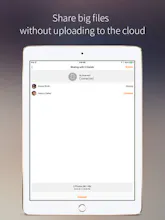
Sunshine enables you to access and share files instantly without uploading to the cloud and downloading to each local device. No more file size limits, no more wasting time waiting for uploads, and no more wasted cloud or device storage. Share and stream instantly.
UXCam App Analytics
Sunshine
UXCam App Analytics
Placemeter
Sunshine
Phontabulous
Sunshine
Phontabulous
Sunshine
SandStorm
Sunshine
The Pitch
Incredible
Sunshine
The Pitch - Havenly w/ Phil Nadel, Millie Tadewaldt & Nikhil Kalghatgi
Sunshine
Wiselike
Sunshine