No reviews yetBe the first to leave a review for Tab Manager
Maker
📌
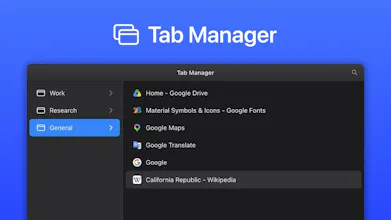
I'm one of those people who somehow always ends up with 60+ tabs spread across 5 windows, with no idea what's where. I tried a bunch of tab managers over the years and none of them really stuck, so eventually I just built my own. The idea: manage your tabs like files.
You hit a shortcut (⌘/Ctrl + E) and an overlay pops up — windows down the left like folders, tabs on the right like files. From there it's mostly muscle memory you already have:
- Search instantly — ⌘ + F and start typing. The list filters as you go, so you're not squinting at 30 identical favicons trying to find the one you want.
- Drag tabs between windows — grab one, or select a whole group and drop them somewhere else.
- Cut / copy / paste tabs (⌘ + X / C / V), or pull a selection out into its own new window.
- Rename your windows — call one Work, another Research, another Shopping. The name stays for as long as the window's open.
- Unload idle tabs to free up memory, then load them back when you need them.
- Follows your light/dark theme, and fully keyboard-driven.
On the privacy side: it only reads tab titles and URLs to show and organize them. Nothing is collected or sent anywhere; everything stays on your device.
It's free. Screenshots and the Chrome Web Store link are here: https://tab-manager.berryscript....
Would love to hear your thoughts and suggestions.