Textriptor is a lightweight, elegant desktop writing assistant designed to help you catch spelling and grammar mistakes with ease. Powered by LanguageTool, it provides reliable proofreading across nearly two dozen languages while keeping your personal writing style completely intact. Enjoy features like flexible spacing rules that respect traditional typewriter habits, a clean side-by-side review pane, and color-coded edits for instant clarity.
Hello, Product Hunters! 👋
We would like to introduce to you all our new desktop application titled 'Textriptor.' After spending months deeply entrenched in the exhausting double-release cycle of building complex iOS and macOS apps, we've found ourselves constantly needing a clean, lightweight writing companion that wouldn't get in our way.
Most modern writing tools come with heavy baggage: they try to force strict formatting rules on you, override your muscle memory, or wrap simple text correction in bloated web interfaces.
That’s why we've built Textriptor.
It’s a native macOS desktop assistant powered by LanguageTool that handles proofreading across nearly two dozen languages. But more importantly, it respects your writing habits. If you're old-school and prefer two spaces after a period, Textriptor adapts to your traditional typewriter habits instead of forcing modern single-spacing rules.
What you get:
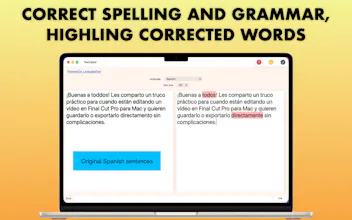
• 🪟 Side-by-Side Review: Original text in the left pane, clean results in the right.
• 🎨 Color-Coded Edits: Instantly spot spelling errors in red and review changes at a glance.
• 🌍 Multilingual: Solid backing for English, French, Spanish, and many more.
• ⌨️ Habit-Friendly: Flexible spacing rules that don't fight your keyboard rhythm.
It’s lightweight, elegant, and ready to use on your Mac today. Textriptor is not perfact as it relies on an open-source, AI-powered writing assistant. We would love to hear your thoughts, feedback, or feature requests. Give it a spin and let me know what you think! 🚀


Quick Sub 2: Video Subtitling