
Launching today

Venn.ai
Delegate real work to AI agents with safety guardrails
464 followers
Delegate real work to AI agents with safety guardrails
464 followers
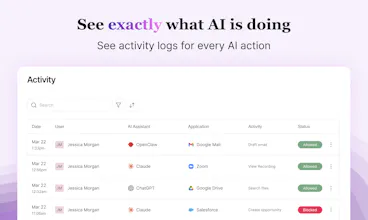
Connect Claude, Cursor, OpenClaw, ChatGPT, and VS Code agents to your apps — then set guardrails for around what they can do. Draft but don't send. Update but don't delete. Full action-level control, complete visibility, no coding required.

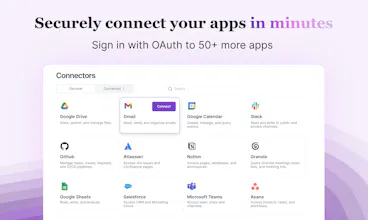

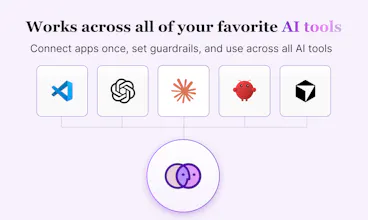
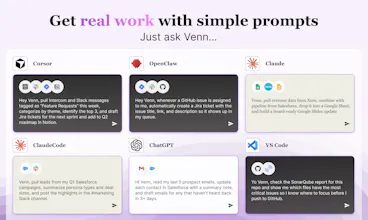


I'm biased because I helped create Venn with my team, but I think Venn is super useful. Instead of having to hook a ton of MCP servers to Cursor, Venn creates a sidekick that both finds my tools, runs them, and also makes sure I'm not doing something stupid in the process.
Great for those moments where you don't want to leave your flow but would like to post a ticket, consult a previous slack chat, write up org facing documentation, or see how your cluster's health is doing after deploying that last feature.
There's like a dozen business apps we all use and have to cross index on a daily basis. Venn is the portal to connect them all with your agent, and without having to bring a crufty platform along with you.
Venn.ai
I manage paid campaigns across Google, Meta and LinkedIn. Lots of data, lots of context-switching, lots of time spent on things that shouldn't take that long.
What changed for me with Venn is that Claude can now actually reach into the tools I work in every day — Sheets, Docs, Drive, Gmail, Asana. Not just talk about them. The workflow I use most is pulling campaign performance into Sheets, having Claude flag what's off, and drafting a summary straight into Docs. What used to take a couple of hours is now something I kick off and come back to.
The permissions setup is also just... sensible. I'm comfortable with Claude reading and writing to Sheets, but I still want to review before anything goes out in Gmail. Venn lets me draw exactly that line.
Honestly didn't expect to get this much practical value out of it this fast. It's become a daily part of how I work.
Venn.ai
@dimitar_genev It's great to learn about your workflow on Venn as it fits with exactly why we built Venn. We'll be launching new social apps like TikTok and Instagram over the next couple of weeks too.
P.S. I'm glad you appreciate the permissions setup. The permissions piece is something our team spent a lot of intentional time on!
@deb_nav Glad to hear that
Simulator by GoPractice!
I’m a big fan of Venn (I also advise the team).
The biggest unlock for me has been connecting Claude to GitHub and Amplitude.
Once Claude has real context, it becomes a much more powerful assistant:
Vibecoding with full codebase awareness
Data analysis grounded in actual product usage
It stops being a generic AI and starts feeling like a true extension of the team.
I’m sure there are many more use cases, but these alone have already been very valuable for me.
Venn.ai
@seanellis Thank you for your support!
Congrats on getting Venn out there, @melissa_weir1. I like this line: [Put AI to work inside your apps without giving up control]. This is the kind of promise that makes a security-minded user stop.
Checked your site content. Two things stood out.
First, the pricing page shows a free tier with "connectors are read only" and a Pro tier at $5/month that unlocks read/write. That's great. But the hero section talks about "setting guardrails for what AI can read and write."
A user lands, reads that, then sees the pricing, and wonders: "Do I need to pay to actually let my AI do anything?"
That tension is there.
And the free tier is great for testing, but the message could be clearer upfront.
Second, the "how it works" section is four steps, but step 4 says "Ask your AI, 'Hey Venn, what can Venn do for me?'"
That's a nice demo, but it doesn't show the user doing real work.
A stronger step 4 would be a simple example like "Ask your AI to draft an email and schedule a meeting." That shows value immediately.
I attached a screenshot below for your convenience. Spotted a couple of other things that could cost you. Happy to share.
These are just insights from me because I audit product pages daily. Good luck!
Venn.ai
@taimur_haider1 Thank you so much for taking time to give us thoughtful feedback!
To clarify, is the confusion around whether you could set guardrails for the free tier? You can certainly turn off specific actions in the free tier.
Or is the question on whether you need to pay for your AI to take action? We do give a free 7 day trial for everyone to use all of Venn's full capabilities, both read and write.
Thank you for your feedback on #4. That is very on-point!
@jammiepeng Appreciate the reply, Jammie. Glad the feedback landed.
The confusion is around the hero section saying "set guardrails for what it can read and write." So a user lands, reads that, then sees the free tier is "read only" on the pricing page. They might think they need Pro to actually take action.
The free trial covers that, but the hero doesn't mention it. A small tweak could clear it up.
On step 4... glad that landed. Showing real work examples helps people see what's possible faster.
If you want a second pair of eyes on the messaging after you make those tweaks, happy to take a quick look.
Spotted a couple other things that could help too.
Venn.ai
@taimur_haider1 Thank you for clarifying! Venn was free during our early access period, so we haven't thoroughly scrubbed all of our content to reflect the new pricing tiers. It makes a lot of sense to mention the free trial earlier on!
Will let you know once we make those tweaks. CC @melissa_weir1
@melissa_weir1 @jammiepeng Appreciate that, Jammie. Glad the feedback landed. I would like to hear how it goes.
Venn.ai
@Venn.ai has made a huge difference in my day-to-day interaction with Claude - I can easily access a dozen MCPs simultaneously, and can direct it to talk to my personal email in one prompt and my business email in another. Getting customer info from salesforce, email, and granola, and summarizing it in a google sheet to plan followups has been incredibly powerful.
The product’s seamless integration into Openclaw has made it simple for me to let Openclaw interact with my apps but not do things it shouldn’t be doing. I run a sandboxed openclaw in a Digital Ocean droplet, and since it’s headless it’s really hard to authenticate to MCP servers. WIth @Venn.ai I simply told Openclaw to install the Venn skill, got an API key from Venn, and gave that key to Openclaw. And just like that Openclaw had access to the apps I wanted it to see, with limitations I set so it wouldn’t run wild.
Venn.ai
My favorite AI use case isn't just "automation." It is about unlocking capabilities that used to be gated by technical skills.
This week, I spent a few hours using @Cowork + @Venn.ai to setup scheduled tasks. They help me fill the gaps where our enterprise tools are too heavy or where I previously lacked the technical skills to get the job done.
Here is how I’m using agentic AI to run my workflow:
📊 Weekly Funnel Reporting
Use @Venn.ai connector to pull data from @Grafana , create an activation funnel report, and post it directly into Notion. I get visibility without needing a data warehouse or data analyst. While it’s not perfectly scalable since I can hit token limits on heavy logs, it is incredibly effective for short-term monitoring.
💌 Personalized Research Outreach
Use @Venn.ai connector to pull data from @Grafana, identify users who haven't completed product setup, and draft personalized emails in Gmail based on an email template stored in @Notion. This used to be a copy-paste nightmare. Since research happens in spurts, I could never justify the effort of a full HubSpot automation sequence. I still review, edit, and send manually because I don't trust AI with sending emails yet, so I turn off that capability in Venn's settings.
✅ Automated Response Tracking
I put multiple-choice answers directly in my emails to make it easier for users to respond. Use @Venn.ai connector to check my inbox daily, extract those answers, and log them into @Notion . It even records which subject lines have higher response rates in a Google Sheet for A/B testing.
Agentic AI isn't about replacing the big tools in our stack. It's about creating the custom connections we need to move fast and stay lean.
Are you using AI to automate your existing tasks, or are you using it to do things that were previously impossible for you?