
Launched this week

Venn.ai
Delegate real work to AI agents with safety guardrails
672 followers
Delegate real work to AI agents with safety guardrails
672 followers
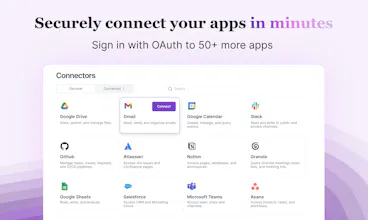
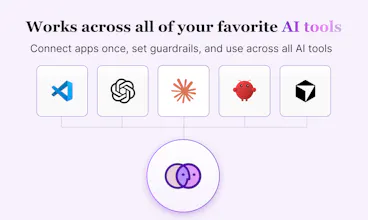
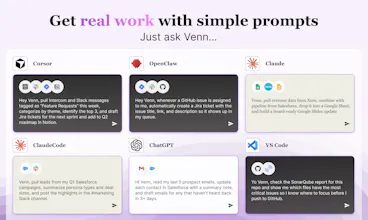
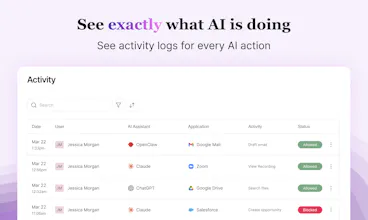
Connect Claude, Cursor, OpenClaw, ChatGPT, and VS Code agents to your apps — then set guardrails for around what they can do. Draft but don't send. Update but don't delete. Full action-level control, complete visibility, no coding required.




Venn.ai
My favorite AI use case isn't just "automation." It is about unlocking capabilities that used to be gated by technical skills.
This week, I spent a few hours using @Cowork + @Venn.ai to setup scheduled tasks. They help me fill the gaps where our enterprise tools are too heavy or where I previously lacked the technical skills to get the job done.
Here is how I’m using agentic AI to run my workflow:
📊 Weekly Funnel Reporting
Use @Venn.ai connector to pull data from @Grafana , create an activation funnel report, and post it directly into Notion. I get visibility without needing a data warehouse or data analyst. While it’s not perfectly scalable since I can hit token limits on heavy logs, it is incredibly effective for short-term monitoring.
💌 Personalized Research Outreach
Use @Venn.ai connector to pull data from @Grafana, identify users who haven't completed product setup, and draft personalized emails in Gmail based on an email template stored in @Notion. This used to be a copy-paste nightmare. Since research happens in spurts, I could never justify the effort of a full HubSpot automation sequence. I still review, edit, and send manually because I don't trust AI with sending emails yet, so I turn off that capability in Venn's settings.
✅ Automated Response Tracking
I put multiple-choice answers directly in my emails to make it easier for users to respond. Use @Venn.ai connector to check my inbox daily, extract those answers, and log them into @Notion . It even records which subject lines have higher response rates in a Google Sheet for A/B testing.
Agentic AI isn't about replacing the big tools in our stack. It's about creating the custom connections we need to move fast and stay lean.
Are you using AI to automate your existing tasks, or are you using it to do things that were previously impossible for you?
As a graphic & web designer, @Venn.ai has genuinely changed how I move through a project. I've been using it to connect Claude with Asana, Google Docs, Slides, Sheets, Figma, and Slack. Instead of jumping between tools to piece together context, I can track briefs, run design research, and start building out my projects all from one thread.
@Venn.ai helps me pull task details from Asana, reference brief docs, and feed that context directly into Claude, all while staying in control and knowing exactly what the AI can access and what it can't. And for client work especially, the security side is important. Connecting this many tools means you need to trust how your data is handled, and Venn takes that seriously.
Venn.ai
@tea_vel Thanks for sharing your experience with Venn! It's always so exciting to see how people work efficiently and securely with Venn and AI!
When you set action level guardrails like "draft but don't send," does the agent queue those drafts somewhere for batch review or do you approve them one by one in real time? Nice work on this!
Venn.ai
@borrellr_ Hey Ignacio. Ah, in this example, it would be the Gmail - Create Draft tool that you can set Venn to allow, but the Gmail - Send Email tool would be disallowed. And indeed, your agent / AI-app would create and create+save a draft. You can see all of the tools available by clicking on either Preview Actions or Manage Actions on Gmail when you're in the app.
Venn.ai
@borrellr_ There's 2 ways to do this:
1. The easy to bypass way: You can just write "create drafts in gmail, but don't send it" to the AI. Even for creating drafts, Venn will ask for permission first:
But since AI is nondeterministic, you never know when it will bypass your instructions and do something else. So...
The more secure way: In the Venn UI, disable "Send Email."
This way, the AI can never send emails until you change that permission.
The drafts are created in gmail, ready for me to review and send:
As a solutions engineer I am forced to do sales hygiene ( update opps, next steps, add notes, etc), with one prompt I can query my granola notes and update my opportunity in SFDC. huge time saver.
Venn.ai
@jason_parisi yes and you can take it further - use sales insights and action items from those granola notes to generate tickets on jira, connect to figma or google slides and create a presentation with graphics. creativity is the limit with venn
Can different access rights be assigned to different employees? And in general, is there a corporate account with a management dashboard?
Venn.ai
Hi@natalia_iankovych. For enterprise-level governance, check out Barndoor (https://barndoor.ai). With Barndoor, you have the ability to manage policies org wide including a central registry of MCP servers, AI agents/apps, IdP integration, etc. For the administrator, it's easy to manage very powerful fine-grained access control. For the end-user (consumer of MCP servers), it's as easy as using Venn.
@Venn.ai I LOVE Venn! It has genuinely changed how I work. My day spans Gmail, Slack, Notion, Asana, Google Drive, and more. With Venn, I can kick off a new hire onboarding sequence across all of them in one flow, and when it comes to recruiting, I can pull curated candidate feedback from Slack threads, emails, and docs into one place, send candidate follow-ups. There's no more hunting across systems to remember where a conversation landed.
The governance piece is what matters most to me as an HR person. I decide what Claude can and can't do, draft but don't send, update but don't delete. So much trust and efficiency with Venn! I get so much more done with Venn! 🙌
Venn.ai
Hi Product Hunt community and friends! I'm Deborah and I work on Platform Strategy and wear a ton of hats at Barndoor. I'm proud to have been a part of launching Venn.
Below is a use-case I've shared on how I use Venn:
--------
At Barndoor AI, one of the things I work on is platform integrations, helping to ensure our product works seamlessly with everyone we integrate with, like Google, Notion, Figma and more.
One thing they all have in common is that their customer data has to be handled safely.
However, the requirements to work with each of these platforms is unique, from both technical and business sides.
This is exactly where Venn AI thrives.
I’m able to connect any of my AI agents (often Anthropic’s Claude) to all of my apps like GitHub, HubSpot, Slack, Jira, Google Drive. Having a centralized place across all of my data saves me so much time.
Venn AI also makes connections that scale in ways only an agent can.
It frees up my capacity to be more creative because I can take a step back and orchestrate across my workflows instead of jumping between tools. It’s reduced a lot of my context switching.
One of the best parts is that it leverages MCP with Barndoor’s security and a control plane I manage, so I can use AI agents across company systems with ease.
----
Now, our product also integrates with OpenClaw and every week, we add more app integrations! Please reach out to me if you have questions or need support getting setup, today and in the future!