

Vozo AI — Video localization
Translate every layer: voice, subtitles & on-screen text
4.5•13 reviews•3.2K followers
Translate every layer: voice, subtitles & on-screen text
4.5•13 reviews•3.2K followers
Vozo AI delivers complete video translation — across voice, subtitles, lip-sync, and on-screen text.
Unlike traditional dubbing tools, Vozo translates every layer while keeping speech natural, lips perfectly synced, and visuals consistent. Turn one video into multilingual versions that look and feel native.
This is the 3rd launch from Vozo AI — Video localization. View more
Visual Translate by Vozo
Launched this week
Fully translated videos — finally.
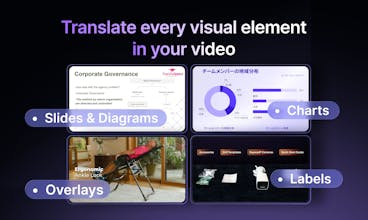
Visual Translate adds the final layer — translating text inside videos — on top of voice dubbing, lip-sync, and subtitles. It detects and translates on-screen text, from slides and diagrams to callouts and labels, while preserving the original layout, style, and animation. Turn slide videos and explainers into multilingual versions and reach a global audience — without recreating visuals from scratch.





Free Options
Launch Team / Built With


NOVA
Interesting launch!
Most translation tools focus only on audio or subtitles, but translating on-screen text inside the video itself is a much harder problem.
If this works well, it could be huge for:
• creators localizing content globally
• educational videos
• marketing teams repurposing videos for different markets
Curious, how does Vozo handle complex scenes where text moves or changes in the frame?
Congrats on the launch and excited to see where this goes.
Vozo AI — Video localization
@dharmikp1908 Thanks for the thoughtful comment — you’re absolutely right that translating on-screen text is a much harder layer.
For complex scenes where text moves or changes, the current beta version mainly supports entry and exit animations. Continuous motion (text that keeps moving within the frame) is still challenging and not something we handle perfectly yet.
Right now Visual Translate works best with videos like slide videos and explainers, where text appears with relatively simple animations. Supporting more complex motion and dynamic scenes is definitely something we’re working on next.
Really appreciate the encouragement and the great use cases you mentioned!
NOVA
@josie_oy Thanks for the detailed explanation, that makes a lot of sense. Starting with slide videos and explainers seems like a smart approach since they’re widely used already. Excited to see how you expand it to more complex scenes over time. Wishing you a great launch and looking forward to the updates.
Vozo AI — Video localization
@dharmikp1908 Thanks for your question, Dharmik. Regarding your last question, here is a demo of where we translated a Gemini intro video with lots of animations and changes, hope it helps :)
NOVA
@jojo_li Thanks for sharing the demo! That’s really helpful to see in action. Translating a video with that many animations is impressive, excited to see how the feature evolves from here. Great work!
Really impressive work on the on-screen text layer — that's been the missing piece for years. I run explainer videos for a SaaS product and dubbing audio was easy, but our slide content always stayed in English. Quick question: do you support batch processing for multiple videos at once, or is it currently one-by-one? Would love to know if enterprise/API access is on the roadmap since we'd use this heavily.
Vozo AI — Video localization
@ilya_lee Thanks for the thoughtful comment — really glad the on-screen text layer resonates with you!
We’re currently in beta. Processing is handled concurrently, but batch uploading multiple videos isn’t supported yet. It’s on our roadmap and something we plan to add soon.
For API access, we’ll consider opening it up once we see stronger enterprise demand. In the meantime, you’re very welcome to try our SaaS product and share any feedback.
If you’d like to discuss enterprise use cases in more detail, feel free to reach out to our BD team at bd@vozo.ai.
Vozo AI — Video localization
@ilya_lee Appreciate the thoughtful question!
Right now videos are processed individually. Batch uploads and APIs are on our roadmap.
Really impressive approach to full-layer translation — most tools only handle subtitles but ignoring on-screen text is a huge gap. How accurate is the lip-sync for languages with very different syllable structures like Turkish or Japanese?
Vozo AI — Video localization
@listsgenie Thanks!
Our lip-sync system is language-independent and works based on audio signals rather than specific languages. In general, if the sounds are similar across languages, the lip movements will also appear similar.
Our LipReal model is trained on a large multilingual dataset, which helps handle these cases well. However, some languages involve different mouth movements that can produce similar sounds, which may occasionally lead to minor inaccuracies.
Feel free to give it a try and see how it works for your use case — we’d love to hear your feedback.
Vozo AI — Video localization
@listsgenie Thanks for the thoughtful question!
Our lip-sync is audio-driven rather than language-specific, so it generally adapts well even across languages like Turkish or Japanese. It’s still improving, but we’ve seen solid results across many multilingual videos.
Told
The on-screen text problem is actually one of the most annoying parts of video localization — everything else gets handled but then you've got slides or lower thirds in the wrong language and it breaks the whole thing. Curious how it handles text that's embedded in complex backgrounds or motion graphics — that's usually where automated tools struggle. If the detection is solid, this fills a real gap that most dubbing workflows just skip over.
Vozo AI — Video localization
@jscanzi You’re absolutely right — that’s exactly the gap we’re trying to solve. In most localization workflows, audio dubbing and subtitles are handled, but the on-screen text (slides, UI, lower thirds, etc.) remains in the original language, which breaks the experience.
For complex backgrounds or motion graphics, we handle it in two stages:
1. Text detection and understanding
Our AI analyzes the video frame-by-frame and uses surrounding frames to infer the text layer. This helps it detect text even when it’s partially occluded or blended into the background.
2. Visual reconstruction
Once the text layer is identified, the system regenerates the translated text while trying to preserve the original layout, position, and styling so the result looks natural in the video.
That said, the hardest cases are still heavily animated backgrounds or fast-moving text, where artifacts can occasionally appear. We’re actively improving the rendering side of the system to handle those scenarios better.
But for a lot of real-world cases — slides, product demos, UI recordings, training videos, and lower thirds — the results are already quite solid and remove a big manual step from localization workflows.
Vozo AI — Video localization
@jscanzi You're exactly right — that's the gap we wanted to close.
Our approach is to reconstruct the background behind the original text and render the translated text back into the video, so the visual layer stays consistent.
Really interesting feature. Translating the actual text inside videos feels like a missing piece for making content truly multilingual. Keeping the translated text editable also sounds very useful. How does Vozo handle cases where the translated text becomes longer and might break the original layout or design?
Vozo AI — Video localization
@vik_sh Great question. This happens quite often when translating between languages.
Vozo analyzes all the text elements in the frame and understands their layout. After translation, it recalculates the placement and length of the text to generate a new layout that fits the translated content as naturally as possible.
Everything remains editable in the editor, so you can still adjust wording, font size, or positioning if you want to fine-tune the visual balance.
Can I manually adjust line breaks or positioning after translation?
Vozo AI — Video localization
@winkyky Yes, absolutely. In our editor you can freely adjust the translated text — including line breaks, positioning, wording, and styling.
One thing we cared a lot about when building Visual Translate was making everything fully editable, so you’re not locked into the automatic result. You can refine the layout and text directly in the editor until it looks exactly the way you want.
@josie_oy That's impressive. I'm honestly surprised by how flexible the editing is!
Vozo AI — Video localization
@winkyky Yes! The translated text is fully editable. You can control everything from text position to style settings like font family, size, line breaks, color, and background fills. Think of it as a working canvas for the text layer with a timeline.
Vozo AI — Video localization
@winkyky yes, full control of the translated text!
How does Vozo handle very small or faint text?
Vozo AI — Video localization
@flora07 In most cases, if the text is visible to the human eye, Vozo can detect and translate it.
Very small or faint text can sometimes be more challenging, and like any model we can’t guarantee perfect handling for every edge case. We’re continuously improving the detection and translation quality to make it more robust over time.
Vozo AI — Video localization
@flora07 One more thing worth mentioning: it’s not a one-shot process. If the model misses some text, you can select the region and trigger a more detailed detection just for that area.
This greatly increases the chances of capturing and translating the text correctly. More details are available in our docs.
Vozo AI — Video localization
@flora07 From our testing, small text is often detected surprisingly well. If anything gets missed, Visual Translate lets you manually select the area and trigger translation for that region.