Wakaru turns any audio playing on your Mac — meetings, videos, webinars, podcasts — into movie-style translated subtitles in real time. Everything runs 100% on-device with Apple's speech and translation AI: no account, no API keys, and your audio never leaves your Mac. On Apple Intelligence Macs, an optional high-accuracy mode translates with conversational context. Understands 10 spoken languages, subtitles in 22. Free for 14 days — then a single one-time purchase, no subscription.
I built Wakaru because, as a non-native speaker, I kept sitting in meetings and watching videos thinking "I wish this just had subtitles — in my language."
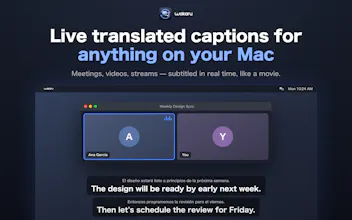
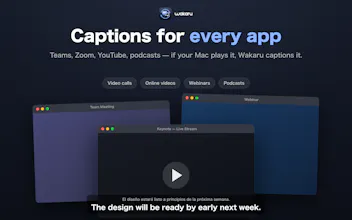
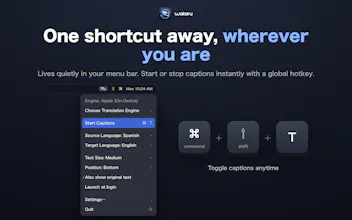
Wakaru lives in your menu bar and overlays live, movie-style translated subtitles on top of ANY app — Teams, Zoom, YouTube, webinars, podcasts. If your Mac plays it, Wakaru can subtitle it.
What makes it different:
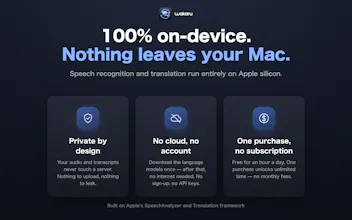
🔒 100% on-device — speech recognition and translation run entirely on your Mac using Apple's frameworks (SpeechAnalyzer, Translation, and the Apple Intelligence on-device LLM for a high-accuracy mode). Your audio never leaves your machine. No account, no API keys, no cloud.
🎬 Feels like movie subtitles, not a transcript log — the original text appears while someone is still speaking, then turns into a translated caption the moment the sentence completes. Captions pace themselves to your reading speed.
⚡ Zero setup — language models are managed and downloaded by macOS. Understands 10 spoken languages (30 locales), subtitles in 22 languages — and new ones arrive automatically with OS updates.
💰 One-time purchase — free for 14 days, then still free for 1 hour/day. A single purchase unlocks unlimited time. No subscription.
Requires macOS 26 (Tahoe) on Apple silicon.
I'd love to hear your feedback — especially which languages you'd use it with, and what would make it more useful for your meetings. Ask me anything! 🙏
Report
No reviews yetBe the first to leave a review for Wakaru: Live Caption Translate




Hi Product Hunt! 👋
I built Wakaru because, as a non-native speaker, I kept sitting in meetings and watching videos thinking "I wish this just had subtitles — in my language."
Wakaru lives in your menu bar and overlays live, movie-style translated subtitles on top of ANY app — Teams, Zoom, YouTube, webinars, podcasts. If your Mac plays it, Wakaru can subtitle it.
What makes it different:
🔒 100% on-device — speech recognition and translation run entirely on your Mac using Apple's frameworks (SpeechAnalyzer, Translation, and the Apple Intelligence on-device LLM for a high-accuracy mode). Your audio never leaves your machine. No account, no API keys, no cloud.
🎬 Feels like movie subtitles, not a transcript log — the original text appears while someone is still speaking, then turns into a translated caption the moment the sentence completes. Captions pace themselves to your reading speed.
⚡ Zero setup — language models are managed and downloaded by macOS. Understands 10 spoken languages (30 locales), subtitles in 22 languages — and new ones arrive automatically with OS updates.
💰 One-time purchase — free for 14 days, then still free for 1 hour/day. A single purchase unlocks unlimited time. No subscription.
Requires macOS 26 (Tahoe) on Apple silicon.
I'd love to hear your feedback — especially which languages you'd use it with, and what would make it more useful for your meetings. Ask me anything! 🙏