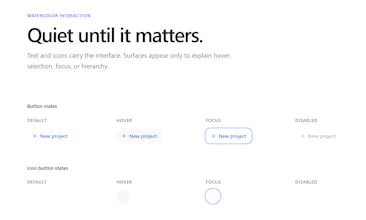
Watercolor UI makes AI-assisted frontend development faster and more reliable. Give your coding agent a consistent set of React, Vue, and Next.js components, then generate and refine polished interfaces with a distinctive watercolor-inspired style.
Hey everyone!
I’m excited to share Watercolor UI, an open-source component library for React, Vue, and Next.js, designed to work well with both developers and AI coding agents.
The core library is already implemented and usable. It provides typed, composable components with predictable APIs, making it easier for AI agents to understand, generate, and modify interfaces while maintaining a consistent visual style.
That said, Watercolor UI is still evolving quickly. There are some rough edges, missing refinements, and issues we’re actively working through. We’re shipping improvements fast, expanding the component set, and making the library more reliable for AI-assisted development.
I’d really appreciate your feedback—especially on:
• Components or patterns you’d like to see
• Problems you encounter while using the library
• How well it works with your preferred AI coding agent
• Areas where the documentation or APIs could be clearer
Thanks for checking out Watercolor UI and joining us at this early stage. Your feedback will have a real impact on what we build next!
Henry
Report
Finally a component kit that doesn't make every AI-generated site look identical, and the watercolor styling actually holds up at different sizes. Would love to see Svelte support down the road.
Report
A Figma plugin that exports your watercolor components directly as code snippets would save a ton of time, since right now I have to manually reference the docs while designing.
Report
Reviews
No reviews yetBe the first to leave a review for Watercolor UI
Finally a component kit that doesn't make every AI-generated site look identical, and the watercolor styling actually holds up at different sizes. Would love to see Svelte support down the road.
A Figma plugin that exports your watercolor components directly as code snippets would save a ton of time, since right now I have to manually reference the docs while designing.