OpenClaw, NanoClaw, MiniClaw... the Claw family is booming. But every single one requires npm, Docker, git clone, or a Mac. 75% of desktop users run Windows — and none of them were invited to the party. WinClaw changes that. An AI agent that lets you control your Windows PC with natural language — from your phone, by voice or text. No terminal. No command line. No tinkering. Just double-click the installer and start talking.
No reviews yetBe the first to leave a review for WinClaw
Maker
📌
Hey everyone! Maker here.
Before the Claw family blew up, we were already quietly building an AI assistant for Windows. We just called it something different (AC-AIBot — not exactly a catchy name).
Here's the thing that kept bugging us: every time a cool new AI agent launched, the install instructions were always the same — npm install, git clone, Docker, WSL2... For developers, that's Tuesday. But for the hundreds of millions of people who just use Windows to get work done? That's a wall.
So we made one stubborn decision from day one: Windows only. Double-click install. Zero terminal.
That decision isn't "sexy" — but it's honest. The people we're building for are:
The office admin drowning in Excel files
The college student making weekly PPTs
The small business owner who does everything solo
Your parents, who already find computers complicated enough
With the Claw ecosystem booming, we decided to rebrand as WinClaw — to make it clear that Claw isn't just for geeks. It's for everyone.
A few things I'm especially proud of:
3-minute setup — literally double-click and go
Voice control from your phone — tell your PC what to do from the couch
Built-in Office tools — PPT, Word, Excel generation without opening Office
Browser automation — AI uses your real browser with your logins
Completely free — supports DeepSeek, Doubao, and other affordable models
We're not trying to replace OpenClaw — it's amazing for power users. We're just here for the rest of us.
Would love your feedback. And if you're a Windows user who's tried other Claw variants, I'm especially curious about your experience!
Blog post with the full story: https://docs.winclaw.cc/blog/win...
Report
I’ve used OpenClaw and similar projects before — powerful, but usually terminal-heavy and not exactly friendly. WinClaw is a very different experience on Windows: native installer, full GUI, zero command-line friction. You can get it running in minutes.
What I didn’t expect is that the simplicity doesn’t mean it’s shallow. Under the hood it’s actually pretty deep. With the built-in tools and model flexibility, it quickly turns into a real productivity engine, not just a chat bot.
I set it up “just to test” and somehow my token usage started climbing again — which probably says more than any feature list could.


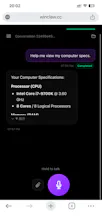

I’ve used OpenClaw and similar projects before — powerful, but usually terminal-heavy and not exactly friendly. WinClaw is a very different experience on Windows: native installer, full GUI, zero command-line friction. You can get it running in minutes.
What I didn’t expect is that the simplicity doesn’t mean it’s shallow. Under the hood it’s actually pretty deep. With the built-in tools and model flexibility, it quickly turns into a real productivity engine, not just a chat bot.
I set it up “just to test” and somehow my token usage started climbing again — which probably says more than any feature list could.