
Launched this week

WithSubtitles
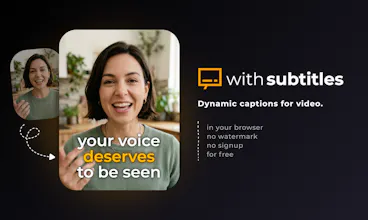
Free dynamic captions for video - no watermark, no signup
30 followers
Free dynamic captions for video - no watermark, no signup
30 followers
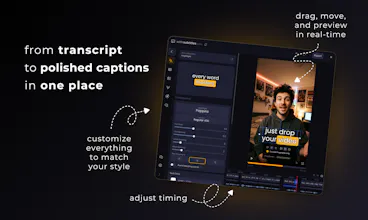
When your video already looks good - captions can make it great. Drop your video, pick a style, customize it the way you like, and share. Every caption syncs perfectly with your voice without tedious editing. Right in the browser, 100+ languages, for free and 100% private.


Been using this for a while now. Started with the free web version and quickly upgraded to the paid desktop version.
Have kept recommending this to others as its one of the best for non-english subtitles out there.
Highly recommended.
Hey Product Hunt! I'm Artur, a solo indie dev from Poland.
About a year ago I shared a free subtitle tool on Reddit and the response blew me away. Since then, I've had a lot of fun working on it and I just shipped the biggest update yet: a completely rebuilt editor.
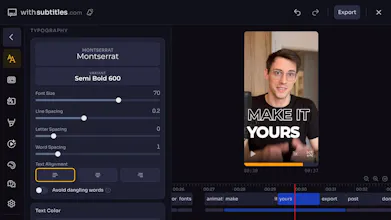
The idea is simple: add dynamic, animated captions to your videos to reach a broader audience and engage your viewers. It happens entirely in your browser. No signup, no watermark, no upload to servers. Your video never leaves your device. Everything runs locally using on-device AI and browser-based video processing.
What's new in this update:
- Multiple caption positions in the same video
- Style individual words
- Text alignment, letter and word spacing
- Word-level animations
- Audio waveform on the timeline
- New caption styles
- Safe zone overlay
- Search in captions editor
- Rebuilt rendering engine
- Refreshed UI across the board
The browser version is completely free - and always will be. It does everything you just saw. But browsers have limits. If you need faster exports, unlimited file sizes, or custom presets - the desktop version breaks past those. One-time purchase, no subscription. Use code PRODUCTHUNT for 20% off this week.
I'd love to hear what you think and what's the most annoying part of adding captions to your videos?
I loved the web version, which I started using because I was fed up with running into the limitations of Kapwing's free tier. (3 videos, limited time) After using the web version for a while, I was finally intrigued enough to pay the small one-time fee for the desktop app with the promise that it would be way faster - and it is!
I'm running With Subtitles on an underpowered laptop and it works very well. It is so versatile and well thought out. You get a ton of fonts, styles, and animations that look super-slick and professional, and it lets you easily resize and move the captions anywhere on the screen. I really love the new setting that shows you where the site "overlays" are for common sites like YouTube Shorts, TikTok, and Instagram, so you can make sure your captions don't run into the overlay areas. I also appreciate the fact that you can turn off subtitle animations, which is helpful when doing English subtitles for a foreign-language video.
Even with my terrible setup, With Subtitles can get me from loading pre-existing subtitles (I use SubtitleEdit) to a full video with gorgeous subtitles in under a minute. I even . managed to create a quick how-to video showing my process (with subtitles, of course!).
If I had a wishlist, it would be - the app seems to be doing a ton of stuff when you start it up and it brings every other process on my system to a literal standstill. I would like it to start up quickly and NOT do whatever it does to eat up memory / processor until I actually load a video and start processing it. (For example, if I'm going to be loading pre-existing subtitles, I don't need to use the naturally processor-heavy AI/transcription features!) I don't know what the app is doing now, but the workflow seems to be:
Open app. Stall. Freeze. Monopolize system. I wait, grab a coffee, play with my phone, etc.
Eventually, focus returns. Load a video. Stall. Freeze. Grab more coffee, play with phone.
Choose pre-existing subtitles. Stall. Freeze. More coffee. More phone.
And then from that point on, everything works fine - even (more or less) quickly.
So yeah. It needs a leaner startup but besides that, this app is gorgeous, easy to use, and everything I've ever wanted. Thanks so much, Artur!
@tzivia Thank you! One of the latest updates (v1.1.1) changed a bit behavior you are mentioning - the model is still loaded initially but offloaded from memory once the transcription is done, so that editor part should be smoother. I'm still wondering how to make it properly without sacrificing UX. My idea was to load the model initially so the first transcription is faster - without initial waiting for model to load. But you just showed me that in some cases, this may be worst experience than without it. I'll definitely think about it again 🙌
Hey Artur,
I feel really lucky to have found the tool you created. I use it multiple times a week, and it helps me a lot with a personal educational project about adult toys.
It worked perfectly in the browser version, and of course I purchased the desktop version as well to save a great deal of time. However, sometimes it doesn’t do the job properly at the end of a video — the last few sentences are missing, or it only subtitles a few random words instead of full 2–3 sentences. So I have to fix it manually, which isn’t a big deal… but this never happened in the browser version.
One feature that would be incredibly helpful is the ability to choose the translation language for subtitles. That would help reach an even broader audience!
I’m really thankful for your product, and I’m honored to be one of your early users.
@yunadvd thank you, really appreciate the detailed feedback! the issue with missing sentences at the end of videos on desktop - I've been trying to fix that in recent updates. is it still happening in the newest version? If so, please reach out to me through support form. Regarding translation - that's definitely planned.
Been using withsubtitles for multiple (personal at the moment) project, the ease of use, plethora of options and great langauages models makes this a must have. despite lots of captioning services out there, this one wins it all, very very simple and intuitive controls, highly detailed and great results. and I cannot forget the dev. help and support (even in free version). thank you for that.
@noam_daatheist wow, thank you. comments like this make the solo dev life worth it ❤️
@artur_rosa you brought simplicity into a world of chaos...all other editors i've used are so cumbersome...
This has been my go‑to app for captioning videos. The amount of customizability and the ability to export subtitles with alpha so you can easily import them into your video editor is just great. The best part is that it all works locally and there’s NO subscription. These are exactly the kinds of apps I love to see. The developer has also been super active in adding new features, and the app has already come a long way since the initial release. Wishing you the best with this launch!🚀
@boxtermaiti man thank you for this. you’ve been around long enough to see how much has changed since v1 and that means a lot. glad the no-subscription and local processing thing resonates - that was a deliberate choice from day one
local processing + no watermark + one-time purchase is such a rare combination in this space - most caption tools make you pay monthly forever just to export clean footage