
Woise
AI Voice & Screen Recording Tool for Websites
108 followers
AI Voice & Screen Recording Tool for Websites
108 followers
Users report bugs with "it's broken" or request features with "add x feature here" both frustratingly vague. You ask for screenshots, steps, use cases. They forgot. You can't recreate it or understand the request. Days wasted going back-and-forth. Why? People don't want to spend time WRITING detailed feedback! With Woise: Users record their screen + voice showing the bug OR explaining their idea. AI converts the voice into text for a quick glance. No more guessing. Just actionable feedback.




@samesh13 This is very cool. Check if I understand it correctly. If I am a user of your product, I can enable this option from somewhere on the website and record my screen and voice, which is sent to the product team automatically without users having to use their own tools like Loom to send you the videos. I can send feedback natively from inside your product, yes?
@rohanrecommends Yes, that's correct.
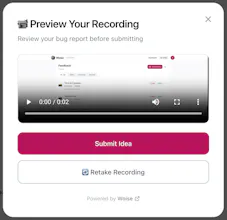
Once you install Woise on your website, your users can send feedback directly from inside your product.
They just click the widget, record their screen, talk through what’s happening, and submit. That recording (plus their voice narration and context) comes straight to your dashboard. No external tools like Loom. No asking them to upload anything manually.
It’s all native. They show and tell what’s happening, and your team gets everything in one submission - screen, voice, and AI transcription.
If they don't want to do a screen recording, they can do a voice submission or even a text submission as well. You can check out the demo at woise.app. Just click on the "Try Demo" button.
Hey @samesh13, capturing user feedback can be a real pain point, especially when vague requests lead to wasted time. By allowing users to record their screen and voice, you're addressing a crucial gap in communication and making the process seamless. What strategies are you considering to ensure users adopt this feature and keep coming back to it?
@arbhaveshpro You’re right — vague feedback is exactly what we’re trying to eliminate.
For adoption, we’re focusing on a few simple things:
First, zero friction. They click the widget, record, and submit. That’s it. If it feels heavy, they won’t use it.
Second, flexibility. Not everyone wants to record their screen every time. So we give three options:
Screen + voice (full context)
Voice + screenshots
Text + screenshots (mobile friendly fallback)
Third, speed. Submissions take seconds, not minutes. And the AI transcription means teams can quickly scan feedback instead of watching every second.
Combining all this, the biggest retention driver is for companies using Woise: when companies see useful feedback that turn into product improvements, they use it again. If companies close the loop and respond, this becomes useful for the feedback providers as well.
Congrats on your launch! But im kinda confused about the actual workflow of this product. Let's say i bought a bag of rice at Amazon, the quality sucks and i want to get a refund, but somehow the refund request doesn't show up after i posted it. So I use Woise to screen-recording my refund section on Amazon app and record my voice explaining the problem. After that, i can upload the text and screen-recording to the help center of Amazon. Is it correct?
@melanie_z thanks for your question.
Woise is for end users to send feedback. The website installs the Woise button, and their users click it to record and submit feedback.
So using your example with Amazon:
If Amazon had Woise installed on their site or app, you would:
Click the Woise feedback button
Record your screen while showing the refund issue
Explain the problem with your voice
Submit
That submission (screen recording + voice + transcription + device info) goes directly to Amazon’s team.
You don’t upload it manually anywhere. It doesn’t go to a help center separately. It’s already integrated into the product.
So Woise sits inside the website/app, and users use it there to send structured, high-context feedback in one go.
You can check out the demo at woise.app. Just click on the "Try Demo" button.
@samesh13 Thank you for the debriefing! Got the idea now! So Woise is more of a 2B product rather than 2C product right?
@melanie_z yes that is correct :)
Great idea, but there’s no screenshot showing how it looks on the live site. Also, before the form with feedback options — is that a button? Is there a keyboard shortcut to open the window? Can you highlight something and then it loads a prompt to leave feedback?