No reviews yetBe the first to leave a review for WorkspacePro
Maker
Hi, PH 👋
I am a software developer and after every starting macOS, I needed to launch routine apps (like design apps, different developer tools, and other daily apps). This process annoyed me and I decided to create an app to help other macOS users like me. :)
How it works 🤩:
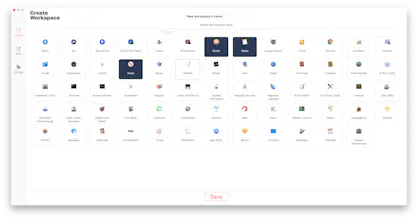
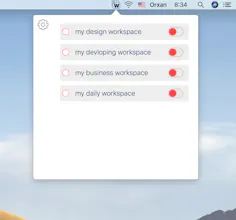
- Create a group of apps - workspaces
- Open and close all apps of this workspace only just clicking to button in the menu bar
Other features 😎:
* Can create unlimited workspaces
* Workspaces can contain unlimited apps
* Hide launched apps
* Create new instances of apps if one is running already
* Force terminate running workspace apps
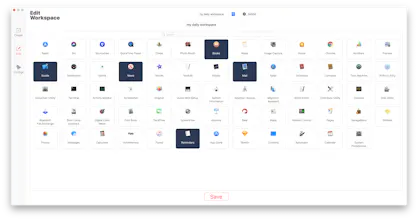
* Edit already created workspaces (name and contained apps)
* Launch WorkspacePro on startup
We will add new cool features in the next updates and You will get lifetime access to new updates.
Let me know what you think about WorkspacePro 🙂
@orkerimli Does it have or do you have plans to have custom positions for apps on the screen? I'm a paid user of Lay Auto @layautoapp and that seems to be the only missing feature to make the switch.
Report
Maker
@jorgecerda Yes, Cerda. I've already added this feature to next update plan. I'll add this cool feature soonly ;)
Report
Hi,
Congrats on the launch of your product. I would like to know if there is any difference between your App and Workspaces App that I bought recently from Apptorium (https://www.apptorium.com/worksp...). The name of your App and what it does is strikingly similar to them. Not sure how I feel about it, to be honest.
Report
Maker
@pathik_botadra thanks a lot. I did not know anything about the existing of this app. And yes, names are similar :) But they are different apps - my app launches and closes groups of apps at the same time and allows to control launching and closing behaviours (such as hide apps after launching, force terminate apps if some app does not respond, create new instance of app one instance already running), but your app is quick access app. :)
Report
Usually nice job @orkerimli. Couldn't wait to your next update. So when will it come to us approximately?
I've been looking for a product like this, but unfortunately it's not working for me. New workspaces I created not showing up. Please help
Report
Maker
@okuiux let me explain You: firstly go to "create" tab in settings, enter new workspace's name and select apps -> save it. After getting success message, go to the menu bar and click the WorkspacePro's icon. A list will pop-up and You can see there workspaces which created. click toggle button ("as it has done in above gif") and all apps of this workspace will run. Check it ;)
Cool! Love the idea. I've been wanting/trying to setup Alfred workflows to open and close apps and processes. Specifically for gaming. Like when opening Counter Strike: GO. Need to close everything resource possible.
Thnx!
Report
Maker
@calebsylvest exactly, with WorkspacePro You can avoid all these routine works 🤩
Great idea! I'm a product designer and when I design, most of the time I use the same combination of tools. Sketch, Zeplin and Flinto (and Spotify in the background)
So the idea of launching them at the same time pretty cool!
Report
Maker
@sitenley Yes, exactly. WorkspacePro is for to save your time in such daily routine cases ;)
Report
Very cool idea! Nicely done!
Opening a specified project/collection of files in a code editor would be a really sweet addition for the future too - I could definitely see myself using it to switch quickly between projects :)
Report
Maker
@shytechie glad to hear that :) Yes, I've already added specific file opening feature to my new update plan. I'll publish this feature soonly. Till new update enjoy WorkspacePro 😉


Supercut
StudioHop
Prime Indies