
 •
•11mo ago
From "What's Product Hunt?" to #1 Product of the Day 🚀 Hi, I'm Hira, AMA!
Two months ago, I'd never heard of Product Hunt. When I told people we were launching @AI Context Flow here, they told me to keep my expectations in check.
Fast forward to today: #1 Product of the Day and #1 Productivity Tool of the Week.
The journey was chaotic, humbling, and honestly surreal. If you'd told me this would happen, I wouldn't have believed you.
To everyone who upvoted, commented, and cheered us on: Thank you. Your support means everything and keeps us building.
If you need any tips on how we pulled this off as complete first-timers, ask your specific questions below
•5mo ago
What would you do if you were told the problem you are working on will NEVER make money?
"Data portability doesn't make money."
I heard this for years - from market leaders, from VCs, from people I respected.
"This is a regulatory problem, not a technical one." "This is a feature, not a product." "People don't pay for idealistic things."
<<Back story>>
In 2019, my team and I went deep into Self-Sovereign Identity: wrote research papers, ran experiments, and found ourselves at the intersection of data, identity, and web3. Right at that intersection lay data portability and sovereignty: the ability to own your data and take it anywhere on the internet.
•4mo ago
Are you "Team Filesystem" or "Team Vector Search" for AI Memory?
When it comes to AI Memory, everyone's arguing "RAG vs. grep" like it's a religious war. It's not. It's just a cost curve. I've gotten this question so many times that I thought I'd just share my thoughts. So here goes:
Vector search wins when your corpus is massive, messy, and unstructured. Thousands of docs, no clean boundaries, meaning matters more than exact words.
Filesystem plus grep wins when your corpus is structured and actually yours. A folder of markdown files you can open, read, and audit line by line. No infra required.
Anthropic already ran this experiment in production. Claude Code dropped its RAG pipeline for plain agentic search (grep, glob, read) and it outperformed the vector pipeline on real work. Not close.
But the benchmark wars are missing the actual point. It was never about picking one. It's about knowing what each layer is for.
Markdown is your source of truth. Portable, human readable, greppable, not locked to one provider. Memory you can actually own and move.
Vector search is an accelerant on top of that truth. A fast index for when the haystack gets too big for exact match to keep up.
Use either one alone and it breaks down:
- Markdown alone stalls at scale and struggles with paraphrasing or fuzzy recall
- Vectors alone turn your memory into a black box you can't read, audit, or export
The next step for memory infrastructure isn't picking a side. It's the filesystem as the ledger and RAG as the index on top of it, so memory stays legible and portable, and still fast when it needs to be.
This is the exact direction we're building with AI Context Flow: markdown as the portable, ownable source of truth, with retrieval layered on top instead of replacing it.
If your memory only exists as embeddings inside someone else's vector DB, that's not memory. That's a lease.
Which team are you on?
•2mo ago
AI Context Flow reaches 4200+ users <3
AI Context Flow reached 4200+ users in 10 months with new paid users coming in every week - proving that context management is a growing pain for AI users.
If you are also frequently repeating context to different AIs, try AI Context Flow and make your life a little easier.
•2mo ago
How important is human-agent experience (HAX) in the AI space?
Memory (or context) is a very interesting problem in AI, but not for the reason most people think.
This is the first layer that needs to be EQUALLY READABLE BY MACHINES AND HUMANS (opinions are my own).
I have done an extensive analysis of the current products in the space, some of which are heavily funded like Mem0 or supermemory.
Current focus areas include making retrievals faster, hitting benchmarks, expanding the product surface (all valid problems).
But they're all missing the human-agent interaction part.
Right now, memory works like this: you give an context engine your memories as a dump and then it does its thing and start providing your agents the required context.
But keep doing it for a while (in any product of your choice) and then slowly it becomes a junk drawer where you know you put something but where was it, why did you add it, who changed it, poof. Good luck at that point.
This is one of the areas I'm obsessed with. How do we make context engineering as simple as a perfectly organized notion, and still ridiculously easy for agents to retrieve as well.
What I keep wrestling with in my mind these days: Imagine you are an AI-native individual with 100s of documents and dozens of ongoing clients, is a knowledge graph really the right abstraction?
What "context abstraction" would you want if you are working with agents day-in day-out?
 •
•6mo ago
6 Months After Getting #1 on Product Hunt, What Really Happened?
We launched, we won, we almost lost ourselves. This is the honest story of building AI Context Flow after the spotlight faded.
Six months ago, we launched on Product Hunt. We were excited and nervous in equal measure , not sure what a community that has seen everything, every single day, would think of our product. Now, looking back, six months felt both incredibly long and impossibly short. A lot happened. Just consider how many AI launches have come and gone in that time.
 •
•12mo ago
AI Context Flow - Reusable AI Memory for Smarter Prompts Anywhere
•2mo ago
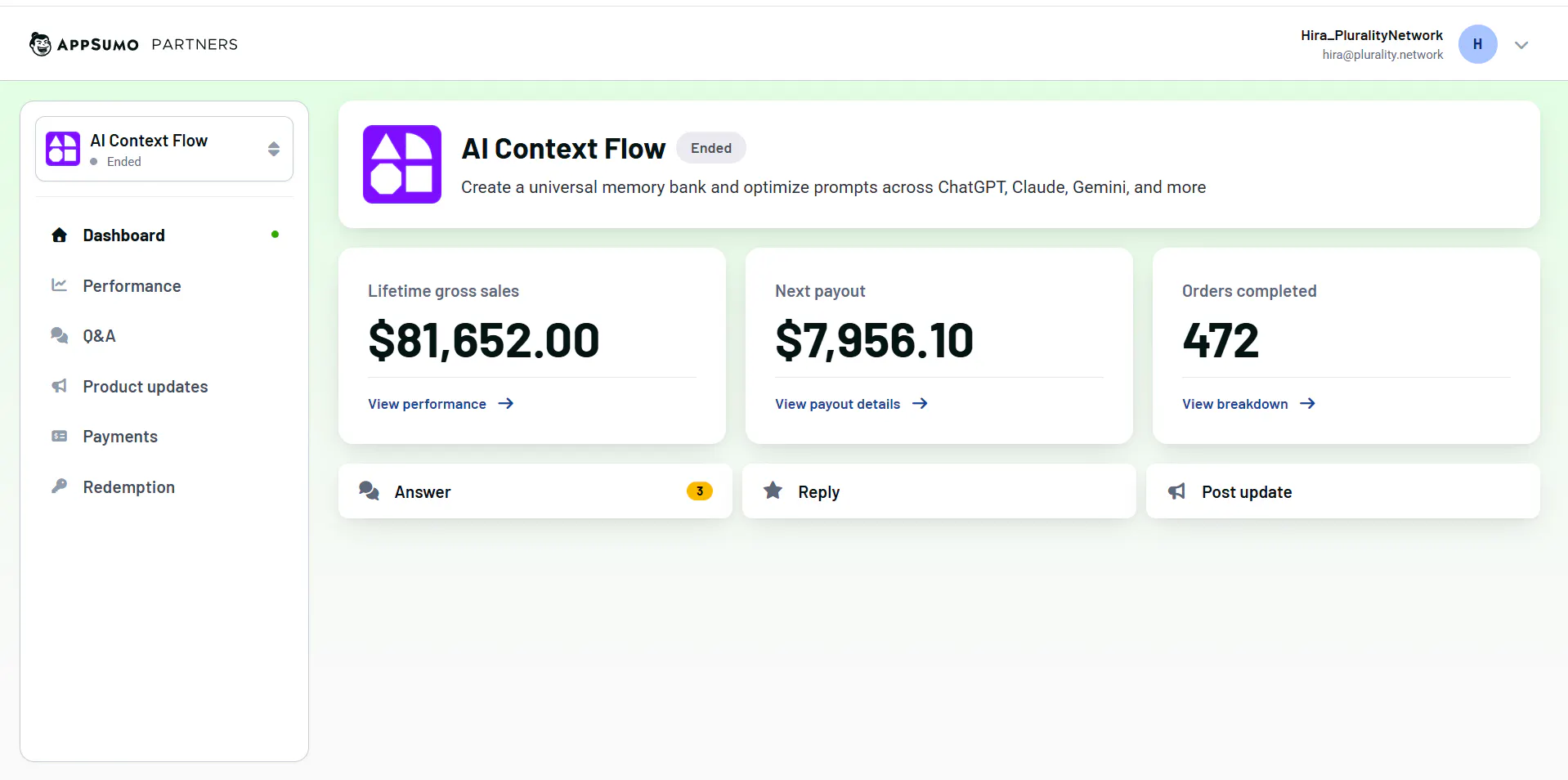
$80k+ paid for AI Context Flow :)
An year ago, if somebody would have told me that people will take out 80k+ out of their pockets for a product that my team and I built, I would have laughed it off.
We wanted to build something people need and use regularly. And we gave it our all.
Sometimes, you make an effort and the universe responds.
Exciting things to come. Stay tuned.
 •
•4mo ago
Are you a product builder or a messenger between different AIs?
If you're building a product with AI tools, here's how your morning probably looks:
Open ChatGPT. Paste your project context. Ask your question. Get a decent answer.
Switch to Claude for something else. Paste your context again. Different tool, same briefing.
Hop into your codebase with Codex. Paste context again.
You're not just a builder anymore. You're a context delivery system.
The indie hackers I've talked to who use AI most effectively have one thing in common: they've figured out how to stop babysitting their tools and just use them.
•4mo ago
AI memory quickly becomes a junk drawer. We built the organization layer.
You can now store unlimited context for AI, but without structure, your memories quickly become a messy pile of information that you have no idea how to work with. We've been there too.
So, we've been heads-down building, and Memory Studio now has a Notion-style editor: with version history, rich formatting, enhanced file understanding, markdown support and more.
Here's what's we shipped: