
Launched this week

Agentation
The visual feedback tool for AI agents
602 followers
The visual feedback tool for AI agents
602 followers
Agentation turns UI annotations into structured context that AI coding agents can understand and act on. Click any element, add a note, and paste the output into Claude Code, Codex, or any AI tool.



Visual feedback for AI agents is something I didn't know I needed until I read this. Right now when my agent does something unexpected on the frontend I have to manually figure out what selector it acted on. Live DOM visibility during an agent run would cut debugging time significantly.
Indie.Deals
Agentation bridges the gap between design feedback and code changes. Annotate any element on your UI — click, type, done — and get structured output that AI coding agents can immediately understand and act on.
Paste your annotations into Claude Code, Codex, or any AI tool and watch feedback become working code.
Key features:
Multiple annotation modes: select text, click elements, multi-select, draw areas, or freeze animations to capture specific states
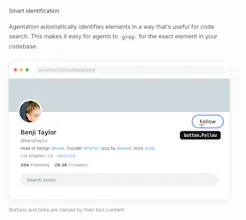
Smart element identification: automatically generates grep-friendly selectors so agents find the exact element in your codebase
React component detection: surfaces the full component hierarchy for any element, right in the annotation popup
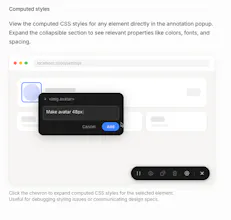
Computed styles: view live CSS properties alongside your notes for precise design specs
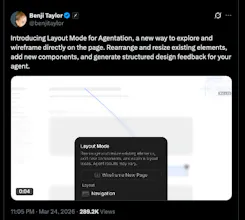
Layout mode: drag 65+ component types onto the page and rearrange sections; changes sync to agents in real time via MCP
Structured markdown output: copy clean, agent-ready annotations with one keystroke (C)
MCP integration: two-way agent sync lets AI acknowledge, question, or resolve your feedback directly.
Check out the latest video demo by the maker here, who also happens to have joined X recently as the Design Lead.
Wannabe Stark
One of the most underrated pain points in building with AI agents is having zero visibility into what they're actually doing, you're basically flying blind until something breaks. Curious how you're handling agent workflows that branch or run in parallel. Does the visualization scale well for more complex pipelines?
This solves a real friction point. Right now when I use Claude Code or Codex, I spend a lot of time writing context about which element I mean - "the button in the top-right of the filter panel" etc. Having structured annotations that feed directly into the agent as context is much cleaner. How does it handle dynamic elements that change state? Like a button that’s disabled until a form is valid?
Biteme: Calorie Calculator
@mykola_kondratiuk
yeah curious to see how they handle that edge case - seems like the kind of thing that makes or breaks the actual agent workflow
Biteme: Calorie Calculator
Congrats on the launch! Visual feedback for AI agents is a big gap right now. Most agent tools just give you text logs and hope for the best. What does the feedback loop actually look like in practice?
Radar By Paved
@adithya This is completely badass. In the past, I was adding small text and design tweaks to Bugherd, Jira, or Linear. Now I can breeze through an entire site, creating small tasks at-will, and instantly hand them over via the MCP to get resolved in bulk. Really really well done. :)