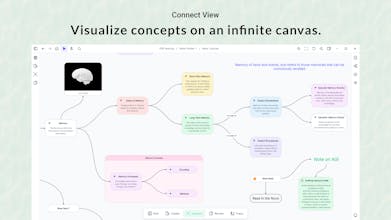
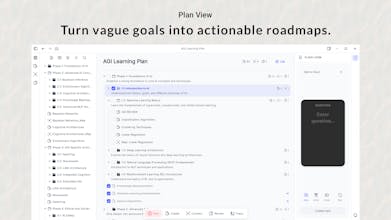
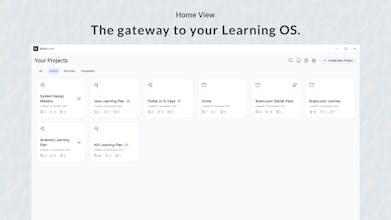
Stop switching between different apps just to study. BrainLoom is the local-first Learning OS that unifies your study workflow. Turn PDF highlights into Flashcards instantly and keep them linked to the source text for deep context. You can also structure ideas visually on an Infinite Canvas using "Smart Paste" without touching your mouse. Available for Windows v1.0 (Mac soon). To fund the expansion, grab a Lifetime License for $29 today (First 150 users only).
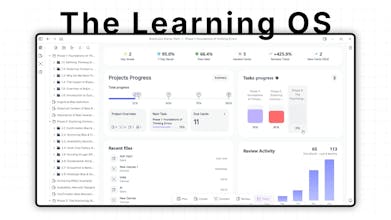
Since hitting #2 Product of the Day a few weeks ago, the feedback from medical students and developers using BrainLoom (our Local-First Learning OS) has been insane. But they all had one problem: They were flying blind. They didn't know if their study habits were actually working until exam day.
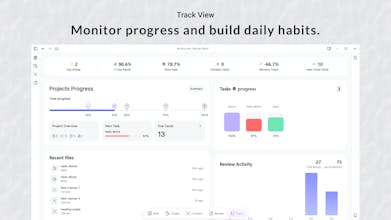
Today, I am dropping BrainLoom v1.0.6: The Analytics Engine.
When I launched BrainLoom (The Local-First Learning OS) two months ago, the goal was simple: Your second brain should live on your hard drive, not a server.
If you study anatomy, engineering, or complex flowcharts, you know the pain of traditional flashcard apps. Manually drawing 20 individual boxes over a diagram completely destroys your focus.
I wanted to fix that friction.
In our latest update (v1.0.4), I shipped the Image Occlusion Studio.
@jakub_ner Great question. BrainLoom stores everything locally (ISER), so you always own your data. Today, you can right-click to import notes (.md, .txt) directly into the app, which makes getting started straightforward.
In v1.0.2, which is coming in the next 1–2 weeks, I’m adding mass import support, including drag-and-drop for multiple files, to make migration much smoother.
Report
The "View Source" feature is genuinely killer - I've always hated losing context when reviewing flashcards weeks later. The fact that you built FSRS v6 directly into the app (not as a plugin) shows serious commitment to the learning science. As a fellow knowledge worker drowning in PDFs, the Smart Paste for mind maps without touching the mouse sounds like a huge time-saver. Is the Mac version planned for Q1 2026, or later in the year?
@easytoolsdev You hit on the exact three pillars I obsessed over! Integrating FSRS natively was non-negotiable for me—plugins are too fragile for something as critical as memory.
On the Mac Version: Definitely Q1. Actually, Since the code is already written (Flutter), I am aiming to have a Beta in the hands of users by mid-February. If you grab a license now, you lock in the Founder's price and get that Mac build the moment it compiles!
Report
Turning PDF highlights into linked flashcards is powerful. How do students usually review or resurface those cards over time inside BrainLoom?
I integrated the FSRS Algorithm directly into the app.
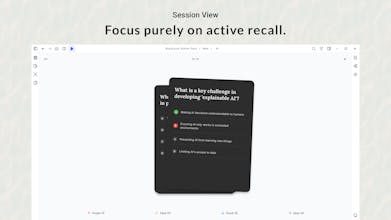
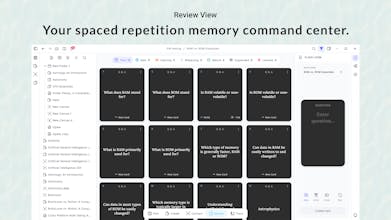
When you create a card, I automatically schedule it into a daily queue based on how well you remember it. You just open the app, click the 'Review' tab, and app serve up the exact cards you're about to forget. No manual scheduling needed!
Report
@ujjwalranga That makes sense — integrating FSRS directly removes a lot of friction.
I like the “review what you’re about to forget” approach, it feels very user-centric.
Nice implementation 👍
Report
@ujjwalranga Hi Ujjwal,
Your app has an excellent UI/UX, and it's really cool.I almost went premium. However, I encountered these issues and missing features
1. App Crashes when importing dense PDFs (like textbooks with 2K pages).
2. No support for creating image based notes from various sources for concise revision.
3. Unable to generate image-based MCQs.
4. Unable to export annotations.
5. Missing PDF outlines, searching page numbers is slow and causes crashes on dense files.
6.Export options for annotated notes, image based notes , cuz it will be helpful for quick revision
Could you please assist or confirm if these are available?
@drskram Hi! First, thank you for the kind words on the UI, and even more for this brutal, honest feedback. This is exactly what I need to make the app better.
Here is the breakdown:
1. The Crashes (2k+ Pages & Outlines): This is a memory optimization issue with the current PDF renderer. I am moving this to Critical Priority. I will push a hotfix for large-file handling and PDF Outlines (Table of Contents) in the next update.
2. Image Support (Notes & MCQs): You are right—visual learners need Image Occlusion and image-based cards. This is currently planned for Q2. I focused on text first to get the Flash-Loom engine perfect, but images are next.
3. Exports: Right now, you can export decks to Anki/CSV, but full annotation export is still in development.
My Offer to You: If you are willing, please join the Discord (link in bio) and DM me. If you can share the specific PDF that caused the crash (or a similar size one), I will use it to debug the engine and ping you personally when the fix is live.
I want to earn your premium purchase, not just ask for it.
Report
Local-first is refreshing, but how do you see syncing or backups fitting in log term without compromising that philosophy?
@ill_robyn Great question. v1.0 is strictly local (folder-based) for privacy. For v2.0, I plan to offer optional encrypted cloud sync, but the local-only mode will always exist for those who prefer full sovereignty over their data
Report
Very useful product with good UI/UX. Can I know which stack did you use?
@cruise_chen Thanks, Cruise! Glad the local-first philosophy resonates.
Regarding the refresh:
If you mean saving to disk, it happens instantly in real-time. Because I use a local database (Isar).
(Or if you meant how the AI handles memory context, let me know and I can clarify that too!)
BrainLoom
@jakub_ner Great question. BrainLoom stores everything locally (ISER), so you always own your data. Today, you can right-click to import notes (.md, .txt) directly into the app, which makes getting started straightforward.
In v1.0.2, which is coming in the next 1–2 weeks, I’m adding mass import support, including drag-and-drop for multiple files, to make migration much smoother.
The "View Source" feature is genuinely killer - I've always hated losing context when reviewing flashcards weeks later. The fact that you built FSRS v6 directly into the app (not as a plugin) shows serious commitment to the learning science. As a fellow knowledge worker drowning in PDFs, the Smart Paste for mind maps without touching the mouse sounds like a huge time-saver. Is the Mac version planned for Q1 2026, or later in the year?
BrainLoom
@easytoolsdev You hit on the exact three pillars I obsessed over! Integrating FSRS natively was non-negotiable for me—plugins are too fragile for something as critical as memory.
On the Mac Version: Definitely Q1. Actually, Since the code is already written (Flutter), I am aiming to have a Beta in the hands of users by mid-February. If you grab a license now, you lock in the Founder's price and get that Mac build the moment it compiles!
Turning PDF highlights into linked flashcards is powerful. How do students usually review or resurface those cards over time inside BrainLoom?
BrainLoom
@noha_elmeselhy Great question, Noha!
I integrated the FSRS Algorithm directly into the app.
When you create a card, I automatically schedule it into a daily queue based on how well you remember it. You just open the app, click the 'Review' tab, and app serve up the exact cards you're about to forget. No manual scheduling needed!
@ujjwalranga That makes sense — integrating FSRS directly removes a lot of friction.
I like the “review what you’re about to forget” approach, it feels very user-centric.
Nice implementation 👍
BrainLoom
@drskram Hi! First, thank you for the kind words on the UI, and even more for this brutal, honest feedback. This is exactly what I need to make the app better.
Here is the breakdown:
1. The Crashes (2k+ Pages & Outlines):
This is a memory optimization issue with the current PDF renderer. I am moving this to Critical Priority. I will push a hotfix for large-file handling and PDF Outlines (Table of Contents) in the next update.
2. Image Support (Notes & MCQs):
You are right—visual learners need Image Occlusion and image-based cards. This is currently planned for Q2. I focused on text first to get the Flash-Loom engine perfect, but images are next.
3. Exports:
Right now, you can export decks to Anki/CSV, but full annotation export is still in development.
My Offer to You:
If you are willing, please join the Discord (link in bio) and DM me. If you can share the specific PDF that caused the crash (or a similar size one), I will use it to debug the engine and ping you personally when the fix is live.
I want to earn your premium purchase, not just ask for it.
Local-first is refreshing, but how do you see syncing or backups fitting in log term without compromising that philosophy?
BrainLoom
@ill_robyn Great question. v1.0 is strictly local (folder-based) for privacy. For v2.0, I plan to offer optional encrypted cloud sync, but the local-only mode will always exist for those who prefer full sovereignty over their data
Very useful product with good UI/UX. Can I know which stack did you use?
BrainLoom
@szymcode Thanks! I poured a lot of love into the design, so I appreciate that.
The stack is Flutter & Dart. For the database, I used Isar (it's blazing fast for local storage).
Agnes AI
Indeed I like BrainLoom's local first concept! Just curious - how often does it refresh the local memory?
BrainLoom