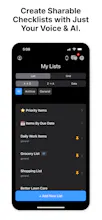
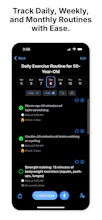
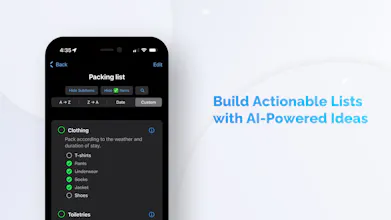
The smart, simple way to create and share lists — in seconds. Use your voice or a photo to instantly build actionable checklists powered by AI. Track daily, weekly, and monthly routines with ease.
Thanks so much! That’s exactly what I was aiming for — a checklist app that feels like a helper, not a second job.
As for your question:
That’s a really interesting idea—auto-suggestions based on past lists. I’ll definitely add that to the product backlog — but Checklist Genie does make it easier to reuse what you’ve already created.
Here’s what it can do right now:
Duplicate Lists: You can instantly duplicate any list.
Smart Suggestions: When you generate a list with AI, Genie uses your prompt to build a tailored checklist (e.g. “Plan a wedding” or “Launch a product”).
Templates (Coming Soon): I’m working on saved templates so you can quickly reuse your favorite lists with just one tap.
Checklist fatigue can be real. I like that there's a way to flag for priority items. Are there ways to use Checklist Genie to overcome checklist fatigue?
Absolutely — checklist fatigue is real, and we designed Checklist Genie to help you stay productive without burning out. Checklist Genie was built to reduce stress — not add more of it. One tap, one voice command, or one glance is often all it takes.
Each of the following is how:
Flag Priority Items: Highlight what matters most so you’re not overwhelmed by low-priority noise.
Smart Routines: Create daily, weekly, or monthly routines that auto-populate — no need to rebuild your checklist every time.
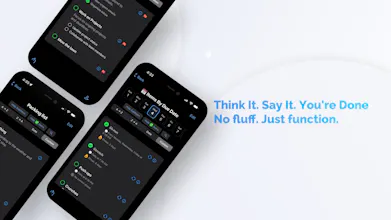
Voice Input: Speak your tasks and let Genie handle the rest. Quick, hands-free, and surprisingly fun.
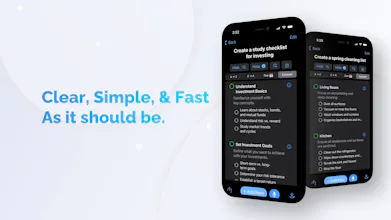
AI-Powered List Creation: Just give it a prompt (“Plan a weekend trip” or “Start a podcast”) and Genie builds a full checklist for you.
Calendar Sync: Sync important tasks directly to your calendar, so your day stays structured across tools.
Local Notifications: Set reminders and get push alerts when it’s time to tackle something — even offline.
Apple Watch Support + Widgets: Check things off from your wrist or see your checklist at a glance on your home screen.
Change Log: Keep track of changes to shared lists so you always know what’s been added or completed.
Turning voice or photos into actionable checklists? That’s such a time-saver! Feels like a great tool for daily routines or team workflows. Congrats on the launch 🧞♂️🚀
Awesome, thanks. Good luck with your upcoming launch. Let me know when it's live.
Report
Love the voice feature! How does the AI handle complex, multi-step instructions? For example, if I say *'Weekly deep clean: vacuum under furniture, wipe baseboards, then organize pantry by category'*—will it automatically break this into sub-tasks?
Report
@tim_holmgren can we create a group that must align with same checklist for their daily operational tasks? Very curious about this now!
Thanks! Yes, you can share a checklist with your entire group and it will stay synced in real time. You’ll also have access to a change log that shows who did what and when — super helpful for tracking updates. Let me know if you have any other questions!
Report
so if understand correctly can it be shared and edited the person I shared it with the only see by that person
Absolutely — if you share a list in Checklist Genie, the person you share it with can edit it too. It’s fully collaborative, so you’ll both see changes in real time.
Report
Tried creating a few checklists and while the speed is great, I wonder if there's a way to re-order items manually. Sometimes I like to group things by priority and couldn’t figure that part out yet.






This is so clean and fast and finally, a checklist app that doesn’t feel like a second job to use!
Curious though: can it learn from my past lists to auto-suggest next time? That’d be magic
@tim_holmgren
Dope Notes
@tim_holmgren @shantanusewu
Thanks so much! That’s exactly what I was aiming for — a checklist app that feels like a helper, not a second job.
As for your question:
That’s a really interesting idea—auto-suggestions based on past lists. I’ll definitely add that to the product backlog — but Checklist Genie does make it easier to reuse what you’ve already created.
Here’s what it can do right now:
Duplicate Lists: You can instantly duplicate any list.
Smart Suggestions: When you generate a list with AI, Genie uses your prompt to build a tailored checklist (e.g. “Plan a wedding” or “Launch a product”).
Templates (Coming Soon): I’m working on saved templates so you can quickly reuse your favorite lists with just one tap.
Trufflow
Checklist fatigue can be real. I like that there's a way to flag for priority items. Are there ways to use Checklist Genie to overcome checklist fatigue?
Dope Notes
@lienchueh
Absolutely — checklist fatigue is real, and we designed Checklist Genie to help you stay productive without burning out. Checklist Genie was built to reduce stress — not add more of it. One tap, one voice command, or one glance is often all it takes.
Each of the following is how:
Flag Priority Items: Highlight what matters most so you’re not overwhelmed by low-priority noise.
Smart Routines: Create daily, weekly, or monthly routines that auto-populate — no need to rebuild your checklist every time.
Voice Input: Speak your tasks and let Genie handle the rest. Quick, hands-free, and surprisingly fun.
AI-Powered List Creation: Just give it a prompt (“Plan a weekend trip” or “Start a podcast”) and Genie builds a full checklist for you.
Calendar Sync: Sync important tasks directly to your calendar, so your day stays structured across tools.
Local Notifications: Set reminders and get push alerts when it’s time to tackle something — even offline.
Apple Watch Support + Widgets: Check things off from your wrist or see your checklist at a glance on your home screen.
Change Log: Keep track of changes to shared lists so you always know what’s been added or completed.
Linkinize
Turning voice or photos into actionable checklists? That’s such a time-saver! Feels like a great tool for daily routines or team workflows. Congrats on the launch 🧞♂️🚀
Dope Notes
@naderikladious
Thank you for the support, I really appreciate it! Let me know if you have any suggestions or feedback on how I can make it even better.
Linkinize
@tim_holmgren1 Sure thing, once I have collected some insights, will make sure to share them across 😊
Dope Notes
@naderikladious
Awesome, thanks. Good luck with your upcoming launch. Let me know when it's live.
Love the voice feature! How does the AI handle complex, multi-step instructions? For example, if I say *'Weekly deep clean: vacuum under furniture, wipe baseboards, then organize pantry by category'*—will it automatically break this into sub-tasks?
Dope Notes
@tim_holmgren @surya006
Thanks! Yes, you can share a checklist with your entire group and it will stay synced in real time. You’ll also have access to a change log that shows who did what and when — super helpful for tracking updates. Let me know if you have any other questions!
Dope Notes
@ahmad_ahmad_abdulhamid
Absolutely — if you share a list in Checklist Genie, the person you share it with can edit it too. It’s fully collaborative, so you’ll both see changes in real time.
Tried creating a few checklists and while the speed is great, I wonder if there's a way to re-order items manually. Sometimes I like to group things by priority and couldn’t figure that part out yet.
Dope Notes
@david_strc
Thanks for trying it out! You can actually reorder items manually (select "custom" sort) — just tap and hold, then drag them into the order you want.
There’s also a sort option if that’s easier: you can sort by date, A–Z, or Z–A depending on how you like to organize things.
Thank you for checking out the app!