
Community Figma MCP server
Allow AI Agents to help you with Figma designs!
430 followers
Allow AI Agents to help you with Figma designs!
430 followers
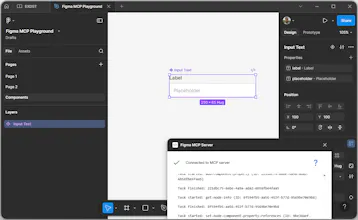
The unofficial Figma Model Context Protocol(MCP) server is a missing link between your AI agent and the Figma design document. Now, AI agents can create, edit, and arrange your Figma design. You can use it together with ChatGPT, Claude Desktop, Cursor, or any other client that supports MCP. The project is free and open source. You don't need anything extra. You use Figma together with your LLM.






This is exciting — I use MCP daily with Claude Code for automating financial workflows, and seeing it expand into design tooling feels like the right next step. The idea of AI agents working directly inside Figma rather than just describing changes is a big unlock. Curious — how granular is the control? Can agents handle component-level edits, or is it more layout-level for now?
Figma Make on steroids 💪🏻
Solving the read-only limitation of the official MCP server is a nice approach. When the AI agent makes edits to a Figma file, does it preserve the existing layer structure and naming conventions? I'm curious how it handles complex component hierarchies.
Community Figma MCP server
@yamamoto7
It will be up to the Large Language Model(LLM). It will decide how to use and name everything.
And it might change depending on your choice: ChatGPT, Claude Opus, Claude Sonnet, Gemini, etc.
So, the workflow should be next: firstly, try as is. Then, if you are not happy about some LLM decisions, just add rules about hierarchy and naming.
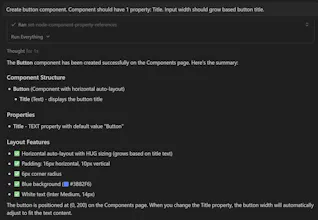
For example, you can take a look at the Loom video. I use Cursor+Claude Opus there, and I have just one simple hierarchy rule in Claude.MD: "component should be on the Components page". It creates components on the proper page and preserves structure.
@anton_tishchenko
That makes sense - letting the LLM handle decisions while using rules to guide behavior gives a lot of flexibility. The Claude.MD approach for defining component placement is a clean solution. Thanks for sharing the Loom video, I'll check it out.
Agnes AI
Cool now my agent app could connect to Figma... great ease! thanks for the launch!
Community Figma MCP server
@cruise_chen Please, try it and let us know about your feedback!
Jinna.ai
Fantastic project! A few questions,
Does it allow to overcome Figma’s own MCP server 5 requests per month limit?
What’s your plan if tomorrow Figma will roll out the edit functionality in their own MCP
Community Figma MCP server
@nikitaeverywhere
1. It is a completely separate MCP server. It doesn't affect the official Figma MCP server work. It works via the Figma Plugin API. You don't have any limitations there. You can use it even on the free Figma plan without any limitations.
2. We will be happy when Figma rolls out this functionality. It will become more convenient without this plugin "hack".
@anton_tishchenko @alina_medvid @vladimir_exdst Congrats on launching! The fact that you solved the "read-only" limitation of the official Figma MCP is brilliant—enabling AI agents to actually edit, arrange, and scaffold prototypes directly from Figma is a real game changer. Wishing you tons of engagement!
Community Figma MCP server
@alina_medvid @vladimir_exdst @kjosephabraham
Thank you!